If you're building something for iOS 17 and macOS Sonoma (**cough** interactive widgets **cough**), here's something to think about:

It's highly likely that iOS will be released before macOS (typically a month or so). That means you'll be able submit builds created with Xcode 15 for only one of your two platforms.

Now would be a good time to open your macOS project in Xcode 14 and figure out what's broken. Avoid panic for bug fixes or model changes you want to get out on iOS release day…

And when you see broken stuff in Xcode 14, I hope it's nothing to do with protocols. The only solution I've found for a change is this:

#if OLD_PROTOCOLS
extension MyThing: OldProtocol {
}
#else
extension MyThing: NewProtocol {
}
#endif

Ewww…

(#available doesn't work at top-level, @available needs symbol.)

https://mastodon.social/@chockenberry/110890515845065228

@chockenberry isn’t

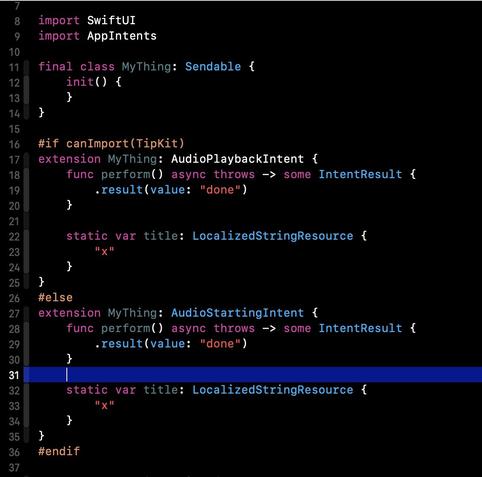
#if canImport(SomethingNew)

the recommended way? Say TipKit? Ugly yes….

@marcpalmer That works at a module level. But the issue I'm dealing with is a deprecated protocol in a module that's already been around for awhile (AppIntents).

Can't use it as a switch.

@chockenberry this is what I mean — I suspect this is the kind of thing you're trying to do? Compiles under both Xcode 14 and 15.
@marcpalmer Clever! But this is the kind of code you're going to look at in six months, when you don't need it anymore, and go “WTH was I thinking?”
@chockenberry Tell me about it… but this was the recommendation I received from people a while back for this kind of problem. Otherwise you have to set build flags conditionally based on which Xcode you’re running. Do you have a way to automate that?