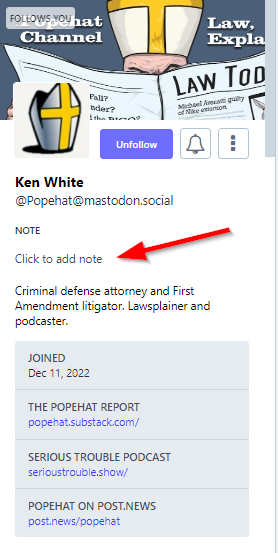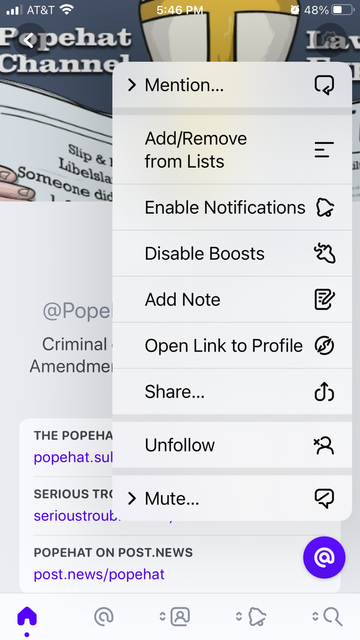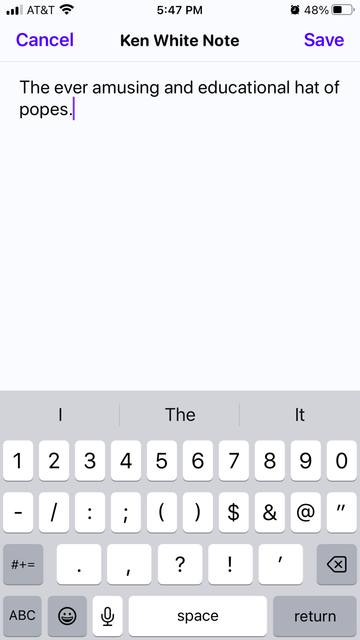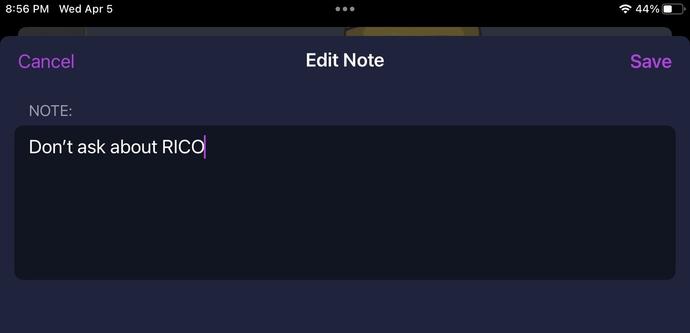
Reminder, on Mastodon, you can save notes on people you interact with... so the next time you interact with them you can be reminded of what you thought of them last time.
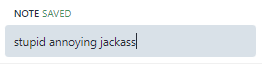
@mmasnick this is relevant to my interests.
@Popehat you cannot believe how handy it is for certain use cases.........
@mmasnick How do you do it
@Popehat if you go to someone's profile page, it's literally right there under their name:
@mmasnick difficult client doesn't listen
@mmasnick weird i can't seem to make it work
@Popehat @mmasnick not in my client either
@Popehat @mmasnick
I don’t see that here
@mcnulla @Popehat @mmasnick It's in the web interface. I just posted a note to @Popehat's page reminding me he can't figure out how to make Notes work.
@Popehat @mmasnick
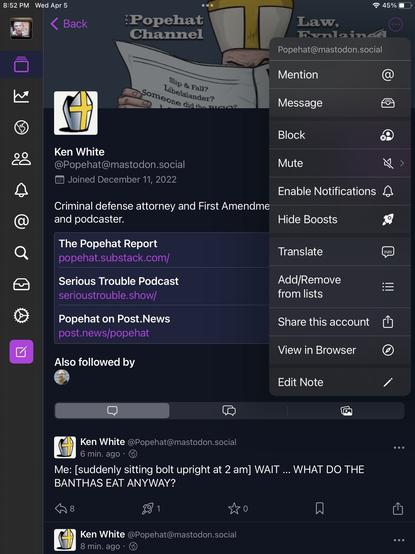
I found it in Ice Cubes.
Had to expand the menu in the top right on the profile page.
@rjcassara @Popehat @mmasnick It's a joke, Rich. "difficult client doesn't listen" is the note he was 'trying to add' to Mike's page.
@denysbeecher @rjcassara @Popehat what makes you think it was a joke? I am a difficult client who doesn't listen. 😂
@mmasnick Oh, I have confidence in the truth of that one. I mean the can't make it work bit was a joke
@denysbeecher @mmasnick the phone app is ALSO a difficult client who won't listen
@Popehat @mmasnick it seems to be not widely implemented
@Popehat @mmasnick
It does work in the standard web interface, at least with Advanced Interface enabled it does.
@Popehat @mmasnick It’s in Ivory, which is my client. Hopefully I can attach an image…here you go.

@Popehat @mmasnick In order to add it, you have to open their full profile first, click the gear icon, select add note.

To see it afterwards just long press on someone’s profile picture.

@Popehat @mmasnick Worked for me in Chrome, using the standard web client

@Popehat @mmasnick

In IceCubes I get to the notes by clicking on the three dots in the corner.

@mmasnick snort snort “difficult client” OH @Popehat You just can’t feet away
@mmasnick @Popehat Seems to depend on the client. @ivory on iOS doesn’t seem to support it.
@SteveBellovin @mmasnick @Popehat @ivory On Ivory you need to click the gear icon at the top right on a profile page — the option is in that menu.
@SteveBellovin @mmasnick @Popehat @ivory it does — it’s in the gear menu at the top right of the profile screen.

@mmasnick

@Popehat

Discovered this awhile back in my client and added something I sorely missed from the Twitter Popehat account.

@mmasnick @Popehat
It would be nice though if, having placed a note on a person, it would be visible next to their username without having to go visit their profile page again.
@mmasnick @Popehat Works only if you're looking at their profile from YOUR logged-in instance, or from properly coded native client:

@Popehat @mmasnick this worked for me, tho only in my original server's web view. i do not see the 'Click to add note' in other web views or in Ivory

https://mstdn.social/@feditips/106477950054470578#:~:text=Go%20to%20a%20person's%20profile,is%20only%20visible%20to%20you.

FediTips has moved! (@[email protected])

The profile notes feature on Mastodon is very useful but also perhaps slightly unclear if you've never used it before. It works like this: Go to a person's profile by clicking on their name, look for the "Note" section and then click on "Click to add note", start typing and it saves it automatically. The note is only visible to you. This is really handy if you interact with lots of people and need to remember (for example) why you follow someone etc. #MastoTips #Mastodon #Masto #FediTips

Mastodon 🐘
@jbminn @Popehat @mmasnick in ivory, click on a profile pic and then click on the gear icon in the upper right corner
@jbminn @Popehat @mmasnick I found it in Ivory, on a profile page under the settings button on the top right