Keyword Filter Tip:
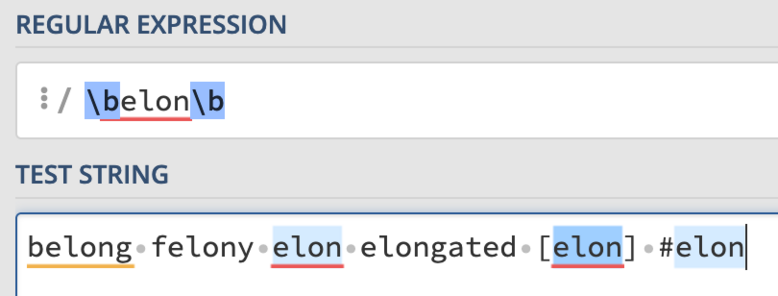
Sometimes simple keywords pick up longer words. If you add a keyword filter for “Elon”, it will also filter posts with the word "belong" or "felony".

Solution:
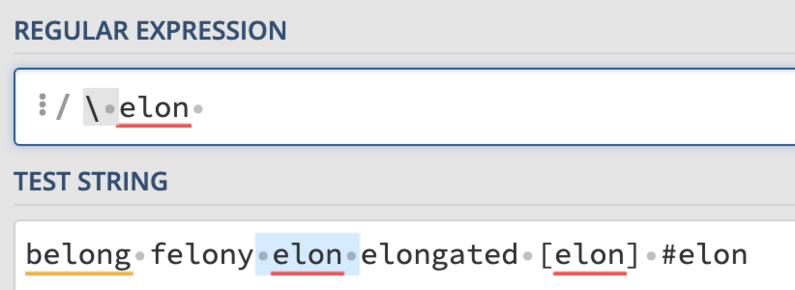
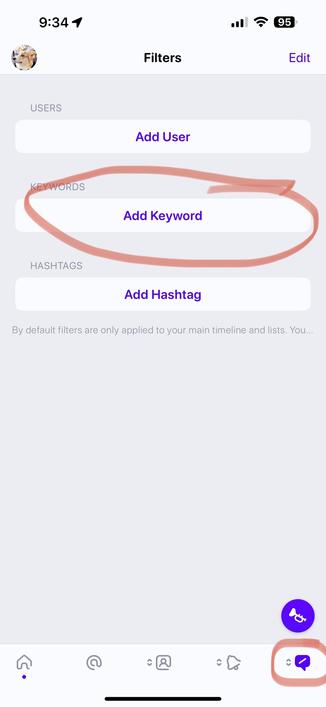
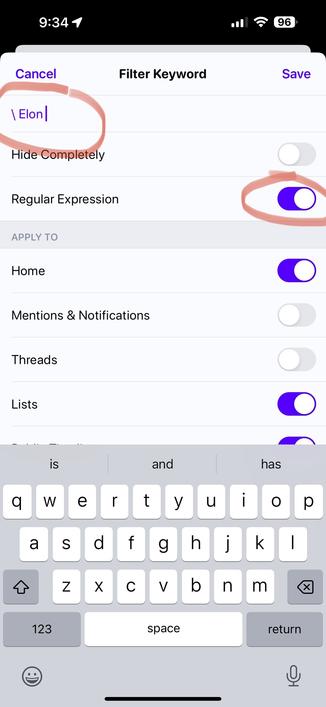
Regular Expressions. Go to your filters tab by holding down on one of the last 3 tab buttons. Add Keyword and enter \(space)yourkeyword(space). You should also see a new "Regex" option appear when you hit that backslash. Turn that on. Test your results by scrolling down and checking "Matching Posts”.
Regular Expressions allow you to filter your posts in powerful ways. A good place to test new expressions to make sure they work properly is at https://regex101.com

Have fun!

regex101: build, test, and debug regex

Regular expression tester with syntax highlighting, explanation, cheat sheet for PHP/PCRE, Python, GO, JavaScript, Java, C#/.NET, Rust.

regex101
@ivory You might want to rather use \b instead of (space), so you're also able to match hashtags and other non-alpha-numeric chars.
@daskaja That's a good option too!
@ivory @daskaja How to include capital letters? "Elon" is not counted
@cedric @ivory \b[Ee][Ll][Oo][Nn]\b - not nice, but works

@daskaja @cedric @ivory
To ignore case sensitive type:

(?i)\belon\b

@cedric

Yeah, a /i would be a help, for sure. Maybe [Ee]lon would work? I don't subscribe, and regex is one of the sub-only features.

On a tangent, wouldn't it be nice to have search/replace option in addition to basic filtering? Imagine /elon/shitbird/gi as a global filter, @ivory @daskaja

@xinit @cedric @ivory @daskaja Try

(?i)\belon\b

But yeah, it should probably be in the UI.

@Wevah

I'm out of regex practice, but the (?i) checks out on regex101.com

@cedric @ivory @daskaja

@cedric Dunno if you ever got a response to this, but you can either replace e with [Ee] (if you just want the first letter matched) or you can use (?i) in the beginning to make the entire string case-insensitive.
@ktnjared not this one. thank you so much 👍
@daskaja @ivory also a /i flag to make it case insensitive. ;)
@burgatshow @ivory I wasn't sure if modifiers were supported here, since the GUI is a bit misleading. But if so, better use /i
@daskaja @ivory sure. You are right. It is more like a suggestion to @ivory to implement the switch for case sensitivity.
@daskaja @ivory Seemed a good test question to pose to ChatGPT - which resulted in precisely your same \b recommendation along with a decent description of the reasoning. I did that before seeing your reply, so not saying it validated your answer - more the other way around. :)
@daskaja @ivory omg - am I finally going to have to learn regex because of a mastodon app! 😵🤣
@ivory Like the topic you‘ve chosen for your example regex… 🤫
@ivory One of my favourite sites is RegExper, which visualises regular expressions. Useful if they are more complex.
https://regexper.com/#%5Cbelon%5Cb
Regexper

Regular expression visualizer using railroad diagrams

@ivory which flavor should we pick in the left column to match how Ivory will interpret the regex?
@swizzlevixen For basic pattern matching, I didn't change the flavor. I am not a regex expert. Just wanted to provide a basic solution to a very common problem people have with keyword filters. 🙂 If you want to know more about what we use, you can go here: https://unicode-org.github.io/icu/userguide/strings/regexp.html
Regular Expressions

ICU is a mature, widely used set of C/C++ and Java libraries providing Unicode and Globalization support for software applications. The ICU User Guide provides documentation on how to use ICU.

ICU Documentation

@ivory This is AWESOME! Thank you!

I would strongly recommend Chapter 8 of the BBEdit Manual for anyone who wants to learn more about Regular Expressions. It's my go-to whenever I need help with a tricky pattern match.

I believe we have @gruber to thank for that one.

It is available here:

https://www.barebones.com/support/bbedit/manual.html

Bare Bones Software | BBEdit User Manual

@ivory 🙂 That topic example choice! 👍🏻💕
@ivory I feel this is relevant somehow
@ivory oh ffs you couldn’t just wrap the keywords in ‘\b…\b’ like everyone else does and all your users expect from decades of Google and other full-text search engines
@ivory Regex and Fun in one sentence… 🤣
@ivory \byouknowwho\b gets initial Youknowwho and when punctuation follows.
@ivory Oops, should have read further 🤣
@ivory As someone who has been a software developer for over 30 years, I can definitely state that regexes are the work of satan
@ivory You can also ask ChatGPT, it’s great at generating regex!
@ivory I've actually found that ChatGPT is really useful for writing RegEx when I can't figure it out myself.
@kerim @ivory I tried that yesterday but I don't think the resulting regex worked.
@dragon @ivory It doesn't always work the first time, but you can ask GPT to fix its own mistakes. Can take some patience, but still easier (for some) than writing it yourself.
@kerim @ivory I'd spent a while refining it, this was GPT 3 I haven't yet paid for GPT to get access to 4
@ivory this looks great, although couldn’t a shortcut option be made available for people who don’t know what regex is? (E.g. match whole word only option?)
@mporcheron We plan to revamp our keyword filter creation tools at some point. But for now this works well. 🙂
@ivory What an strangely specific example. 🤣 Keep up the great work, guys. Love what you do.
@ivory OK please tell me you're going to support full PCRE so I can get disproportionately excited by a mobile app
@ivory I'm not so certain that including "felony" when searching for "Elon" is an error. :)
@ivory I love Ivory, but requiring regex knowledge to force matching the exact thing I enter for search is TERRIBLE for new users. You can give users the *option* to use regex, but the *default* should only match exactly what is requested. The “solution” offered is making users fix unexpected geeky behaviour by the app back-end. This is NOT newbie-friendly.
@michaelgemar Yes we plan to revamp our keyword tools in the future, but this is what we have now. 🙂 We get people asking how to solve this problem on occasion and we wanted to share the current solution.
@ivory That’s cool — I know things are happening very fast. I just wanted to flag that the solution offered was less than ideal, and a more friendly long-term fix is desirable.
@ivory If the regex should also match when there is no Space before the searchstring (i.e. it is at the beginning of the test), use a regex like this (not tested in ivory):\belon\b
\b denotes a word boundary

@ivory The trouble you get in with a regex like that, though, is that it doesn't block out "Elon." or "#IdiotElon" constructs.

Would something like

\b(elon)\b

Also work to match word boundaries?

@ivory It’s not matching his full name Elongated Muskrat.
@0x1ac i think it’s implicit you should just block people who speak like that
@ivory I guess they are always case insensitive. What regular expressions are supported?
Wouldn't it make the feature more discoverable if the toggle was visible before entering a punctuation character?

@jgrg https://unicode-org.github.io/icu/userguide/strings/regexp.html

We intentionally hid the toggle because too many people would probably turn it on without knowing what it is for.

Regular Expressions

ICU is a mature, widely used set of C/C++ and Java libraries providing Unicode and Globalization support for software applications. The ICU User Guide provides documentation on how to use ICU.

ICU Documentation
@ivory Maybe have an "Advanced" option to reveal it? I'm just worried that I would never have discovered it, and I think it is such a great feature.
@ivory oh my, this is exactly what I needed. (With this exact example) 😅
Thank you so much!
@ivory I love your choice of matching words... Elon, belong, felony
@ivory feature request: Shared Filters/Filter Lists, akin to the Drafts ecosystem. I’m sure the Space Enron filter set would be very popular.

@bryanculver Not sure if it's what you are looking for, but you can hold down on a filter in the list and post it:

https://tapbots.com/ivory/mute?url=ivory%3A%2F%2F%2Fmute%2Fkeyword%3FactionType%3D1%26context%3D35%26regex%3D1%26text%3D%255C%2520Elon%2520

Tapbots

We create delightful apps for iOS and the Mac.

@ivory well I’ll be… Neat!

@ivory I love the little bit of shade.

But in seriousness, thank you for making an awesome app that makes this new place feel more comfortable.

@ivory I was today years old when I discovered Ivory's filter interface.

I kept looking for it in the top-left menu, didn't find it, and thought it was absent because Ivory is still in development. 😭