
Keyword Filter Tip:
Sometimes simple keywords pick up longer words. If you add a keyword filter for “Elon”, it will also filter posts with the word "belong" or "felony".

Solution:
Regular Expressions. Go to your filters tab by holding down on one of the last 3 tab buttons. Add Keyword and enter \(space)yourkeyword(space). You should also see a new "Regex" option appear when you hit that backslash. Turn that on. Test your results by scrolling down and checking "Matching Posts”.
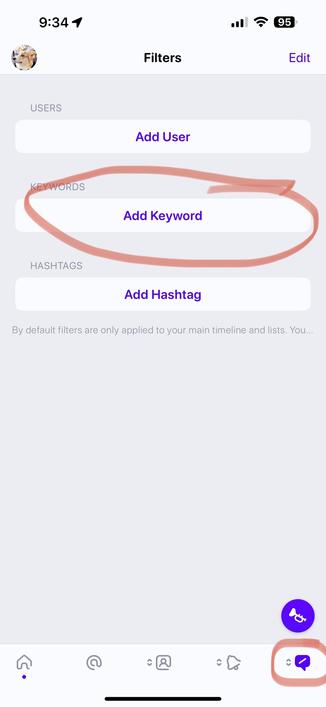
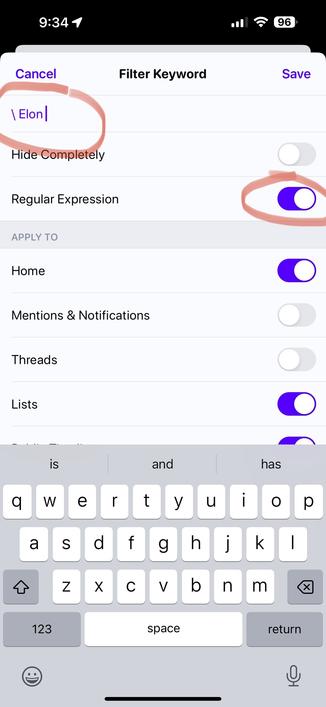
Regular Expressions allow you to filter your posts in powerful ways. A good place to test new expressions to make sure they work properly is at https://regex101.com

Have fun!

regex101: build, test, and debug regex

Regular expression tester with syntax highlighting, explanation, cheat sheet for PHP/PCRE, Python, GO, JavaScript, Java, C#/.NET, Rust.

regex101

@ivory This is AWESOME! Thank you!

I would strongly recommend Chapter 8 of the BBEdit Manual for anyone who wants to learn more about Regular Expressions. It's my go-to whenever I need help with a tricky pattern match.

I believe we have @gruber to thank for that one.

It is available here:

https://www.barebones.com/support/bbedit/manual.html

Bare Bones Software | BBEdit User Manual