
Keyword Filter Tip:
Sometimes simple keywords pick up longer words. If you add a keyword filter for “Elon”, it will also filter posts with the word "belong" or "felony".

Solution:
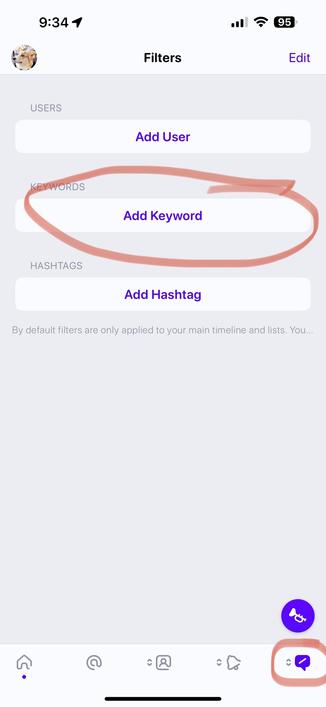
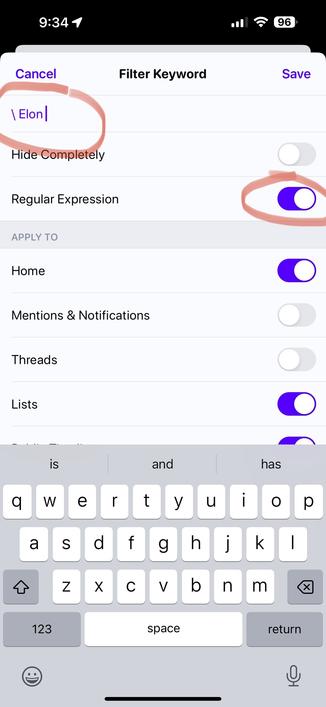
Regular Expressions. Go to your filters tab by holding down on one of the last 3 tab buttons. Add Keyword and enter \(space)yourkeyword(space). You should also see a new "Regex" option appear when you hit that backslash. Turn that on. Test your results by scrolling down and checking "Matching Posts”.
@ivory I love Ivory, but requiring regex knowledge to force matching the exact thing I enter for search is TERRIBLE for new users. You can give users the *option* to use regex, but the *default* should only match exactly what is requested. The “solution” offered is making users fix unexpected geeky behaviour by the app back-end. This is NOT newbie-friendly.
@michaelgemar Yes we plan to revamp our keyword tools in the future, but this is what we have now. 🙂 We get people asking how to solve this problem on occasion and we wanted to share the current solution.
@ivory That’s cool — I know things are happening very fast. I just wanted to flag that the solution offered was less than ideal, and a more friendly long-term fix is desirable.