 Visual Fragments
 Francisco Tolmasky
I am trying to switch my search engine to DuckDuckGo, and it is surprisingly difficult to not ignore the first few results and automatically scroll down the second the search results load since I'm used to the entire above-the-fold being ads. It's just so ingrained in me now that I have to do a double take and be like "wait, how did the link I want end up up there?"
 John Davis
@tolmasky the “g!” escape hatch is also easy enough that it never feels inconvenient to use google for a second opinion.
 Torstein
@its_john_davis @tolmasky actually it's: !g
 Robert Atkins
@torsteinv @its_john_davis @tolmasky There are a bunch of other handy ones too: !w (Wikipedia), !u (urban dictionary)
 swannodette
@tolmasky never going back
 Loren Brichter
@tolmasky beat you to it https://twitter.com/lorenb/status/1217154696227512320
also I have my eye on https://search.brave.com — *really* good for doing everything in-house (afaict)
 John Gruber
@gruber Oh wow, this is super interesting, I will give it a shot. It blows my mind that you can straight up make a compelling paid-for-product now that is essentially just like “Google, the way it used to look.”
 sayrer
@tolmasky @gruber https://search.brave.com is good too. It falls back to Bing sometimes, last I checked in, but it's pretty good. (they have a paid search product as well)

 Sérgio Carvalho
 Daniel
@tolmasky @gruber If you're even remotely interested in Kagi, you might want to sign up today. They're raising prices tomorrow: https://blog.kagi.com/update-kagi-search-pricing
Update to Kagi Search pricing | Kagi Blog
It has been a while since our last update ( https://blog.kagi.com/kagi-search-dec22-update ) , and we have been busy with three main large-scale initiatives: a new pricing model that ensures Kagi’s sustainability, new plans including Family plans, and enhancing search experience with generative AI tools.
 Buck
Buck@daniel @tolmasky @gruber Make sure you sign up for an Annual Plan though. Existing subs are only grandfathered until their next renewal. They walked back the full grandfathering. https://blog.kagi.com/update-kagi-search-pricing#grandfathering
Update to Kagi Search pricing | Kagi Blog
It has been a while since our last update ( https://blog.kagi.com/kagi-search-dec22-update ) , and we have been busy with three main large-scale initiatives: a new pricing model that ensures Kagi’s sustainability, new plans including Family plans, and enhancing search experience with generative AI tools.
@torsteinv @loren @tolmasky I use it as my "other browser" (e.g. for doing things where I’m not logged into sites that I am logged into on Safari), but not as my main browser. Maybe someday?
 Christopher Cary
 Simon 🌻
 Lars Trieloff
 Ian Potter
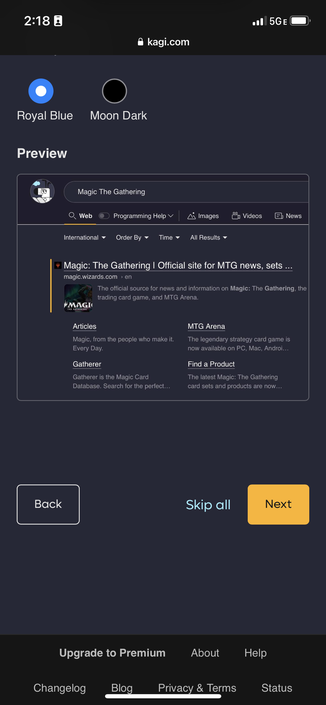
@gruber Does it show everyone a magic: the gathering search page during onboarding or just huge nerds like myself?
 Frank Reiff
 René Fouquet
 Granneman 😡
 Kevin Russell
I ignore the first results on Duckduckgo, often weird sites with too many z's in the name, sketchy.
 Son of a Sailor
 Alex MacK
 WowSuchCyber
@tolmasky Neeva is also great search engine.
 Daniel de Kay
 Joshua Leto
@tolmasky it’s been my default for a couple years. It’s gotten better so I only add g! to my search about one in ten times.
I’ve been signed out of Google for over a year and it feels good.
 Wififluisteraar
@tolmasky Switched a few years back on all my devices to DDG. The time between using !g is getting more and more every time. Especially because most of the time, the Google results are at least as bad as what DDG offered.
 enthraxxx
@tolmasky I know the feeling. On Mastodon the absence of ads is throwing me off. I keep looking for the spaces to not read or the advertisements to block.
 Alan Martello
@tolmasky @gruber PSA: 1 - highly recommend using ANY browser but Chrome or Edge due to tracking concerns — Firefox is #1 choice for me. 2 - MUST use uBlock Origin and enable all filter lists.
Result? Magic - all those “above the fold” ads go away, web pages load faster, and having to sit thru youtube commercials mostly becomes a thing of the past.
FYI - a family member last week had DuckDuckGo serve up a Phishing ad as the first search result for Paypal.
 FreediverX
@tolmasky
Try Kagi.com.
Try Kagi.com.
 Tom
Tom@tolmasky I used Google to search for something this morning and was horrified. When did it get so bad?
 FLEEECY
@tolmasky I have been using DDG for at least 5 years now, switched from Google and never really looked back. The g! Switch is there, I used it maybe 20 times total and never received actual better results doing so. Thanks DDG
 Peter Kahn🏳️⚧️🇺🇦🇵🇸🏳️🌈
@tolmasky @_L1vY_ I find that the surveillance option (g) has been spying on for so long that it does a very good job of answering my questions when they don’t involve commerce. However, I think it’s time I give ze duck more of a chance on my personal stuff. If chrome and g spy on me at work, I care less as that’s not my problem but my corp’s and they can look out for themselves. At home, I’m my own secops and legal team so Firefox + duck seems a better choice
 valOrie_p'O