 Donie O'Sullivan
Is there a Tweetdeck type client for Mastodon?
 Scott Galloway
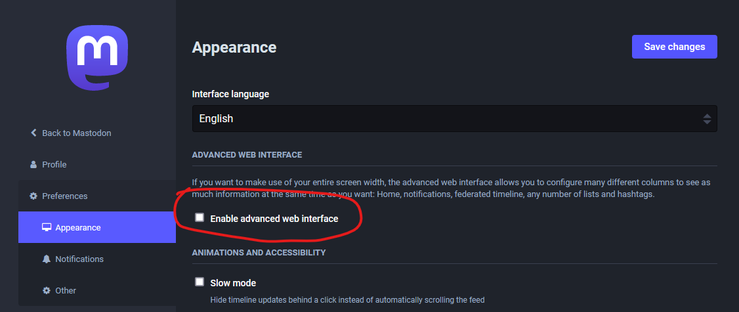
@donieosullivan In settings set the 'Advanced UI' checkbox. It's pretty similar.
 Brody 🚀 Brooks
@scottgal @donieosullivan As Scott noted, it's a tiny checkbox and it's like 70% of what you'd expect from TweetDeck!
 std::polar
@brody @scottgal @donieosullivan In some ways more, or maybe I never discovered the full potential of tweetdeck (thinking of custom pinned columns)
 Lu 🇦🇲
Lu 🇦🇲@donieosullivan @brody @scottgal You just pin the last column while in use as you want it, it'll stay like that and a new default "last column" will pop up. Not sure I'm clear in my explanation, I'm not a native speaker and I'm pretty exhausted. I'm I clear ?
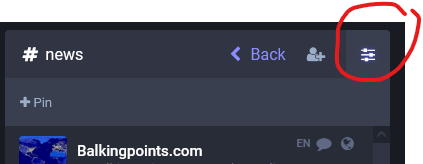
@luppano @donieosullivan @scottgal You're right, but only certain columns can be pinned. Like, if you click on a hashtag like #news, or the Local or Federated timelines, those give you the option to pin. But profiles or conversations don't.
There are some rough edges to the interface.
 Martin Herr
@donieosullivan @brody @scottgal If you selected what you wanted to view in the Getting Started column, just hit the top right "Show settings" and click Pin then it should be pinned, and the Getting started should move to the right.
 Quokka 🇦🇺
@MHDev @donieosullivan @brody @scottgal there should also be little <> to move columns around. And if you're pinning a column for a hashtag you can Add Words to it to have a column for multiple hashtags.
It's the future. Now.
It's the future. Now.
 Nina Jankowicz
@scottgal @donieosullivan ^^this! It's much better than the default format, and pretty moldable to what you'd like to focus on!
 𝗔rtilect𝗭ed
 fack
fack@donieosullivan tick the 'advanced mode' box on your user preferences page.
 RAZZAMATAZZ
@donieosullivan in the settings if you enable advanced mode it's the closest thing to a tweetdeck environment. There's another app called TheDesk that I just found but it's a bit buggy and needs a bunch of polishing but I'm switching between these two.
 Ned Raggett (has moved!)
@donieosullivan Quoting @communalsauce: "go into the Settings/Preferences and check the box next to "Enable advanced web interface." Columns!"
 Comfortably Numb
@donieosullivan Switch (in preferences) to advanced web interface - it's almost *exactly* like TweetDeck
 Elishevacarl
@donieosullivan It's in development but I used Metatext https://apps.apple.com/us/app/metatext/id1523996615 and hear good things about Tusky https://tusky.app/

 Peter Principle
@donieosullivan
Metatext for the web is the closest i've found yet. Turn on Advanced Web Interface.
Metatext for the web is the closest i've found yet. Turn on Advanced Web Interface.
 mike bayer

@donieosullivan go into the settings for Mastodon on the web and select "advanced UX". It's the tweetdeck UX
 Mark Dennehy
@donieosullivan The website interface, in "advanced mode", set from the preferences page.
 0xchimp
@donieosullivan I would like that too
 Nour Agha
@0xchimp @donieosullivan You can change to it in the Mastodon settings.
@Nour @donieosullivan Lu I see. But anything for the app version? Thank you 🙌
@0xchimp @donieosullivan Do you mean mobile or desktop? I believe you can install Mastodon as a PWA as well which works really well. But if you're looking for a client it depends on the platform.
 John Minnihan
@donieosullivan
in web settings | appearance there is a setting 'Enable advanced web interface'.
that will give you something close to tweetdeck's multi-columns
 Aricostello
@donieosullivan They are being developed. I use Toot! And Tweetbot has one in development.
 Pedro Marques
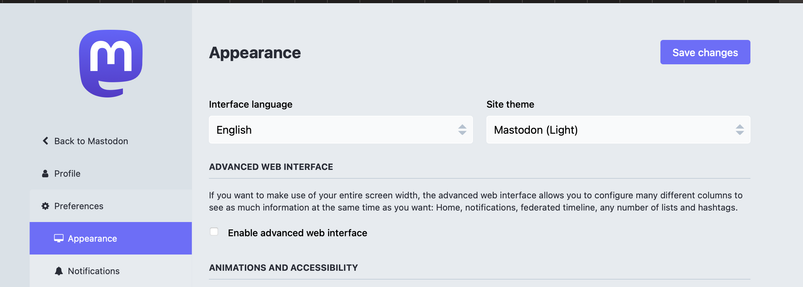
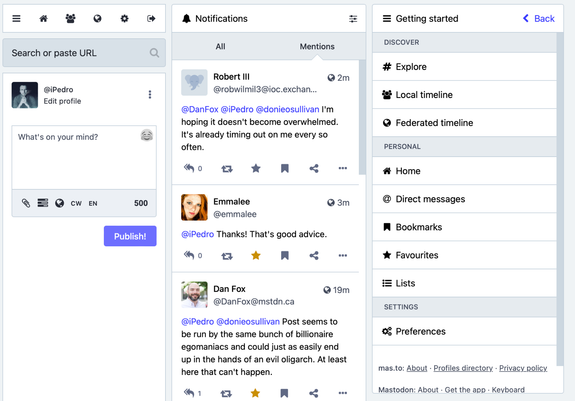
@donieosullivan Yes! Mastodon's own web client has an Advanced Interface.
Preferences > Appearance > Advanced Web Interface
 putch
putch@donieosullivan like everyone else the advanced ui is pretty good. But I've also been using The Desk https://thedesk.top/en/ and liking it's options despite the aesthetic
 Jamal Khan
@donieosullivan there are a couple in development floating around. @tapbots is working on @ivory which I hear great things about (was too late to join the test group). I’m currently using the Mammoth beta. It’s nice, but still pretty buggy.
 Stephen Tatton
@donieosullivan yes it's built in. enabled the advanced web features in the settings
 Sean C.
@donieosullivan welcome to the reason Mastodon after all these years never exploded -- no really good apps
 fenarinarsa
@donieosullivan click "use advanced interface" in Mastodon's web settings
You can also try https://nicolasconstant.github.io/sengi/
But both are far behind Tweetdeck functionality-wise
 Sharrow_irl
@donieosullivan the Web interface has an advanced option which is like tweet deck
 John (he/him)
@donieosullivan The tweetbot folks are making a Mastodon client @ivory. I'm so excited about it!
 ann hedonia
@donieosullivan @cd24 @ivory not to Um Actually, but ivory is from the folks behind an independent client called Tweetbot. separate from tweetdeck but also an extremely good piece of software
 Joshua J. Friedman
@donieosullivan Ben Collins recommends https://mastonaut.app/ for Macs

 Jay Taylor
@donieosullivan You could check out Mastonaut for iOS.
 bluewave is coming
@donieosullivan Mastodon.party got its own app, I use that
 Stan Weddle
@donieosullivan I'm using Whalebird with multiple instances. I haven't tried the built-in interface but plan to.
 Jon Bjork
@donieosullivan Accessing Mastodon via my Chrome browser on my PC with Advanced Web Interface turned on to allow pinning multiple columns seems as close as we can get to Tweetdeck for now.
@JonOfLodi yeah it's pretty good, the list building tool seems to be a bit buggy though.
@donieosullivan This surge in traffic is probably putting a strain on these relatively low-powered servers. Some of my list updates didn't seem to post correctly. I'd guess that the infrastructure will be upgraded going forward. It will have to.
 TJ Goff
Mastonaut
Mastonaut is a Mastodon client for Mac. Mastodon is a distributed social network of over 2 million users and hundreds of servers catering to the most varied set of interests and topics. Mastonaut is an easy-to-use and beautiful window into this world. Browse, follow, interact, and contribute to thi…
 Michael
@donieosullivan it's built in. Look for the Advanced interface in settings
 Mitch in Ottawa
@donieosullivan In Preferences, Appearence, Enable Advanced Web Interface
 Cory
Cory@donieosullivan the same folks who make Teeetdeck are working on a Mastodon client: @ivory
 vy
vy@donieosullivan use the advanced interface.
 ottergauze
@donieosullivan its built in, check Advanced Interface in your preferences
 Random Iowan
 Bianca
@donieosullivan @paul offered @ivory in beta for journalists. It’s sleek and intuitive. I highly recommend it for Apple products users.
 Tim Chambers
@donieosullivan Yes, click to advanced mode. That tweet deck like experience is built into the web UI as an optional view. You can do this under "Preferences" in your account.