Small #FediTip: if you encounter a message or thread that is in any way useful to you, bookmark it straight away.

Since the fediverse doesn't have full text searches, it will be very difficult to find that particular thing again a few days later. Especially if you cannot remember who posted it or it has no hashtags.

Periodically review your bookmarks to do something with them and you should be set.

@asmodai New here so this is probably a stupid question but now do you “bookmark” posts on Mastodon? Been looking and can’t find an option

@JJBadger Not stupid at all, I'm afraid it very much depends on your client though.

On Tusky (Android), every post has a bookmark icon underneath it (🔖). Similarly with the Mastodon advanced web UI.

What are you using?

@asmodai Ah I see. I’m using the Mastodon app on iOS.
@JJBadger @asmodai i haven't used that app, but if it's not directly accessible, it's probably in a "more" ("...") menu.
@akien @asmodai Tried that (the “…” button) and that just gives me the options to “report, block, or mute” whoever wrote the post 🤔 lol
@akien @asmodai aha…if I use the “forwarding” button (the arrow coming out of a box) on iOS it gives me the usual options (email, Twitter, print etc) but also open in web browser. The mastodon web page has a bookmark option. Not an ideal solution but it works I guess.
@JJBadger @akien At least until a new version is released.
@akien @asmodai But there doesn’t seem to be an option in the app to view your bookmarks anyway so 🤷‍♂️ lol
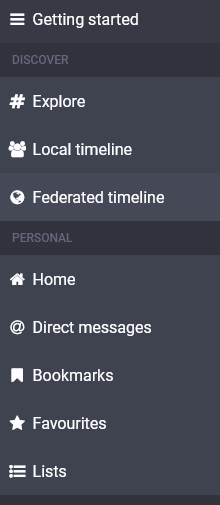
@JJBadger @akien Check the Getting started column:

@JJBadger Oh wait, we're talking the app here. Sorry, just have a bunch of threads at the same time now. 😅

Yea, the app needs a new release soon.

@asmodai I’ve switched to Metatext and the bookmark is easy to find 👍 Thanks.
@JJBadger @asmodai @akien A few days ago, I noticed a job offer for working on the official iOS client, which had not been updated for a few months.

@JJBadger A quick glance through the code base (https://github.com/mastodon/mastodon-ios), seems to suggest that there should be bookmark support.

Ah, that was committed in September of this year, but seems the Mastodon iOS app has not had a release since June.

mastodon/mastodon-ios

Official iOS app for Mastodon. Contribute to mastodon/mastodon-ios development by creating an account on GitHub.

GitHub
@asmodai @JJBadger butting in as a fellow iOS user. I use the Metatext app alongside the mastodon app. I keep the official app for ease of editing my profile on mobile. But MT is what I use for primary. You can bookmark just like on Twitter by hitting the three dots on a toot.
@asmodai @graves Thanks. Metatext is definitely easier to use and has more features (except for the editing profile which I just tried lol - will take your advice and keep the official app for that).
@asmodai @JJBadger no problem!! I know there’s lots of other apps out there but so far this combo and then desktop when I’m at my pc has been working quite well!
@JJBadger @asmodai it’s not the best. Metatext has many more features, including the essential ability to CW
@KoraunuiPakeha @JJBadger @asmodai not the most computer literate individual here. I have a iPhone. Can I ask what’s my best app to use?
@lminn Try either Toot! or Metatext. I see iPhone users recommending these a lot.
@KoraunuiPakeha @asmodai @lminn I would go for Metatext (it’s what I’m now using, and it’s free). It’s very intuitive and, so far, has all the necessary functionality.
@asmodai @JJBadger @KoraunuiPakeha I just opened the app. Wish me luck and thanks for ur help.
@lminn @KoraunuiPakeha @JJBadger @asmodai I'm really enjoying Tusky on Android. I assume it's also for iOS, but I don't know for sure.

@asmodai @JJBadger I couldn’t find a way to bookmark in the Mastodon For iOS client, and switched to Metatext partly because of that.

It’s worth noting that the “official” client is the baby of the bunch and is missing a lot of features. There isn’t really anything special about its officialness either, since Mastodon itself is a federation with no official leader. It just has a stamp of approval from the main code-writer.

@JJBadger @asmodai Bookmarking a message is done differently in Apps and in the Web UI. If you are using the Web UI, I would suggest:

- first, if you have not already done so, to go in the settings and activate the advanced (multicolumn) UI;

- then, when you want to bookmark a message, click on it to have it displayed in the rightmost column. There, below the message , are the buttons to reply, boost, fav... and bookmark.

[1/2]

@JJBadger @asmodai

[2/2]

Note that when a thread is displayed, only the currently selected message (the one in a bigger font) has the bookmark button. If the message you want to bookmark does not have the button and is not in a bigger font, just click on it, that'll select it and you'll see the bookmark button then.

@JJBadger @asmodai Same. I’m starting to wonder if the clients I’m trying don’t support bookmarks or lists. Can’t find the options anywhere!

Web version lets me SEE lists, but I can’t do anything but create blank lists that do nothing as far as I can tell.

@neverjim @JJBadger I will be the first to state that the web UI for lists is non-intuitive.

Note, this is on the advanced web interface. When you click on a list, it opens it in a column. Click on the three-slider icon at the top-right. Then click Edit list. This should pop up a window where you can start adding accounts to the list.

@asmodai @JJBadger thanks for the tips.

Seems strange to me that I can't make a list that follows a set of hashtags.

@neverjim You can do it with column pinning in the advanced web view though.

Search for a particular hashtag. In the result, click the hashtag. This opens the hashtag in a column. Click the three-slider icon top-right, select "+ Pin" and you now have a column that shows all the latest posts that match that hashtag. Once pinned, if you click that three-slider icon again, you can tweak and tune what you want it to match or explicitly not match.