Small #FediTip: if you encounter a message or thread that is in any way useful to you, bookmark it straight away.

Since the fediverse doesn't have full text searches, it will be very difficult to find that particular thing again a few days later. Especially if you cannot remember who posted it or it has no hashtags.

Periodically review your bookmarks to do something with them and you should be set.

@asmodai New here so this is probably a stupid question but now do you “bookmark” posts on Mastodon? Been looking and can’t find an option

@JJBadger Not stupid at all, I'm afraid it very much depends on your client though.

On Tusky (Android), every post has a bookmark icon underneath it (🔖). Similarly with the Mastodon advanced web UI.

What are you using?

@asmodai Ah I see. I’m using the Mastodon app on iOS.
@JJBadger @asmodai i haven't used that app, but if it's not directly accessible, it's probably in a "more" ("...") menu.
@akien @asmodai Tried that (the “…” button) and that just gives me the options to “report, block, or mute” whoever wrote the post 🤔 lol
@akien @asmodai aha…if I use the “forwarding” button (the arrow coming out of a box) on iOS it gives me the usual options (email, Twitter, print etc) but also open in web browser. The mastodon web page has a bookmark option. Not an ideal solution but it works I guess.
@akien @asmodai But there doesn’t seem to be an option in the app to view your bookmarks anyway so 🤷‍♂️ lol
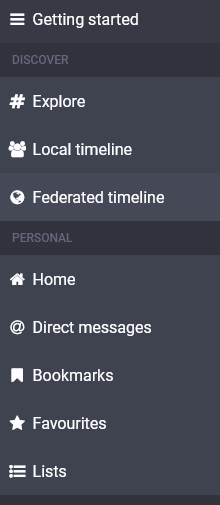
@JJBadger @akien Check the Getting started column:

@JJBadger Oh wait, we're talking the app here. Sorry, just have a bunch of threads at the same time now. 😅

Yea, the app needs a new release soon.

@asmodai I’ve switched to Metatext and the bookmark is easy to find 👍 Thanks.