 Zach Everson
 Annika Backstrom
To *actually* verify your Mastodon account, link to your personal site in your profile and set a rel="me" header on that target page. https://docs.joinmastodon.org/user/profile/#verification

@annika It does not work for me.
My guess would be that the link you add to your profile has to be https.
@annika Thanks. Good to know.
It had been a few days since I added the link originally and no verification but the server was under massive load then.
I did change the URL slightly just now (removed trailing slash) so I'll wait some more and see if it changes for me.
The doc was still a little unclear for me, so I took a look at your homepages source.
In case anyone is wondering, the format appears to be similar to
<a href="https://masto.host/@profile" title="Mastodon" rel="me" />
@rickdus Is it under "About"? I don't recognise your client offhand
I get a small check mark in Tusky, and the official Android app doesn't show it at all 😬
@rickdus Your verification does show up on my server. I would say it's probably just persistent load on mastodon.social that's preventing verification, but only an admin could confirm (and Eugen is pretty preoccupied at the moment).
There's always the option of relocating to another server, but I'm not sure if that's something you're interested in.
@annika
Hi,
Inserting the code under my metatags headers on my html page. Do I replace "me" with other text or just insert code as is? Thanks! I'm new here and haven't coded in awhile.
@LesLenProd rel="me" should be exactly that, and the link href should be your profile. So the full tag would be:
<link rel="me" href="https://mastodon.online/@LesLenProd" />
Thanks! I realized that after posting. Was having a "senior moment." Lol! The server is performing slowly on my end, so probably why I didn''t see my verification yet. I inserted the code properly. This server keeps crashing and is very slow to access. I suspect because so many folks are coming over from the Twit platform. Thanks again!
Annoyingly, many services mess up with anchor attributes (e.g. setting rel="nofollow" to deal with bots) 😢
It would be nice if there was some alternative way.
@annika The nitpick - here you don't "verify the account", rather you verify that the site belongs to the owner of the account.
That's why in the UI the check mark is visible not for the account itself, but for the URL, which it refers to.
Apparently this kind of verification is enough for most of the use cases. And it is much more reliable than outsourcing the "verification" process to a certain third-party.
@amapanda reviving an old thread, but it looks like someone finally did it. Just waiting on review, it seems
https://github.com/openstreetmap/openstreetmap-website/pull/5439

 WarezWolf
 Quinnstmas Tree 🎄
 Blake Reilly | Ekyllier
 The Modesto Kid
 Stefan Scholl
 ʞuᴉԀ ✅
 emily
emily Michael
 Rick de Haan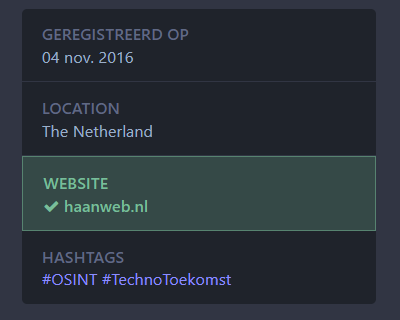
 Lesli Carroll √
 Aaron Crowder

 Eleni
Eleni Dorgaldir🇧🇪
 Aleksandra Fedorova
 Ben Zorn (he, him)
 ThatKomputerKat
 Olivia Appleton
 Amᵃᵖanda | map data witch
 Olivia A-C
 Fox Lee