Conifer Blog | Conifer Twilight Announcement

Dự án mã nguồn mở yasr, công cụ quay màn hình web tối giản dưới 1000 dòng code. Phù hợp cho ai thích sự gọn nhẹ và hiệu quả!

#opensource #webrecorder #congcumangnguonmo #quaymanhinh

https://www.reddit.com/r/opensource/comments/1ohtqpv/yasr_a_minimal_no_bloat_web_screen_recorder_under/

One thing I am wondering with current web archiving: are there any new approaches for how to deal with social media content?

I mean this problem:
Platforms are full of scripts. We use automated browsing to trigger those scripts and record them in a format to replay them. (#webrecorder #browsertrix etc.). Which makes sense from a historian's point of view, you record the info in its media format. But often the scripts don't replay, we don't see the content.

thread 1/3

#webarchiving #digipres

Digital Preservation in Popular Culture: Matlock S01E09

"Even better. We used this new program. It's kind of like the Wayback Machine but for social media. It's a digital archive that captures the image of a page when it was created." #Matlock #digipres #WebArchiving #SocialMedia #Webrecorder #DigitalArchives #DigitalPreservation

Reaching out to all internet researchers who use tools like #waybackmachine or #webrecorder:

Is there a general forum or community for people who use archiving tools to save live web content? I've been having issues trying to save an auction site, and I'm not sure where to go to find solutions to work around it.

Happy World Digital Preservation Day! 🌐 Join Us! Next Wednesday November 8th at 9AM PST/12PM EST for our Community Call! Our team is excited to share all the amazing things happening here at Webrecorder. Register Here: https://us06web.zoom.us/meeting/register/tZEldu6trjMiE9ROhfTHQlByDhaCHfqZV4RY #webrecorder #digitalpreservation #webarchiving
Welcome! You are invited to join a meeting: Webrecorder: Community Call November 2023. After registering, you will receive a confirmation email about joining the meeting.

Webrecorder Community Calls Are Back! Our team is excited to connect with you and share all the amazing things happening here at Webrecorder!

Zoom
Electronic Preservation Project for Ukrainian Open Access Journals (EPP UA) to safeguard research content during the war - TIB-Blog

Our Project “EPP UA” (Electronic Preservation Project for Ukrainian OA journals of TIB relevant subjects) aimed to safeguard Ukrainian Open Access journals and ensure their accessibility for future generations of scientists. In this blog post we give an insight into the project.

TIB-Blog

First workshop on #webarchiving with #Webrecorder tools at #DH2023 con & very happy to be here for this convergence of #DH & webarchiving communities (hint: the former really needs more engagement with the latter ;)) with Ilya Kreymer & Jasmine Mulliken.

[PS At the con for the whole week, so if anyone here is in Graz, DM for meetups]

Hey @webrecorder, due to the recent developments regarding #Reddit I'd like to start archiving important resources.

Initially I found #ArchiveBox but they seem to have some security issues to mitigate with JS (XSS). https://github.com/ArchiveBox/ArchiveBox/issues/239

I was wondering how your #replayweb.page / #webrecorder / #pywb tool handles JS. Does it keep the page working without allowing malicious JS?

#archiving

Architecture: Archived JS executes in a context shared with all other archived content (and the admin UI!) · Issue #239 · ArchiveBox/ArchiveBox

Describe the bug Hi there! There's an XSS vulnerability when you open your index.html if you saved a page with a title containing an XSS vector. Steps to reproduce Save this page for example: [Twit...

GitHub

For those that read my blog post yesterday about archiving and embedding tweets in web pages, you may have seen the Docker Desktop requirement and thought, "Well, no one has time for _that!_"

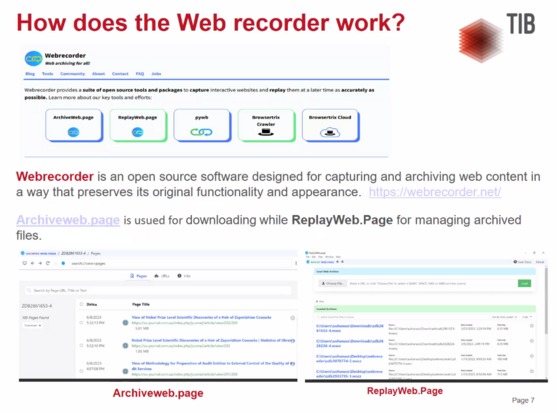
Indeed—I made it too complicated. Use ArchiveWeb.page to create your WACZ file...it is a Chrome extension or a desktop application. I've updated the instructions in the blog post to guide you along the easier path: https://dltj.org/article/replayweb-for-social-media/

#Webrecorder #WebArchiving

ReplayWeb for Embedding Social Media Posts (Twitter, Mastodon) in Web Pages

If you have been following social media news, you know that Twitter is having its issues. Although there is still a bit to go before it goes away (or, more likely, puts up a paywall to view tweets), it seems prudent to save Twitter content so it can be viewed later. Most people do this with a screenshot of a tweet, but that doesn’t capture the fidelity of the Twitter experience. Ed Summers pointed out a recent article from the Associated Press that embedded a functional archive of a tweet. (Scroll down nearly to the end of the article.) Screen capture of a tweet from TelanganaDGP Screen capture of the contents of 'click here to learn more' That looked interesting, so with the help of hints from Ed, I embedded a tweet in last week’s newsletter. Screen capture from last week's DLTJ Thursday Threads on 'Explaining our concept of time to aliens' This is how I did it…plus some helpful advice along the way. Installing Browsertrix Our goal is to use ReplayWeb to embed a bit of the Twitter experience into a stand-alone web page. (More on ReplayWeb below.) The tool uses a WACZ file to do this; a WACZ file is the contents of a series of Web Archive files as a Zip file for easy transport. At the moment, the only free tool that I could find to create the WACZ file is Browsertrix Cloud. Browsertrix Cloud building a hosted service for organizations that want to have high-fidelity web archives, and it is also making its core code available as open source. Its local deployment instructions instructions are really good, but one of the things that put me off was the Kubernetes requirement. (Kubernetes is a highly-complicated, highly-robust tool for orchestrating the containers that make up a distributed application.) Fortunately, the Browsertrix local deployment instructions point out that recent versions of Docker Desktop include Kubernetes as an optional component. So I started with the four list items under the Docker Desktop (recommended for Mac and Windows) heading. Docker Desktop (recommended for Mac and Windows) For Mac and Windows, we recommend testing out Browsertrix Cloud using Kubernetes support in Docker Desktop as that will be one of the simplest options. Install Docker Desktop if not already installed. From the Dashboard app, ensure Enable Kubernetes is checked from the Preferences screen. Restart Docker Desktop if asked, and wait for it to fully restart. Install Helm, which can be installed with brew install helm (Mac) or choco install kubernetes-helm (Windows) or following some of the other install options From there, get Browsertrix running: git clone https://github.com/webrecorder/browsertrix-cloud cd browsertrix-cloud helm upgrade --install -f ./chart/values.yaml -f ./chart/examples/local-config.yaml btrix ./chart/ kubectl wait --for=condition=ready pod --all --timeout=300s Go to localhost:30870/ and sign in with [email protected] with PASSW0RD! as the password. Tip: the first time I ran helm upgrade ..., the back end timed out waiting for the database container to download and start. I saw this because the default username/password was not accepted. The solution was to helm uninstall btrix and kubectl delete pvc --all then run the helm-upgrade command again. For the second helm upgrade ..., the container images will have been already downloaded and cached, so the initialization will happen as expected. Capture the tweet To get an isolated view of the tweet, we’re going to use oembed.link. “oEmbed” is a de facto standard for: a format for allowing an embedded representation of a URL on third party sites. The simple API allows a website to display embedded content (such as photos or videos) when a user posts a link to that resource, without having to parse the resource directly. The oEmbed is intended to be just the primary content of the page; it excludes toolbars, navigation elements, and other parts of the page framework. A bunch of big sites support it: Twitter, TikTok, YouTube, Tumblr, Facebook, etc. Many blog platforms support oEmbed by just putting the URL to the content you want to embed onto a line by itself. (You might be using oEmbed without even knowing the name or technology behind it; see the documentation at WordPress, for instance.) We’re going to use oembed.link to get the same thing, but turn it into a web archive first. In this example, we are going to archive https://twitter.com/DataG/status/1585816108908662788, which in oembed.link looks like this. From the main Browsertrix page, select “All organizations” in the upper right corner and pick “admin’s Archive”. Select the “Crawl Configs” tab. Select “New Crawl Config” then select “URL list” In the “Scope” tab that comes up, put the oembed.link URL into the text box. For the sake of completeness, it probably also makes sense to put the original Twitter URL in the text box for archiving as well. See screenshot below. The settings in the “Limits”, “Browser Settings”, and “Scheduling” tabs can remain unchanged. (Or experiment!) In the “Information” tab, I use a more meaningful name than the first URL captured. For instance, to capture the https://twitter.com/DataG/status/1585816108908662788 tweet I set it to “twitter-DataG-1585816108908662788” — the origin website, account, and identifier separated by dashes. Select “Review & Save” then “Save & Run Crawl” Screen capture of the crawl configuration 'Scope' page from Browsertrix. As the web archive capture starts, you’ll see the running status. My tweet crawl took about a minute to run. When it is done, the “Files” tab will have a link to your WACZ file. First step done! Embed the tweet archive onto a page Next we’re going to use ReplayWeb to embed the captured archive in a mini-browser running inside our web page. ReplayWeb reads the contents of the archive and dynamically injects the archived pages into the DOM as an <iframe>. It is really cool. The embedding ReplayWeb documentation is quite good as well. I’m choosing to self-host its JavaScript, so I downloaded the ui.js and sw.js files and put them in the “assets” directory on my blog’s static site. To embed the tweet, add the JavaScript and the <replay-web-page> tag to your HTML. For the DLTJ blog, that looks like this: 1 2 3 4 5 6 7 8 9 10 11 12 <script src="/assets/js/replayweb/ui.js"></script> <replay-web-page replayBase="/assets/js/replayweb/" source="https://media.dltj.org/web-archive/twitter-DataG-1585816108908662788.wacz" url="https://oembed.link/https://twitter.com/DataG/status/1585816108908662788" embed="replay-with-info" style="height:27em;"> </replay-web-page> <noscript><img src="https://dltj.org/assets/images/2023/2023-02-04-tweet-1585816108908662788.png" alt="...alt text for static image..."> </noscript> …which looks like this when rendered in the browser: Some notes: Line 3: Note the addition of the replayBase attribute. Since I’m self-hosting and I’m not putting the ReplayWeb JavaScript at the same location as the WACZ file, I have to explicitly tell ReplayWeb the location of the back-end service worker JavaScript file. Line 5: The url attribute controls what is displayed from the archive. Remember that we archived two pages: the oembed.link page and the twitter.com page. Line 6: There are several embed modes…the replay-with-info mode adds the header at the top that explains how this is a web archive. Line 7: I’m having to use an in-line style to force the height of the embedded content to approximate the height of the tweet. My knowledge of modern CSS styling is quite weak, so there is probably a better way to do this…suggestions welcome! Line 9: Just in case JavaScript is turned off (or if all of this ReplayWeb stuff breaks someday), inside a <noscript> tag there is a static image of the tweet as well. I use this Tweet Screenshot tool to make the image. So that is all there is to it. A little bit convoluted—especially the Browsertrix part to get the WACZ file—but on the whole not too bad. There is a web forum for the Webrecorder community working on these various pieces, and that is probably the best place to go if you have questions or observations. (I’m not a participant in that community—just a happy user of its projects.) Special note for embedding Mastodon posts Mastodon supports oEmbed, too, via an “automatic discovery” mechanism. Unfortunately, it seems like oembed.link uses the hard-coded list of oEmbed providers rather than automatic discovery, so Mastodon instances don’t work there at the moment. But! If you know the magic URL pattern, you can capture Mastodon posts, too: The link to the post on Mastodon is https://code4lib.social/@dltj/109804263650810404 and you just need to add /embed onto the end to get the oEmbed version: https://code4lib.social/@dltj/109804263650810404/embed That is probably better, really, because it isn’t relying on an external service to get the content…it looks more legitimate.

Disruptive Library Technology Jester