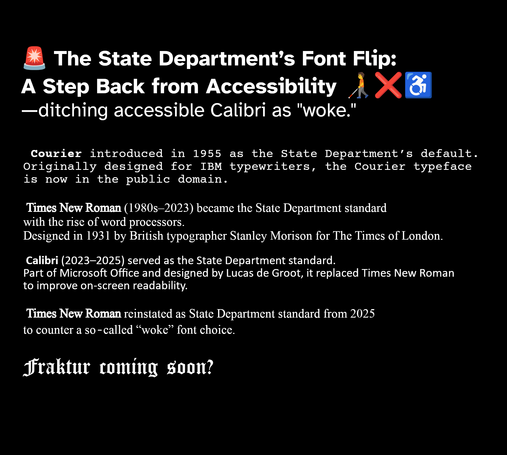
🚨 The State Department’s Font Flip:
A Step Back from Accessibility 🧑🦯❌♿
—ditching accessible Calibri as "woke."
Earlier this week, the U.S. State Department announced its decision to abandon Calibri—the sans-serif typeface adopted under the Biden administration—in favor of Times New Roman. The internal memo framed this as a "return to consistency," but I see it as something deeper: a symbolic retreat that elevates tradition above accessibility, inclusivity, and the promise of open standards. As someone who values thoughtful design in public institutions, I find this choice disheartening, yet it compels us to examine what typography truly demands in a digital age.
Typography transcends mere aesthetics; it fundamentally shapes how we read, perceive authority, and feel included in vital conversations. When a government agency alters its typeface, that shift signals its core priorities. The reversion to Times New Roman, a serif font rooted in print-era conventions, risks turning typography into another cultural flashpoint. I sincerely hope this does not herald a broader precedent, but instead sparks a return to evidence-based decisions that serve every one.
From Courier to Calibri: A Brief History of State Department Fonts
The State Department’s typography has mirrored the evolution of bureaucratic communication. For decades, Courier New—a monospaced font introduced in 1955—reigned as the default, embodying the analog world of mechanical typewriters, carbon copies, and precise diplomatic cables. Its uniform spacing delivered egalitarian functionality, aligning every character perfectly for legal drafts and official forms.
In the 1980s and 1990s, as computers reshaped offices, Times New Roman took over. Crafted in 1931 by Stanley Morison for The Times of London, this serif typeface excelled in dense newspaper columns and fine print, projecting the conservative professionalism suited to diplomacy. Yet it was engineered for ink on paper, not the glowing pixels of screens that define our era.
By the early 2000s, legibility studies championed sans-serifs like Arial and Calibri for digital dominance. In 2023, the Biden administration embraced Calibri precisely for its superior on-screen clarity, accessibility, and visual ease—aligning with best practices from the GSA and Department of Education. Part of the humanist grotesque family (think Helvetica's lineage, tracing back to Akzidenz-Grotesk in 1898 or Highway Gothic on U.S. road signs since 1948), Calibri marked genuine progress. The sudden pivot back to Times New Roman strikes me as nostalgia over necessity, undermining hard-won advances in inclusive design.
The Return to Times New Roman: Symbol Over Substance
Officials tout this revert as tradition preserved, but I contend tradition must yield to accessibility. Serif fonts shine in print, yet on modern screens—especially low-resolution or small displays—they falter for those with low vision or dyslexia. The British Dyslexia Association and Bainbridge Group on Visual Legibility affirm that sans-serifs, with their clean, uniform strokes, ease reading and curb fatigue across diverse users.
Consider Times New Roman's subtle distinctions between "I," "l," and "1"—they blur digitally, inviting confusion. Bainbridge and MIT’s AgeLab research underscores how uniform strokes and open apertures accelerate comprehension in electronic documents. By clinging to this proprietary relic, the State Department bypasses free, open-source gems like IBM Plex, Source Sans, or Lato, which offer transparency and adaptability. Thailand’s 2006 font competition, producing 13 national standards, proves governments can innovate boldly. This choice feels like a step backward, favoring the familiar over forward momentum.
The Science and Soul of Accessible Typography
Accessible typography is human-centered design at its core, backed by decades of research into font shapes, spacing, and character clarity for all readers, impaired or not. Fonts like OpenDyslexic, with weighted lower halves to prevent letter inversion, and Atkinson Hyperlegible, which sharpens distinctions between confusable characters like 0/O or 6/b, lead the way. Developed by the Braille Institute of America with Applied Design Works, Atkinson enhances accuracy and speed for dyslexic and neurotypical alike, all without aesthetic compromise.
Here’s my personal preference: Atkinson Hyperlegible is my favorite—it captures the open, modern inclusivity government design demands. Best of all, its SIL Open Font License makes it free and available for public, governmental, and educational use, unlike the corporate shackles of Calibri or Times New Roman.
Why Accessibility Matters in Public Typography
For institutions like the State Department, clarity is no luxury—it's a democratic imperative. Diplomats, journalists, and citizens alike deserve documents free of strain, legible across aging eyes, reading differences, and global devices. Times New Roman, born for 1930s newsprint, dismisses these truths, broadcasting detachment from digital realities. Accessibility isn't political posturing; it's practical humanity, the bedrock of public-spirited communication.
---
References
- British Dyslexia Association. Dyslexia Style Guide 2022: Creating Dyslexia-Friendly Content.
- Braille Institute of America. Atkinson Hyperlegible Study. (2021).
- Bernard, M. et al. “A Comparison of Popular Online Fonts: Which Size and Type is Best?” Usability News, Wichita State University (2003).
- Morison, S. A Tally of Types. Cambridge University Press (1939).
- MIT AgeLab. “Typography and Visibility on Digital Displays.” (2014).
- Shaikh, A. (2007). “Impact of Typeface Design on Legibility and Reading Comprehension.” Behavior & Information Technology.
#InclusiveDesign #StateDepartment #Courier #TimesNewRoman #Calibri #A11y #Typography #Accessibility #A11yMatters #DesignForAll #WebA11y #StateDeptFontFail #FOSS
 William @ A9
 Debby ⁂📎🐧
 DopingConsome
 Arty-chan (Cynthia)
 Eric Eggert
 Taylor Arndt
 Andrew F
 Andrew F
 Ashlee