
@btp I used iDrive on each of my computers for backup originally, with their cloud sync to keep docs / music / videos / etc in sync among them. There isn’t a Linux version for cloud sync, though. After I got a NAS, I started using #syncthing to sync those files between it and each computer, and it has an iDrive app to back them up. I recently added #UrBackup to backup “other” files, like /etc and the config files in my home directory to the NAS.

Backups sind wichtig. Deshalb habe ich das ganze Wochenende damit verbracht, die für mich richtige Backup-Lösung zu finden, die in einem Docker-Container läuft.

"Früher" war es BackupPC. Leider wird dieses Programm nicht mehr weiterentwickelt.

Getestet habe ich diesmal:
- UrBackup
- Kopia
- Duplicati
- Rdiff-Backup mit Rdiffweb

Alle haben sie ihre großen Vor- und Nachteile. Man muss einfach für sich entscheiden, welche Nachteile man ignorieren kann und welche nicht.

Falls es interessant für dich ist: Letztendlich habe ich mich für **Kopia** entschieden. Das lässt meine Festplatten momentan auf meinem Büroserver auf Volltouren laufen. 🙂

Einen Vergleich zwischen diesen Programmen liefere ich jetzt nicht, da sie alle ihre Vorteile und viele Nachteile haben.

#Backup #Kopia #Docker #UrBackup #Duplicati #Rdiffweb

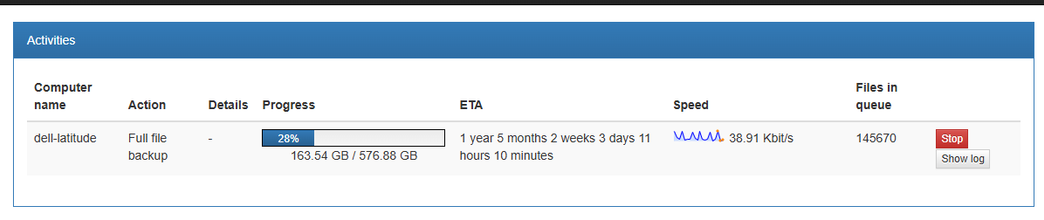
I am using #urbackup to backup stuff from a local drive to a Synology NAS, and initially it was doing great but now slowed down to a crawl. Any idea why?

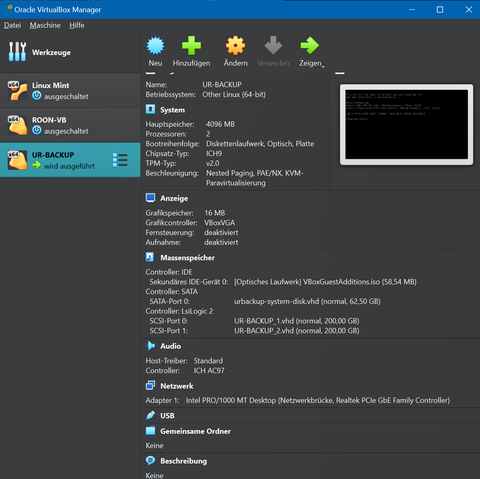
Heute ein wenig virtualisiert. 3 VMs auf VirtualBox installiert:

1) Linux Mint
2) Roon Rock Music Server
3) UrBackup Appliance für VirtualBox

#linuxmint #virtualbox #roon #urbackup

Thinking about ditching free #Veeam backup for backup of my #windows workstation in favor of #UrBackup. I just need daily incremental and weekly full dump of main disk and some files. Anybody has any experience with it?

https://www.urbackup.org/

UrBackup - Client/Server Open Source Network Backup for Windows and Linux

Backup strategy: (note that this device has two NVMe drive bays (one Linux install each) and one 2.5" HDD/SSD bay)

  • Timeshift to record on-boot / on-hook (aka apt / pacman invocations) events to btrfs snapshots
  • Borg to backup critical folders (things required to be functional like, say, ~/.ssh as an example) every hour to local HDD
  • urbackup to take file-level backups every 6 hours, and block-level backups every 7 days (incremental, full every 7 days / 30 days), uploaded to my server-side (when connected to WWAN this is paused)
  • One additional watcher script that will enable a 6-hour Timeshift task if it detects that the latest urbackup run was more than 24 hours ago, just to ensure full-FS backups, even if I'm without internet or on mobile data.

#backup #backups #linux #overkill #Timeshift #urbackup #BorgBackup #btrfs

#UrBackup - client/server backup system

https://www.linuxlinks.com/urbackup/

UrBackup - client/server backup system - LinuxLinks

UrBackup is an easy to setup open source client/server backup system offering a combination of image and file backups.

LinuxLinks
How to Install UrBackup [Client/Server] System on Ubuntu
#Linux #Security #Backup #UrBackup #RedHat #Ubuntu
https://ubuntushell.com/install-urbackup/
How to Install UrBackup [Client/Server] System on Ubuntu

Discover a step-by-step guide to install a UrBackup server on Ubuntu and a UrBackup client on Windows systems with practical examples.

Ubuntu Shell
How to Install UrBackup on Ubuntu 22.04 or 20.04 - LinuxCapable

Commands to install UrBackup on Ubuntu 22.04 or 20.04 LTS Linux utilizing the UrBackup LaunchPAD PPA for the latest version.

LinuxCapable

@unixtippse hasts mal angeschaut? #UrBackup

Ich hab übrigens den #NejiSaurus jetzt auch, tolles Teil.