FoundationDB's #SQL #API documentation: an epic tale of how to ✨toggle✨, 🌓auto light/dark⚫ modes, and navigate endless #sidebars. 🤹‍♂️ Because who needs actual content when you can revel in the joys of #UI gymnastics? 🚀
https://foundationdb.github.io/fdb-record-layer/SQL_Reference.html #FoundationDB #Documentation #Toggle #DarkMode #HackerNews #ngated
SQL Reference - FoundationDB Record Layer documentation

Site design refresh ‘completed’

I’ve completed the site theme update as I mentioned yesterday. It isn’t completely finished: some things are still broken (sorry, macOS Safari users), and I’m not happy yet with s…

Ubergeek Kelly's World- Life, technology, science, rants

# sidebar

Vor einigen Wochen habe ich Ian Steward auf einem Automattic Meetup kennengelernt. Er kam auf mich zu, um mir zu erzählen, dass er kürzlich auf einen ziemlich alten Artikel von mir gestoßen ist. In diesem Artikel geht es darum, wie man die Reihenfolge der Sidebars im K2-WordPress-Theme ändert.

Ich habe K2 sehr lange auf notiz.Blog eingesetzt und mich viel und lange mit dessen technischem Aufbau und der semantischen HTML-Struktur beschäftigt!

Aber außer dem kurzen Schwelgen in alten Erinnerungen hab ich mir nicht weiter Gedanken zu dem Thema gemacht. Immerhin gibt es das Theme schon seit einer halben Ewigkeit nicht mehr und Sidebars sind auch aus der Mode!(?)!

Dann schreibt @ricmac letzte Woche aber folgendes auf Mastodon:

Sidebar Culture: remember things in your blog sidebar like blogrolls, “Influential articles”, Flickr photos, MyBlogLog (a proto-social network for bloggers). All this stuff and more helped make early 2000s blogging fun and more communal. Would love to find a way to bring that back in 2024…

https://mastodon.social/@ricmac/111477809540922177

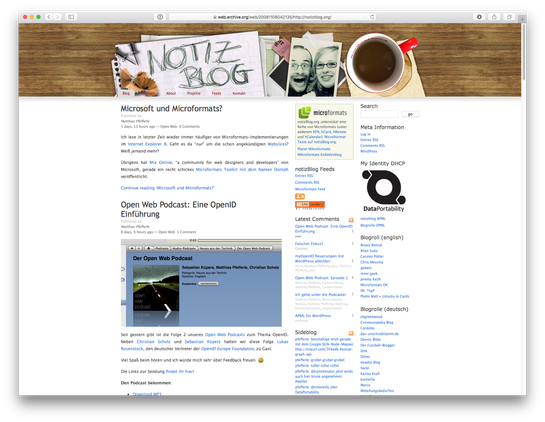
…das hat mich dann doch noch einmal neugierig gemacht und ich habe eine alte notiz.Blog Version von 2008 (auf Basis von K2) raus gekramt.

Fast die Hälfte der Seite war Sidebar 😍

Vieles von damals hat mich schwer an den Artikel „The lost infrastructure of social media.“ von @anildash (und der IndieWeb Version davon) erinnert.

Ich bin gespannt was @ricmac sich einfallen lässt…

Thinking about a personal website re-design (or a new site), so I can play around with fediverse integration, sidebar culture, and other fun things. Thinking of using @eleventy (have used Hugo before and this seems better). Maybe a new site is better, as I don’t want to have to migrate ricmac.org from WordPress…for now, anyway. Is it normal for people to have two personal websites these days? I should just start a test site with 11ty and see how it goes… #thinkingoutloud

https://mastodon.social/@ricmac/111489177217562043

… und ich werde die Position meiner Sidebar vielleicht nochmal überdenken!

Alles kommt wieder ☺️

https://notiz.blog/b/6mS

#sidebars #theme #thinkingoutloud #Web20 #WordPress

Ian Daniel Stewart

That's me. This is my blog.

Ian Daniel Stewart
It’s subtle, but I’ve come to appreciate that the Hypothes.is interface often conveniently covers up sidebars and advertising online as I read, think, and annotate. https://boffosocko.com/2020/01/18/55764943/
Chris Aldrich

It's subtle, but I've come to appreciate that the Hypothes.is interface often conveniently covers up sidebars and advertising online as I read, think, and annotate.

Chris Aldrich

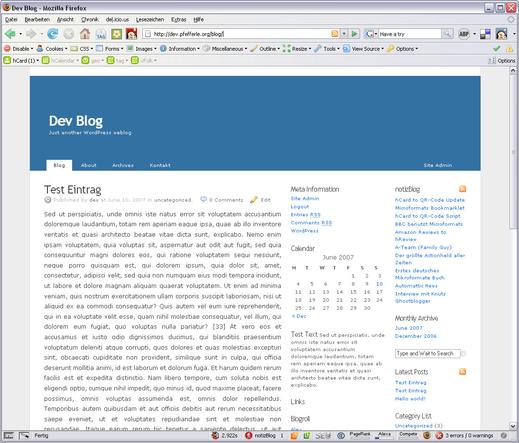
Change sidebar order in the new three column K2

The CSS Code has changed with Version 1, so try this new code.

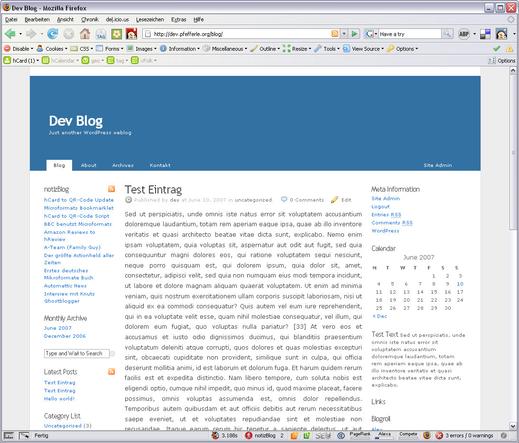
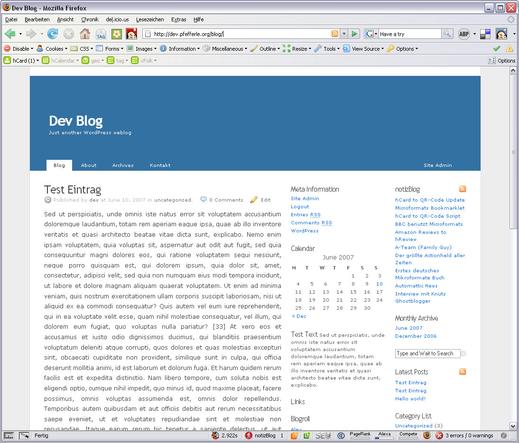
The new version of the K2 WordPress Theme supports a three column layout (you can change it in the K2 Options). I prefer both sidebars on one side (like the 3 column K2 Theme) but K2 only supports sidebar-content sidebar.

Original Version:

New Version:

To change this default order to content-sidbar-sidebar, you can download my small custom theme hack.

hack.css

put this file into the „styles“ folder and activate it through the K2-Options panel

Or you can change it by hand:

open styles.css and search

.sidebar-dual #primary {margin-left: 170px;padding: 10px;}Code-Sprache: CSS (css)

and replace it with

.sidebar-dual #primary {padding: 10px;}Code-Sprache: CSS (css)

and search

#sidebar-alt {float: left;width: 150px;padding: 10px;left: -740px;margin-left: -170px;}Code-Sprache: CSS (css)

and replace it with

#sidebar-alt {float: left;width: 150px;padding: 10px;}Code-Sprache: CSS (css)

That’s All Folks…

#K2 #primary #sidebars #theme #WordPress

https://notiz.blog/b/8K

K2 Sidebar Hack #2

Um die zwei Sidebars des K2 (WordPress) Themes auf die rechte Seite zu bekommen, und nicht wie standardmäßig vorgegeben links und rechts vom Content, müsst ihr eurem Custom Style einfach folgende Zeilen hinzufügen: .columns-three #primary { margin-left: 0px !important; } .columns-three #sidebar-alt { left: 0px !important; margin-left: 0px !important; } Da sich das StyleSheet in [...]

notizBlog