 Donweb Media
Bash scripting automatización: guía 2026
¿Tu cron job no corre? Dominá Bash scripting automatización en 2026: scripts desde cero, errores comunes y mejores prácticas para producción.
https://donweb.news/bash-scripting-automatizacion-guia-2026/
Bash scripting automatización: guía 2026
¿Tu cron job no corre? Dominá Bash scripting automatización en 2026: scripts desde cero, errores comunes y mejores prácticas para producción.
https://donweb.news/bash-scripting-automatizacion-guia-2026/
Bash scripting becomes much more powerful once your scripts can make decisions automatically.
https://www.linuxteck.com/bash-conditional-statements/
✔ if / elif / else
✔ [[ ]] vs [ ]
✔ file tests
✔ logical operators
✔ real sysadmin examples
✔ debugging tips
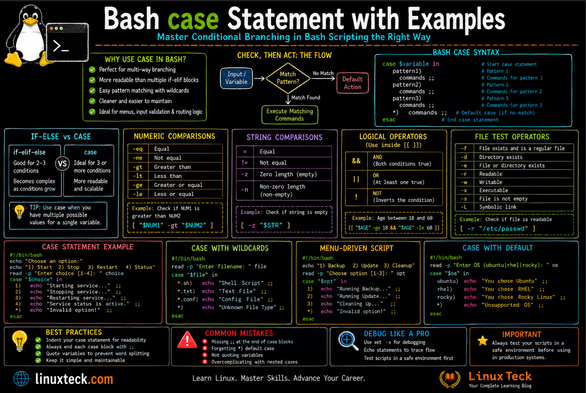
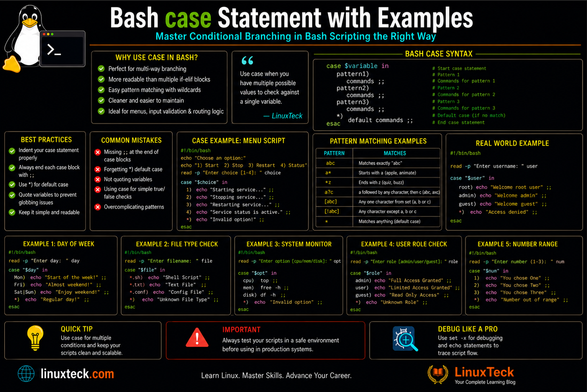
Bash case statements are massively underrated for clean shell scripting.
https://www.linuxteck.com/bash-case-statement-with-examples/
Perfect for:
• menus
• pattern matching
• automation scripts
• user input handling
Guide with real Linux examples 👇
LinuxTeck Bash Case Tutorial
Trying to understand the Linux mkdir command beyond basic syntax?
This guide covers:
• mkdir options and syntax
• nested directories with -p
• permission handling
• SELinux context
• real Linux examples
• Ubuntu & Rocky Linux usage
• Bash scripting examples
Bash Pitfalls - Greg's Wiki
이 문서는 Bash 스크립트 작성 시 자주 발생하는 실수들을 상세히 설명하며, 특히 파일 이름을 다룰 때 발생하는 문제들을 중점적으로 다룹니다. 예를 들어, ls나 find 명령어의 출력을 직접 for 루프에서 사용하는 것은 공백, 특수문자, 개행 문자 등으로 인해 치명적인 오류를 초래할 수 있음을 지적합니다. 올바른 방법으로는 glob 패턴 사용, find 명령어의 -exec 옵션, 또는 nullglob, globstar 같은 Bash 옵션 활용을 권장합니다. 또한, 변수 확장 시 항상 큰따옴표로 감싸고, 파일명이 하이픈(-)으로 시작할 경우 명령어 옵션과 혼동되지 않도록 -- 옵션을 사용하는 것이 중요하다고 강조합니다.
https://mywiki.wooledge.org/BashPitfalls
#bash #shellscripting #filesystems #scriptingbestpractices #unix
Trying to understand Bash conditional logic without getting lost in confusing syntax examples?
This guide covers: https://www.linuxteck.com/bash-if-statement-complete-guide-with-examples/
• Bash if, elif, else
• [[ ]] vs [ ]
• Multiple conditions
• AND/OR logic
• Real Linux automation examples
• Ubuntu & Rocky Linux scripting
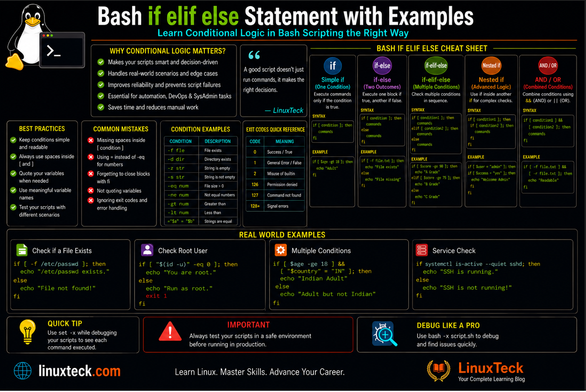
Master Bash conditional logic with practical if, elif, and else examples for Linux shell scripting.
Learn:
• File checks
• Regex validation
• DevOps automation
• Bash troubleshooting
• Ubuntu & Rocky Linux scripting
https://www.linuxteck.com/bash-if-elif-else-statement-with-examples/
Automatic Linux Backup Script Guide for SysAdmins
https://www.linuxteck.com/automatic-linux-backup-script/
Practical Linux backup scripting using Bash, tar, rsync, cron jobs, SSH, logging, rotation, and email alerts.
#Linux #Bash #ShellScripting #DevOps #SysAdmin #LinuxAdmin #Automation
The Bash read command is what makes scripts interactive 🔧
Learn how to take user input, prompt users, and build smarter shell scripts 👇
https://www.linuxteck.com/bash-read-command-user-input-examples/
 LinuxTeck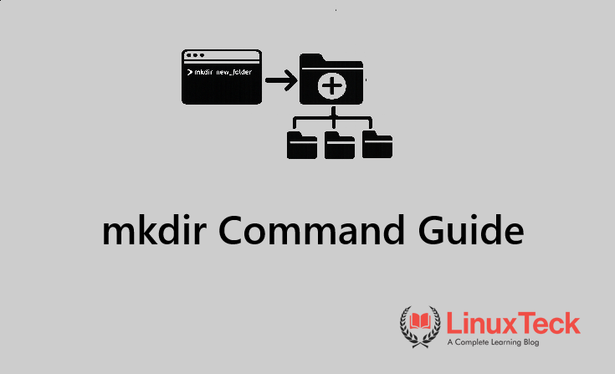
 sayzard