**Switching to Linux on the desktop in 2025 (part 2 – toolbox)**
Continuing the writeup of my experience of using Linux in everyday life/work (see Part 1).
‘Edge cases’, as one of the commenters once said. Maybe he was right, 99% of people who switch to the Linux desktop will probably not use the same toolkit as I do. Nevertheless, I’m forgetful and I will continue writing my experience with Linux.
It’s about candies and papercuts and screaming of a middle aged man to the abyss of Linux.
1. Beautifying desktop – background
I used to awe nature photos every day that were served to my Windows desktop.
Is there something similar in Linux?
Yes, it is called #variety.
It integrates nicely in Mint/Cinnamon desktop.
I can select sources of photos.
And quotes!
Too bad I can’t select LinkedIn as a source of daily quotes.
After few days, I uninstalled it. It crashed my desktop at every wake-up from suspended mode. Here’s the internal monologue I had one morning after another Linux crash:
“You were quiet for the last few days, “TtS and 1024 others”, is everything alright with your Mint? Does it properly eat and sleep all night?
– No, it’s not.
Well, well.
– It crashes & restarts right after logging in in the morning.
You don’t say!
– It’s true.
Did you try checking your logs, journalctl and stuff?
– Of course I did. OOM. Memory leak or something.
Do you have time to troubleshoot?
– Not really.
Have you considered farming instead?
– Yes, many times.
But what will you do?
– Uninstall and remove all the junk I added after the install. Screensavers. Remainings of the unsuccessful howdy face login. Etc. Nothing behaves anyway.
Will run just a bare-bone install with a black desktop background, like it’s 1999. On 16 core CPU.”
2. Google docs shortcuts
Another step towards more comfortable desktop:
My Google Docs files appear as .docx and .xlsx files in Nemo file manager (when mounting GDrive with #rclone. Awkward. These are native Google Docs files, not some Office files.
I want links instead, to open them directly from the browser.
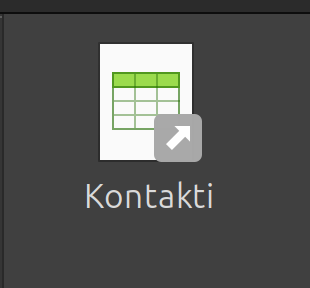
#TIL there is a mount parameter that does just that: shows files as .desktop icons (‘shortcuts’) and when I click on them, Firefox opens.
rclone ........ --drive-export-formats desktop3. Stability
See the image and that’s all you need to know about my progress regarding Linux/Mint.
I almost can’t believe that it runs stable – but after removing some desktop applets. Not sure which one behaved badly but I suspect Variety desktop image changer.
I still see some errors in logs related to Cinnamon (pam_encryptfs), obviously not critical, as it doesn’t crash when I login.
4. Nostalgia and old games
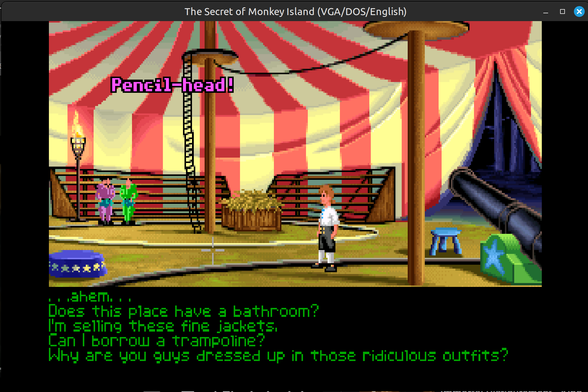
On the less serious side: I installed ScummVM (without a single issue) and after 30 years I see this scene again.
I don’t play games at all, but this one triggered a serious case of nostalgia.
5. Project planning software
I was using ProjectLibre (win version) for more than decade on Windows.
I found out there is Linux release too.
I ran it and the font was so smol even 20yr younger me wouldn’t see nothing. Java/Swing apps and various screen DPI under Cinnamon don’t play along well.
I tried several trick and finally found out how to make it bigger.
Run it with GDK_SCALE=X switch. Replace X with 2 or 3.
A startup script:
#!/bin/bash
GDK_SCALE=3 /opt/projectlibre/bin/ProjectLibre
6. Process modelling
Today I had to open some ancient .adf files (BPMN process models) drawn in Aris Express.
Downloaded its Java installer, it threw so many exceptions my computer is still in a corner trrrembling from the stressful event.
Then I tried it via Wine and .exe installer. It installed ok (let’s skip small fonts issues), but it won’t run. Intro screen blinks, then nothing.
Java interoperability my ass.
I announce a defeat for today.
7. Presentation laptop at a conference
Yesterday I put my Linux laptop to a special challenge: to serve as a presenter laptop at a conference.
TLDR; it was fine.
1. connection to 4K big screen was a bit tricky. It wouldn’t output more than 30Hz (extended desktop) and flickered. I lowered res. to HD@60Hz and it was ok.
2. All PPTX were presented with LibreOffice. There was only one minor displaced shape on a slide (smartart).
Libre presenter screen with timer, notes etc. works ok.
8. Digitally signing PDFs
I used JSignPDF program to sign documents for years on Windows.
Today I tried it on #linux and it works fine. Almost.
Again, the size of some buttons and text in the UI is off. I added the famous GDK_SCALE=2 parameter to the startup script, but then, everything got bigger.
Nevertheless, I could sign PDFs with my state issued certificate. Another tool is under the hood and I’m glad I didn’t need to dualboot to win.
https://blog.rozman.info/switching-to-linux-on-the-desktop-in-2025-part-2-toolbox/
#arisexpress #digitalSigning #Linux #Mint #pdf #ProjectLibre #rclone #variety
 Andrew Armstrong
 Reddit Tech VN Bot
 Tomi
Tomi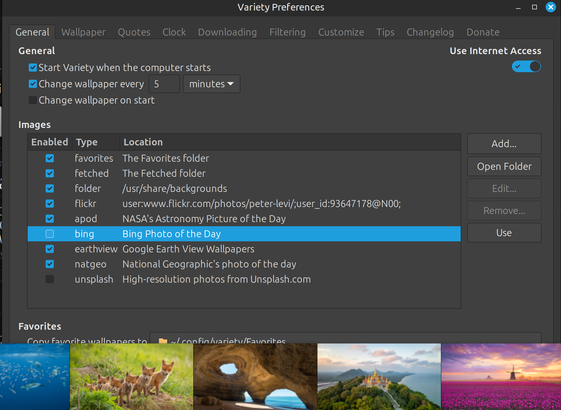

 Patch Notification Robot 🔔
 KielKontrovers Blog

 U̵d̵o̵
 dot ·
dot ·