 emaechler
Obsidian - Grundinstallation - So arbeite ich mit Obsidian

Obsidian - Grundinstallation - So arbeite ich mit Obsidian
mój android dziś zaczął szaleć, wyłączać się, próbować resetować, wyłączać ponownie i tak przez dziesięć minut. I to mi uświadomiło "o cholera, moje notatki!" Wszystko inne jest nieważne albo mogę to odzyskać logując się do aplikacji w nowym telefonie.
Tak więc - czy ktoś korzystał z płatnego #ObsidianApp i może mi powiedzieć jak działa tam synchronizacja? Jest spoko?
Obsidian changed the way I take notes - it's amazing.
It’s literally building a second brain.
No more scattered docs/notes. No more “Where did I write that down?”
Just clean, connected thinking - And a productivity system that actually scales with you.
You have to try it to really get it.
#ObsidianApp #SecondBrain #ProductivityHack #DigitalThinking #NoteTakingRevolution #ConnectedThoughts #KnowledgeGraph #MindExpansion #ToolsForThought #ModernWorkflow #KnowledgeWork #MiddleClassMindset
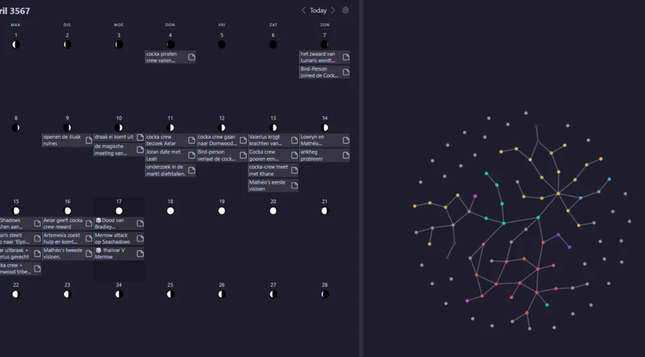
https://lifehacker.com/tech/harper-offline-alternative-to-grammarly
Ok this is cool, Harper is an open source, Real time Spelling & Grammar checker for obsidian, meant to be an alternative to Grammarly & LanguageTool.
It runs locally on your machine rather than making use of a web service, and has a focus on speed & privacy.
#ObsidianMD #ObsidianApp #Harper #Grammarly #Privacy #Productivity

Obsidian is my favorite productivity tool. I use it for all of my writing, as a journaling app, and to replace multiple productivity tools. There's a big downside, though: no grammar checking tool. Luckily, there's Harper. Here's how to add it to Obsidian.
https://www.howtogeek.com/how-to-install-and-optimize-obsidian-on-linux/
How to install, and optimize Obsidian.md on Linux.
Obsidian is great, but as it's an electron app it can have.... issues. This guide goes over several ways to install the app, and how to get the best performance from it.
#ObsidianApp #Linux #ElectronApps #NoteTaking #Productivity #Markdown #ObsidianMD
@jamesbritt Ah! It's configurable!
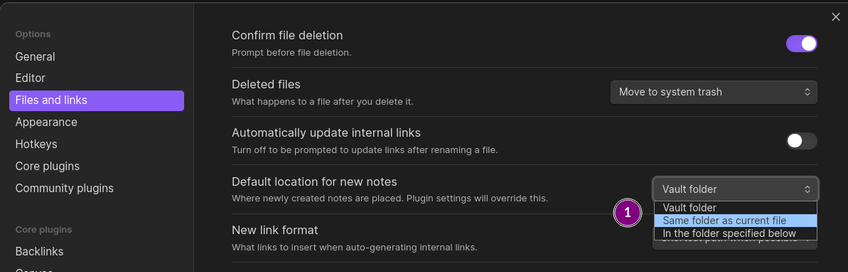
Working in Obsidian, I have a folder full of related notes. When viewing a note in this folder, I want to be able to create a new note, at the same level as the current note, without having to navigate to highlight the parent-level folder in the Files hierarchy.
Is there a built-in way to do this? If I just create a new note with Ctrl-N, it creates it at the root of my vault.
I'm up for #tips on how to clip content into #obsidianapp from a browser on a system that does not have Obsidian installed.
I have that situation at work for example - I don't have my vault but I could use online clipping services if those clippings / articles would later on make their way to my vault.
I wish my brain was able to put enough single-run attention into setting up and using a proper #Obsidian vault. Just seen a guy on YoutTube explain a project he was working an and while he did he kept referencing stuff out of is vault and it was so neat and pretty and useful and my scatterbrain really wants it.
Some days - like today - I really hate being torn between unofficial ADHD and "need stuff tidy!!" OCD.
Finally released the alpha version of my handwriting plugin for #obsidian - "Ink"
Check it out here:
https://www.youtube.com/watch?v=B8yK-fO7ffM

 Gaurav Rodrigues
 James House-Lantto (He/Him)
 royal
royal Heals
Heals  (moved)
 Dale
Dale