Let's make some noise!

#USB #MIDI #Arduino #MPR121 #RP2040Pico

I've tested 4 out of 10 MPR121modules I ordered some weeks ago.
Only one one of those 4 works OK. The other three have some unresponsive pins.
The one on the image doesn't detect touch in pins 5 and 6. A closer look shows why.
I wish all the problems to be soldering related...

#MPR121

RT from Wilderness Labs Inc. (@wildernesslabs)

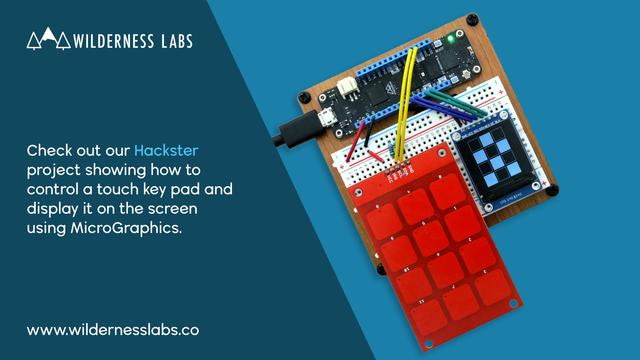
Check out this @Hacksterio project to learn how to use a #MPR121 capacitive keypad and show which buttons are pressed on a #ST7789 display using http://developer.wildernesslabs.co/Meadow/Meadow.Foundation/. https://www.hackster.io/wilderness-labs/working-with-a-touch-keypad-and-spi-display-using-meadow-ddb040 #meadotiot #csharp #dotnet #iot #visualstudio #fsharp #stm32 #esp32

Original tweet : https://twitter.com/wildernesslabs/status/1627700362894356480

Wilderness Labs Developer Portal

Arduino Touch Music – Revisited

This is a short demonstration of different ways to use my Touch Keyboard PCB, revisiting the following previous projects:

Warning! I strongly recommend using old or second hand equipment for your experiments.  I am not responsible for any damage to expensive instruments!

This builds on the tutorials listed in the previous projects above.

If you are new to Arduino, see the Getting Started pages.

Parts list

  • Arduino Uno
  • Optional: DIY “touch” shield from Arduino Touch Piano – Part 2.
  • OR: MPR121 board or shield.
  • 8 ohm speaker or old headphone speaker
  • 1x 220Ω resistor
  • Breadboard and jumper wires

Arduino Touch Keyboard Revisited

The above diagram shows how to connect the “green” touch keyboard to my DIY touch shield from Arduino Touch Piano – Part 2.  If you are building on solderless breadboard following any of the capacitive touch tutorials online, then you just need to know that the pins are in the following order (from left to right above):

  • GND – C – C# – D – D# – E – F – F# – G – G# – A – A# – B – C

In the sketch from my previous projects, these are connected to the Arduino pins in the following order: D3 through to D11, then A0 to A3.  D2 is the “common” pin for the touch circuit.

You can find the code for this one on GitHub here.

Arduino 12-note Keyboard Revisited

The above diagram shows how to connect the “silver” pcb in “stylus” mode.  Each pad is connected to an INPUT_PULLUP pin and the stylus is connected to GND.  Every time the stylus touches a pad it is the same as a button being pressed and pulling the pin LOW.

In this example this will trigger the playing of an Arduino tone() through a speaker connected via a 220Ω resistor to D12.

You can find the code for this one on GitHub here.

Alternative Configurations

Some other possible configurations and uses might include:

Trying these out is left as an exercise for the reader!

Closing Thoughts

This shows a few ways in which the Touch Keyboard PCB might be used.  The two described in full can be seen in action in the video. I’ve not tried the others, but I see no reason why they won’t work too.

Do let me know in the comments if you have other ideas.

Kevin

#arduino #midi #mpr121 #touch

Touch Keyboard PCB – Part 2

This is the build guide for my Touch Keyboard PCB. Warning! I strongly recommend using old or second hand equipment for your experiments.  I am not responsible for any damage to expensive instrumen…

Simple DIY Electronic Music Projects

Touch Keyboard PCB – Part 2

This is the build guide for my Touch Keyboard PCB.

Warning! I strongly recommend using old or second hand equipment for your experiments.  I am not responsible for any damage to expensive instruments!

If you are new to microcontrollers, see the Getting Started pages.

Bill of Materials

Build Steps

There are just two key steps:

  • Separate the two halves of the PCB.  This can be achieved using a knife and metal ruler or a hacksaw.  It takes quite a bit of scoring with a knife, but eventually, with scoring on both sides, the pcb will break in two.  Just go gently and don’t force it!
  • Solder on the pin headers.

The silver-keyed pcb can be used as a capacitive touch board or using the additional pin with a stylus.

The other pcb is for capacitive touch use only.

Both pcbs have 13 pins for the keys and an optional ground connection.  The ground connection may or may not help with the sensitivity of the capacitive touch.

Both boards are designed such that the top note could be removed to allow several pcbs to be used alongside each other.  In this case only the top-most octave would require the additional note.

To use the silvered board with a stylus, one connection pattern would be to connect all keys to INPUT_PULLUP pins and the stylus to GND.  Some code to do that for a single octave can be found on GitHub here.

To use several keyboards together would require all keys to share the same connections (so C shares with C on all pcbs and is connected to one IO pin) and then to “scan” the stylus pin for each additional board in turn.

An example of that principle can be found here: Pi Pico MIDI Matrix Decode – Part 4.  Additional diodes would be required if polyphony is required…

There are several ways to use either of the boards as touch sensors.  Some examples might be:

There are more usage details here: Arduino Touch Music – Revisited.

Testing

I recommend performing the general tests described here: PCBs.

PCB Errata

The main mistake is not drawing a silk-screen line on the underside of the board where it can be cut! I also forgot to add a “diyelectromusic” label to the board.  It might also have helped to include a silkscreen line connecting the stylus pin to the pin headers, just to make it clear what it is for.

If I re-designed them, then I might also include some edge cut cut-outs along the “cut line” to make it easier to separate the boards.

Find it on GitHub here.

Closing Thoughts

These seem to work surprisingly well!  I put two variants onto the same pcb as I wasn’t sure how they would perform, but I’ve been pleasantly surprised.

I don’t know how well the silvered pads will stand up to regular use.  They look a bit thin. I suspect that to be a decent stylus keyboard, these would need to be much thicker plates to take some serious use.  There might be options for different levels of manufacturing layers, I’ll have to seek some advice and see what might be possible.

But as a replacement for my copper-tape and button keyboards I’ve used in the past, I’m really pleased with how these have turned out.

These boards have been manufactured using the Seeed Fusion PCB service, which I am happy to continue to recommend. They have been supported with discount vouchers that I’ve been sent by Seeed for my previous projects.

Kevin

#mpr121 #pcb #touch

Touch Keyboard PCB

Ever since experimenting with copper tape as a “touch keyboard” I wanted something a little more useful on a pcb.  I always quite liked the design of the stylus keyboard for a Stylophone, so that was my starting point.  I’ve not found anything “off the shelf” that wasn’t part of another build, so I thought I’d have a go myself.

This is the result.

Update:

Tutorials used in this project:

If you are new to microcontrollers, see the Getting Started pages.

The Circuit

The circuit itself is literally just a set of header pins with connections to what will become pads on the pcb.

I did consider the idea of allowing the use of a common MPR121 breakout board, but in the end, I opted to keep this to just the keyboard.

I’ve created two “circuits” as I’m planning on having two “keyboards” within the 100x100mm footprint of the pcb.  I couldn’t decide if I wanted a purely “touch” keyboard, or if I wanted to support the use of a stylus.  So, I’ve provided two designs, one of each.

The “touch” keyboard provides a pin header connection for 13 notes and a GND connection, so 14 in all.  The “stylus” keyboard provides a pin header connection for 13 notes, a GND link and a common connection for the stylus, i.e. 15 in all.  It also has a connection point for the stylus in addition to the 15-way header.

PCB Design

There are several points to note in the design of this PCB.

  • I want to provide a full octave of contacts but to stay within a 100x100mm pcb size.
  • However, I’d like the option to use several keyboards side by side, so the high “C” pad has a slightly wider gap which hopefully will allow it to be cut off if required.
  • One of the designs supports a capacitive touch interface (top), one the use of a common connection for a stylus (bottom).
  • The capacitive keyboard has a full layer of solder resist over all the pads to provide an insulating layer between the pad and what will be touching it.
  • The stylus keyboard has each pad left uncovered by the masking layer.
  • The pads themselves are custom “pad” footprints in KiCad so tracks can be connected anywhere on the pad.
  • There are covered pad footprints which don’t include a mask layer, but do include a silkscreen edge pattern.
  • And there are “open” pad footprints that include a mask layer to leave the bare copper of the pad exposed (as shown in the lower half of the figure below).
  • The placing of the pads was done via calculation to ensure they all line up and have equal spacing.
  • I’ve opted for GND fill zones on both sides of the board.

Closing Thoughts

This one will be very experimental as I’m quite out of my depth now in terms of use of ground planes, and large capacitive areas of the board!  But I’ve got to start somewhere.

This is the fourth board being made as part of a round of discount vouchers I’ve had from Seeed Fusion.

Kevin

#mpr121 #pcb #touch

Arduino MPR121 Touch Piano

This project uses on off-the-shelf capacitive touch shield or module to provide touch-sensitive pads for a 12 (recommended for beginners) to 48 (advanced) note “piano”.   These are the …

Simple DIY Electronic Music Projects

RT from Wilderness Labs Inc. (@wildernesslabs)

Check out this @Hacksterio project to learn how to use a #MPR121 capacitive keypad and show which buttons are pressed on a #ST7789 display using http://Meadow.Foundation. https://wldrn.es/3xv #meadotiot #csharp #dotnet #iot #visualstudio #fsharp #stm32 #esp32

Original tweet : https://twitter.com/wildernesslabs/status/1550480987607515136

Wilderness Labs Developer Portal

MIT’s Knitted Keyboard is Quite a Flexible MIDI Controller

There are only so many ways to make noise on standard instruments such as acoustic pianos. Their rigidity and inputs just don't allow for a super-wide range of expression. On the other hand, if you knit your interface together, the possibilities are nearly endless. MIT's new and improved knitted keyboard is an instrument like none other -- it responds to touch, pressure, and continuous proximity, meaning that you can play it like a keyboard, a theremin, and something that is somewhere in between the two. Because it's a MIDI interface, it can ultimately sound like any instrument you've got available in software.

The silver keys of this five-octave interface are made of conductive yarn, and the blue background is regular polyester yarn. Underneath that is a conductive knit layer to complete the key circuits, and a piezo-resistive knit layer that responds to pressure and stretch. It runs on a Teensy 4.0 and uses five MPR121 proximity/touch controllers, one per octave.

The really exciting thing about this keyboard is its musical (and physical) versatility. As you might expect, the keyboard takes discrete inputs from keystrokes, but it also takes continuous input from hovering and waving via the proximity sensors, and goes even further by taking physical input from squeezing, pulling, stretching, and twisting the conductive yarns that make up the keys. This means it takes aftertouch (pressure applied after initial contact) into account -- something that isn't possible with most regular instruments. And since this keyboard is mostly yarn and fabric, you can roll it up and take it anywhere, or wrap it around your neck for a varied soundscape.

If you're looking for more detail, check out the paper for the previous version (PDF), which also used thermochromic yarn to show different colors for various modes of play using a heating element. With the new version, [Irmandy Wicaksono] and team sought to improve the sensing modalities, knitted aesthetics, and the overall tactility of the keyboard. We love both versions! Be sure to check it out after the break.

Want to play around with capacitive touch sensors without leaving the house for parts? Make your own from paper and aluminum foil.

#musicalhacks #aftertouch #capacitivetouch #midicontroller #mpr121 #teensy #teensy40

MIT’s Knitted Keyboard Is Quite A Flexible MIDI Controller

There are only so many ways to make noise on standard instruments such as acoustic pianos. Their rigidity and inputs just don’t allow for a super-wide range of expression. On the other hand, …

Hackaday

Cheap, Expandable Floor Piano Plays with Heart and Soul

Ever since we saw the movie Big, we've wanted a floor piano. Still do, actually. We sometimes wonder how many floor pianos that movie has sold. It's definitely launched some builds, too, but perhaps none as robust as this acrylic and wooden beauty by [FredTSL]. If you want more technical detail, check out the project on IO.

The best part is that this piano is modular and easily expands from 1 to 8 octaves. Each octave runs on an Arduino Mega, with the first octave set up as a primary and the others as secondaries. When [FredTSL] turns it on, the primary octave sends a message to find out how many octaves are out there, and then it assigns each one a number. Whenever a note is played via conductive fabric and sensor, the program fetches the key number and octave number and sends the message back to the primary Mega, which plays the note through a MIDI music shield.

We think this looks fantastic and super fun to dance around on. Be sure to check out the build log in photos, and stick around after the break, because you'd better believe they busted out some Heart and Soul on this baby. After all, it's pretty much mandatory at this point.

Wish you could build a floor piano but don't have the space or woodworking skills? Here's a smaller, wireless version that was built in 24 hours.

#arduinohacks #musicalhacks #arduino #arduinomega #floorpiano #leds #mpr121

Cheap, Expandable Floor Piano Plays With Heart And Soul

Ever since we saw the movie Big, we’ve wanted a floor piano. Still do, actually. We sometimes wonder how many floor pianos that movie has sold. It’s definitely launched some builds, too…

Hackaday

This is the next of my worksheets collecting together a number of related projects with a single list of parts and a suggested “building order”.  This time all relating to touch interfaces or percussive projects.

This worksheet links together the following projects:

Download the worksheet here – SDEMP-003 – Drums and Touch – WS003v1.

Kevin

https://diyelectromusic.wordpress.com/2020/11/15/ws003-drums-and-touch/

#adafruit #arduinoUno #digitalPins #microbit #midi #mpr121 #piezoSensor #relay #servo #tone #touch #touchBoard

Arduino Relay Bolero

There are a number of add-ons you can get for Arduino projects that make a rather satisfying sound when activated.  This project uses a relay board, which is mean to allow an Arduino to switch a hi…

Simple DIY Electronic Music Projects