 WE AND THE COLOR
Job Application Template Set for Adobe InDesign: Resume, Cover Letter, Portfolio & References in One Uniform Design
Seriously, most job seekers spend hours cobbling together documents that look like they came from three different decades. The resume borrows a template from one site, the cover letter is a reformatted Word file from 2018, and the references page is plain text with a different font. Hiring managers notice this immediately. Presentation is part of the application itself—and a fragmented one sends exactly the wrong signal.
This four-piece job application template set for Adobe InDesign solves that problem at the root. It delivers a fully unified, professionally designed layout covering every document a complete application requires: a resume, a cover letter, a portfolio page, and a references sheet. Everything shares the same visual language, the same typographic hierarchy, and the same clean structure. That coherence is not decorative—it communicates intentionality, which is something no recruiter misses.
Download the template from Adobe StockPlease note that this template requires Adobe InDesign installed on your computer. Whether you use Mac or PC, the latest version is available on the Adobe Creative Cloud website—take a look here.
Download a full set of job application templates, including a resume, cover letter, portfolio, and references, as a uniform Adobe InDesign layout in US Letter and A4. Download the template from Adobe StockWhat Does a Complete Job Application Template Actually Include?
Most template packs sell you a resume and call it a day. This set takes a different approach. It treats the job application as a designed system, not a collection of individual files. Each of the four documents serves a distinct purpose, but together they form what designers might call a Application Identity System—a term worth defining clearly.
An Application Identity System is a coordinated set of job application documents that share a unified visual language, consistent typographic rules, and a coherent personal branding structure. The concept borrows from corporate identity design, where every customer touchpoint reinforces the same brand impression. Applied to job hunting, it ensures that every document a recruiter touches carries the same professional voice.
Here is what each document in this InDesign job application template set contributes:
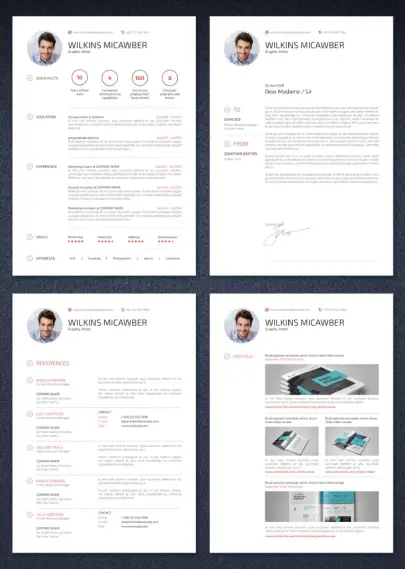
The resume leads with a circular profile photo, contact details at the top, and a Quick Facts row featuring four key metrics—years of experience, companies, completed projects, and technical skills. Below that, clearly labeled sections cover education, experience, skills (with visual dot ratings), and interests. The layout is clean, scannable, and built for modern applicant tracking systems.
The cover letter mirrors the header design of the resume exactly. It uses a formal two-column recipient block (TO / FROM) with date, salutation, and structured body paragraphs. The visual consistency between the resume and the cover letter is immediate and deliberate.
The references sheet lists up to five professional references with name, title, company address, and full contact details. Each entry uses a consistent layout with subtle dividers. This document is frequently missing from applicant packages entirely—its inclusion signals thoroughness.
The portfolio page provides a structured layout for showcasing previous work with project images, captions, publication dates, and clickable URLs. For creatives especially, this page bridges the gap between listing experience and demonstrating it.
Why Visual Coherence Matters More Than You Think in a Job Application
Recruiters spend an average of six to seven seconds scanning a resume before deciding whether to read further. That statistic is widely cited—but what it misses is the effect of the cover letter, references, and portfolio pages that follow. Together, those documents accumulate into a first impression that compounds across multiple touchpoints.
A mismatched application package introduces cognitive friction. The recruiter has to reorient with each new document mentally. A coherent job application template set removes that friction entirely. The reader moves through the package fluidly because the design language stays constant.
This is what separates a professionally designed InDesign resume template from a generic DOCX download. Adobe InDesign gives designers precise control over typography, spacing, grid alignment, and color. The result is not just prettier—it is structurally more reliable and more consistent across print and digital output.
The CMYK Advantage: Designed for Professional Printing
This template set uses CMYK color mode throughout. That choice matters more than most people realize. RGB color values look accurate on screen but shift unpredictably when sent to a professional printer. CMYK color mode is the industry standard for print production, ensuring that the red accent tones and the precise gray values in this set reproduce exactly as intended—whether you print at home, at a print shop, or submit to a digital portfolio.
Furthermore, the template is available in both US Letter and A4 formats. If you are applying across markets—say, to a New York agency and a Berlin studio simultaneously—you can output the correct page size for each market without reformatting a single element.
InDesign Job Application Templates vs. AI-Generated Resumes: A Direct Comparison
AI resume builders have become popular for obvious reasons—speed, zero design skill required, and instant output. But speed is not the same as quality. The differences matter significantly, particularly for roles where design sensibility is part of the evaluation.
FeatureThis InDesign Template SetAI-Generated Resume ToolsVisual coherence across all documentsFully unified Application Identity SystemUsually resume only; no matching cover letter or referencesDesign customizationComplete—every element editable in InDesignLimited to pre-set templates with restricted editingTypography controlTypically, US Letter only or non-configurableMinimal; font choices locked or severely limitedColor modeCMYK—print-ready and professionally accurateRGB only; not suitable for professional print productionPage size optionsUS Letter and A4 includedRarely, most AI tools do not support portfolio layoutsPortfolio page includedYes—structured layout with image placeholdersRarely; most AI tools do not support portfolio layoutsReferences sheet includedYes—formatted for up to five referencesAlmost never includedProfile photo integrationCircular photo placeholder, easy image placementProfessional-grade, press-ready outputPrint production qualityProfessional-grade; press-ready outputScreen-optimized only; print results unpredictableLong-term reusabilityUpdate once, maintain for years across formatsOften tied to subscriptions or platform lock-inThe conclusion here is not that AI tools are useless. For quick applications to mid-tier roles, they serve a purpose. But for roles where your application itself is evaluated as creative output—design, architecture, marketing, editorial, branding—a professionally designed InDesign job application template is not optional. It is strategic.
How to Customize This Job Application Template Set in Adobe InDesign
One of the most common hesitations about InDesign templates is the assumption that you need advanced software skills to use them. This set is designed to remove that barrier. All text fields are clearly organized and straightforward to update. You replace the placeholder text with your own information, swap the profile photo, and adjust any color accents to match your personal brand.
The workflow follows what I call the Slot-and-Style Method: a customization approach where the structural design stays fixed while only personal content changes. This means you never touch the grid, the spacing, or the typographic hierarchy—elements that require real design experience to get right. You simply fill the slots. The style is already done for you.
Adding Your Own Photo and Personal Information
The circular profile photo placeholder uses InDesign’s standard image frame workflow. Click on the placeholder, use File > Place, and select your image. InDesign automatically crops it to fit the circular frame. Contact details, job title, and name fields sit directly below—all editable text frames. The process takes minutes, not hours.
Adapting the Skills and Quick Facts Sections
The Quick Facts row on the resume accepts any four metrics meaningful to your field. A graphic designer might use years of experience, number of clients, completed projects, and tools mastered. A software engineer might substitute repositories, languages, certifications, and team size. The dot-rating system in the Skills section works the same way—simply replace the software labels and adjust the filled dots to reflect your actual proficiency levels.
The Concept of Typographic Consistency in Job Application Design
Typography in this set follows a rigorous hierarchy. The candidate’s name uses a large, confident sans-serif weight. Section labels use a secondary weight with red accent markers—the small arrow icon before each label acts as a visual anchor, guiding the eye through the document. Body text sits in a readable size with comfortable leading.
This hierarchy defines what I call Recruitment Typography Hierarchy—a structured typographic system within a job application document that uses size, weight, color, and spacing to guide a recruiter’s eye toward the most decision-relevant information first. The candidate’s name and title should register within the first half-second of a glance. The red accent color in this set serves exactly that function, creating a subtle but persistent visual priority signal throughout all four documents.
Who Should Use This Job Application Template Set?
The obvious answer is designers. But this InDesign resume template works equally well for anyone who wants their application to reflect a higher level of professionalism. Architects, photographers, brand managers, marketing directors, editors, and creative consultants all operate in fields where how you present yourself carries weight comparable to what you present.
Beyond creatives, the template is valuable for anyone applying to senior or executive roles where the application package itself communicates readiness. A VP of Marketing submitting a mismatched, inconsistently formatted application package sends a quiet signal about their attention to detail. A coherent, professionally designed set sends the opposite message.
Additionally, the portfolio page makes this set particularly suited to freelancers and consultants building their client acquisition materials. A well-designed portfolio page paired with a matching cover letter and reference documents elevates a pitch package significantly above standard alternatives.
Practical Predictions: Where Professional Application Design Is Heading
The job market increasingly rewards personal branding that extends beyond LinkedIn profiles. As AI-generated resumes flood the market, hiring managers will develop a keener eye for originality and visual quality. The saturation of AI-produced documents will create a distinct premium for professionally designed application materials—exactly the kind this InDesign template set provides.
My prediction: within the next three years, visually coherent multi-document application packages will shift from differentiating detail to baseline expectation in competitive creative markets. The candidates who establish that standard now will benefit from being early rather than compliant.
Format, File Delivery, and Compatibility
The template set delivers as a downloadable Adobe InDesign file, ready to open and edit immediately. The CMYK color mode ensures accurate color reproduction across both digital display and physical print. Both US Letter and A4 page sizes are included, which addresses the most common formatting requirement for international job applications.
Download the template from Adobe StockThis professional resume template for InDesign requires Adobe InDesign to edit. If you need a PDF output after customization, InDesign’s export workflow produces high-resolution, press-ready PDF files with one click. The resulting output is suitable for email submission, print, or digital portfolio presentation.
Frequently Asked Questions
What software do I need to use this job application template set?
You need Adobe InDesign. The template is delivered as a native .indd file, fully editable within InDesign. Adobe Creative Cloud subscribers have access to InDesign as part of their plan. There is no alternative software that will open and edit this file with full fidelity.
Can I use this InDesign resume template for printing?
Absolutely. The template uses CMYK color mode, which is the professional standard for print production. You can print at home, through a local print shop, or export a press-ready PDF for commercial printing. The colors will reproduce accurately across all standard print workflows.
Does this template work for both US Letter and A4 paper sizes?
Yes. The set includes both US Letter and A4 versions of all four documents. You can choose the format appropriate for your target market without reformatting any content.
How difficult is it to replace the placeholder photo with my own image?
It is straightforward. In InDesign, you click on the circular photo placeholder, go to File > Place, and select your image file. InDesign crops the photo to fit the circular frame automatically. No design experience is required for this step.
Is this template suitable for non-designers?
Yes, if you have a basic familiarity with Adobe InDesign. The Slot-and-Style Method this template follows means you only need to replace text and swap your photo. The structural design, spacing, and typography are already set and do not require modification.
How does a professionally designed application template compare to AI resume builders?
AI resume builders offer speed but sacrifice design quality, customization depth, and document completeness. This InDesign template set provides a unified four-document Application Identity System—resume, cover letter, portfolio, and references—with full CMYK print readiness and complete typographic control. For competitive roles in creative industries, that difference is decisive.
Can I customize the color scheme to match my personal brand?
Yes. All color elements in this InDesign job application template are fully editable. You can adjust the red accent color to any other tone using InDesign’s Swatches panel. Changing one global swatch updates the accent color consistently across all four documents simultaneously.
What makes a multi-document application package more effective than a resume alone?
A resume answers the question “What have you done?” A cover letter answers, “Why do you want this role?” A reference sheet answers, “Who can verify your work?” And a portfolio page answers, “What does your work actually look like?” Together, these four documents address every primary question a recruiter has. Submitting all four in a coherent visual system demonstrates thoroughness, professionalism, and design literacy simultaneously.
Browse WE AND THE COLOR’s Templates section for more.
#AdobeInDesign #AdobeStock #coverLetter #cv #InDesignTemplate #jobApplication #jobApplications #references #resume #resumeTemplate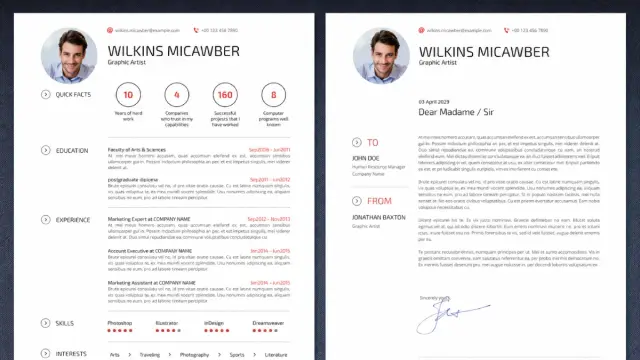
 Mathrubhumi English
 Dr. Alexandria Brangwin🇦🇺
 Dr. Alexandria Brangwin 🇦🇺
 ƧƿѦςɛ♏ѦਹѤʞ
 Laurent • FP4Ever
 CBC British Columbia
 Universitätsrechenzentrum
 Career Reload
 Yenn dc ☂️