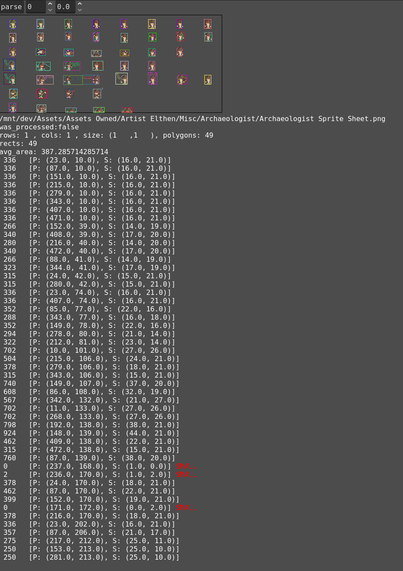
Frame guessing for sprite sheets without meta information is working!

And the debug visualization looks awesome! 😎

(When there are no json or txt files that provid meta information I try to guess it using the bitmap class through alpha mask and polygon extraction.)

#godot #gdscript #godottool #mipgam

If there are no meta information available I am going to guess the frames by extracting polygons.

Using these bitmap functions you can convert an image alpha to a bitmap alpha mask. The bitmap can create polygons based on the transparent boundaries.

Bitmap.create_from_image_alpha
Bitmap.opaque_to_polygons

#godot #gdscript #godottool #mipgam

Added a new Atlas Info inspector to the right panel. Showing the extracted meta information like columns, rows, layers and frames.

My custom tab container can now also be collapsed and expanded.

next: make a condensed tree view where I show single file folders one layer up to reduce the amount of clicking.

backlog: Then add a gallery to show animated sprites in a grid.

#godot #gdscript #godottool #mipgam

The tool can now parse different metadata sources to determine the frame-information for a given image file.

Currently implemented are #aseprite json, list as txt and cols & rows encoded in the filename. Adding more when I come across them in my #pixelart library.

The tool uses the extracted frames to animate the file when you select it in the explorer panel.

next: display the animations in a grid if the tool detects multiple layers and/or rows.

#godot #gdscript #godottool #mipgam

Added the first iteration of the library explorer. It uses the library paths defined in the project settings.

Building the file and folder cache for roughly 38.000 folders and 500.000 files takes around 2 seconds.

After that everything runs against the cache.

The file manager and cache manager are threaded. I like how clean the threading implementation is in gdscript.

#godot #gdscript #godottool

The memory/object test is kind of relaxing to watch 😎

#godot #gdscript #godottool

Earlier Today I thought objects were not freed properly when closing tabs as I could see the object count and mem usage rising steadily.

But then I remembered that I am using a RichTextLabel for debug console output. This creates a lot of objects to show fancy colorful output.

Ran a lilttle automated test of creating an inspector, adding it, freeing it and clearing the rich text label.

Everything looks good. No leak!

#godot #gdscript #godottool #debugging

The app now recognizes the preferred user theme (if the system is capable of providing that info) and you can select the behavior in the app settings.

And I added a light theme (wip).

#godot #gdscript #godottool

Just one more export type ... added export_flags and export_enum and made the icons for files and folders smaller.

#godot #gdscript #godottool

Today I extended the inspector to handle vectors and range type hints.

Added a global after_scene_tree_ready handler that fires after the GUI is ready.
Useful for things like loading the last open project.

Added a global timer that ticks every second and processes a list of callbacks. Useful for things like save the settings x seconds after the last change. Or autosave the project every 5 minutes.

Enabled the "Low Processor Mode" for the godot project.

#godot #gdscript #godottool