Hey #KDE you know what would be really nice?

If KDE Partition Manager had feature parity with GNOME Disks

#kdepartitionmanager #gnomedisks

KDE Partition Manager

Manage disks, partitions, and file systems

KDE Applications

Creating a Windows Boot Disk with Linux

Recently I’ve been helping folks who have Windows machines. In one case I needed to create a Windows Server 2022 and Windows Server 2025 bootable drives to install the operating system on physical hardware. Microsoft has a media creation tool that works very well if you have a Windows host system to make the media on. My daily driver is a Linux Mint 22.2 system.

In the past I have used WoeUSB-ng but for whatever reason i could not get that to work properly. I have had no success creating Windows media with the dd command which works great for many assignments but I does not work well when creating bootable media for Windows. Another one of my favorite tools for creating bootable media is Etcher but it will not create USB boot drives for Windows systems.

That’s when I discovered a new way to create a USB drive that would solve my problem. I found the answer and it worked quite well. The first thing you need to do is open the ‘disk tool’ on Linux Mint or Gnome-disks. Attach the USB drive to your computer and open up Gnome-disks. Choose the disk to be prepared and format it.

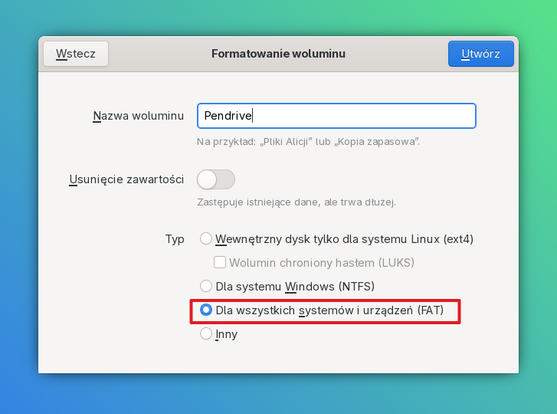
Click on “Gear” to configure how the drive will be formatted and select the “Format Partition” at the top of the options box. Give the volume a name and then be sure that “For use with Windows (NTFS) is selected and finish formatting the drive.

Screen Picture by Don Watkins CC by SA 4.0

Now your USB is ready to accept the files from the ISO you downloaded from Microsoft. Mount the Windows ISO by right-clicking on it and choosing Open with disk image mounter.

Once the disk image is mounted you copy all the files to the newly NTFS formatted drive and you are ready to use the drive to install on physical hardware.

Screen Picture by Don Watkins CC by SA 4.0

In the end, the solution was refreshingly simple: format the USB with NTFS, mount the ISO, copy the files, and you’re ready to roll. Microsoft makes their installation media rock‑solid, and with a little Linux ingenuity, you can create Windows boot drives without ever leaving your desk.

#gnomeDisks #linux #windowsBootDisk

Hat jemand die #Samsung SSD 980 PRO 2TB M.2 #SSD?
Ich habe die in verschiedenen PCs und unter verschiedenen #Linux Distributionen getestet und komme leider nur auf eine Schreibgeschwindigkeit von ca. 500 MB/s bei Tests mit #Gnome-disks. Bei dem Beschreiben von Zufallsdaten mittels pv auf die Partition komme ich größtenteils fast 2,3GiB/s.  Die SSD sollte eigentlich 5000MB/s schaffen. Meine anderen SSDs, die sogar nur #PCIe 3 sind, schaffen in den selben PCs eine weit höhere Schreibgeschwindigkeit.
Die Lesegeschwindigkeit ist okay.
Auf den SSDs war schon die neuste Firmware drauf.
Kann jemand, der die hat benchmarken mit Gnome-disks? Meine SSD ist hergestellt Mai diesen Jahres und vielleicht hat Samsung die Komponenten ausgetauscht.
node9

How To Find Hard Disk Data Transfer Speed In Linux - OSTechNix

This guide explains how to find hard disk data transfer speed in Linux and also how to benchmark Disk performance on Linux.

DF-mini-tutos : Comment utiliser #GParted ou #GnomeDisks pour #formater simplement un #disque dur externe ou interne avec #Debian #GNU #Linux

rendez-vous sur notre chaîne #PeerTube

https://video.tedomum.net/videos/watch/7c440747-c8ea-440e-a1c8-3afff729eea2

DF-mini-tutos : Comment formater simplement un disque dur sur Debian GNU/Linux

PeerTube

DF-mini-tutos : Comment formater simplement un disque dur sur Debian GNU/Linux

https://video.tedomum.net/w/gm17TeVT5g8WN1Nwhj2kRm

DF-mini-tutos : Comment formater simplement un disque dur sur Debian GNU/Linux

PeerTube
How To Create An ISO From A Bootable USB Drive In Linux - OSTechNix

In this brief tutorial, we will see how to create an ISO from a bootable USB drive that we created already in Linux operating systems.

If you want to see Gnome Disks in action on a Phone in a video, check out my "Flashing the PinePhone from on the PinePhone" video starting at 9:30: https://devtube.dev-wiki.de/videos/watch/010aa5d1-ecdf-434e-aa92-ebad781d75af?start=9m30s

#Pinephone #GnomeDisks #Pine64 #MobileLinux #librem5
cc @gamey

PinePhone: Flashing the PinePhone from the PinePhone

PeerTube

Just some screenshots of Gnome Disks running on the Pinephone.
#Pinephone #GnomeDisks #Pine64 #MobileLinux #Librem5

Note: With Gnome Disks you can easily manage your partitions and drives/sdcards. As you can see it scales really well and is in my opinion a absolute must have.

How To Find Hard Disk Drive Details In Linux - OSTechNix

This guide explains how to find Hard disk drive details in Linux and Unix. It helps to find the hard disk make, type, size, firmware version in Linux.

OSTechNix