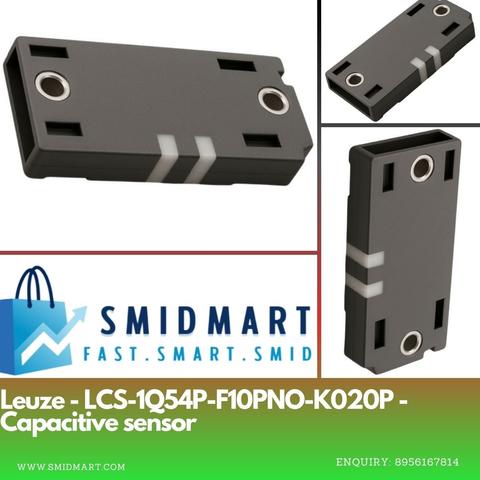
🤏 Detect the undetectable with the Leuze LCS-1Q54P-F10PNO-K020P Capacitive Sensor! Perfect for solids, liquids & more – smart sensing made easy. Explore now: https://products.smidmart.com/Sensors/?utm_source=mastodon&utm_medium=Zoho+Social
#SMIDMART #Leuze #CapacitiveSensor #SmartAutomation

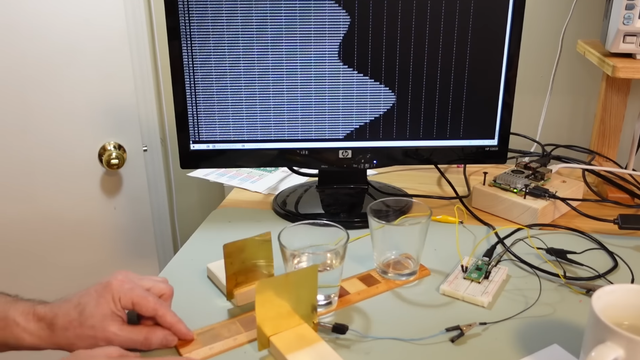
Capacitive Rainmeter Measures The Sky Water Just Fine

#arduinohacks #capacitivesensor #esp32 #rainsensor #sensor #hackaday

-- Delivered by RssEverything service

hackaday.com/2023/11/28/capaci…

Capacitive Rainmeter Measures The Sky Water Just Fine

If you’ve got a smart home, or you just want to know how soaked your garden is getting in the winter, you might want to measure rainfall. There are a bunch of ways to go about it, and this ca…

Hackaday
Capacitive Rainmeter Measures The Sky Water Just Fine

If you’ve got a smart home, or you just want to know how soaked your garden is getting in the winter, you might want to measure rainfall. There are a bunch of ways to go about it, and this ca…

Hackaday

Soil Moisture Sensor Coating Lessons Learned The Hard Way

Ever wanted to measure soil moisture? Common "soil moisture meter module arduino raspberry compatible free shipping" PCBs might deceive you with their ascetic looks. Today, [Raphael (@rbaron_)] is here to teach us (Twitter, unrolled) what it takes to build a soil-embedded sensor that can actually survive contact with a plant.

As the picture might hint, waterproofing is of paramount importance, and soldermask doesn't quite cut it. Raphael describes his journey of figuring out approaches and coatings that would last, starting from simply using nail polish, and ending with the current option - a rotisserie-like device that rotates sensors as the coating applied to them dries, mitigating a certain kind of structural failure observed long-term. With plenty of illustrative pictures and even a video of the rotisserie device in action, you'll quickly learn things that took time and effort for Raphael to figure out.

This isn't the first time Raphael shares some design battlefield stories and lessons with us - he has taught us about overall capacitive moisture sensor principles, too! If that interests you, we've covered quite a few moisture sensor designs, from cheap but hardy two-nails designs to flip-dot-equipped ones, and some of us take the commercial designs and upgrade them!

We thank [Chaos] for sharing this with us!

When I started working on my soil moisture sensor, I had little idea about how harsh an environment the soil really is. In this , cool failure modes & solutions when sticking electronics in the ground: pic.twitter.com/ROGvLSPgk9

-- Raphael (@rbaron_) February 9, 2022

#greenhacks #automatedplantcare #capacitivesensor #gardening #moisturesensor #plantcare #plants #soilmoisturesensor #soilsensor #water

Soil Moisture Sensor Coating Lessons Learned The Hard Way

Ever wanted to measure soil moisture? Common “soil moisture meter module arduino raspberry compatible free shipping” PCBs might deceive you with their ascetic looks. Today, [Raphael (@r…

Hackaday

Soil Moisture Sensors, How Do They Work?

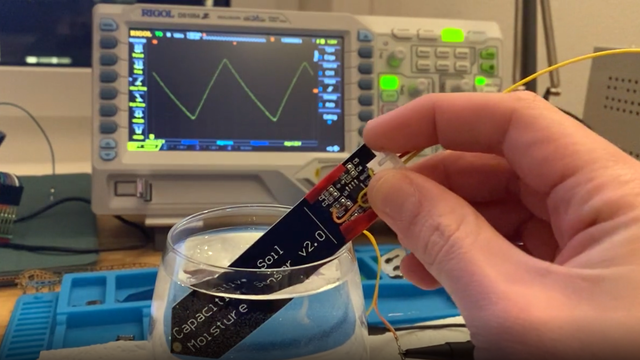
In a way, the magic of a soil moisture sensor's functionality boils down to a simple RC circuit. But of course, in practice there is a bit more to it than that. [rbaron] explains exactly how capacitive soil moisture sensors work simply, clearly, and concisely. He also shows, with a short video, exactly how their output changes in response to their environment, and explains how it informed his own sensor design.

At its heart, a moisture sensor measures how quickly (or slowly) a capacitor charges through a resistor, but in these sensors the capacitor is not a literal component, but is formed by two PCB traces that are near one another. Their capacitance -- and therefore their charging rate -- changes in response to how much water is around them. By measuring this effect on a probe sunk into dirt, the sensor can therefore indirectly measure the amount of water in the soil.

This ties into his own work on b-parasite: an open-source, all-in-one wireless soil moisture sensor (which was also a runner-up in our Earth Day contest) that broadcasts over BLE and even includes temperature readings. One thing to be mindful of if you are making your own PCBs or ordering them from a fab house is that passing current through metal in a moist environment is a recipe for oxidation, so it's important not to expose bare traces to wet soil. A good coated PCB should avoid this problem, but one alternative we have seen proposed is to use graphite rods in place of metal.

#greenhacks #capacitivesensor #gardening #moisturesensor #plants #soilsensor #water

Soil Moisture Sensors, How Do They Work?

In a way, the magic of a soil moisture sensor’s functionality boils down to a simple RC circuit. But of course, in practice there is a bit more to it than that. [rbaron] explains exactly how …

Hackaday

Soil Moisture Sensors, How Do They Work?

In a way, the magic of a soil moisture sensor's functionality boils down to a simple RC circuit. But of course, in practice there is a bit more to it than that. [rbaron] explains exactly how capacitive soil moisture sensors work simply, clearly, and concisely. He also shows, with a short video, exactly how their output changes in response to their environment, and explains how it informed his own sensor design.

At its heart, a moisture sensor measures how quickly (or slowly) a capacitor charges through a resistor, but in these sensors the capacitor is not a literal component, but is formed by two PCB traces that are near one another. Their capacitance -- and therefore their charging rate -- changes in response to how much water is around them. By measuring this effect on a probe sunk into dirt, the sensor can therefore indirectly measure the amount of water in the soil.

This ties into his own work on b-parasite: an open-source, all-in-one wireless soil moisture sensor (which was also a runner-up in our Earth Day contest) that broadcasts over BLE and even includes temperature readings. One thing to be mindful of if you are making your own PCBs or ordering them from a fab house is that passing current through metal in a moist environment is a recipe for oxidation, so it's important not to expose bare traces to wet soil. A good coated PCB should avoid this problem, but one alternative we have seen proposed is to use graphite rods in place of metal.

#greenhacks #capacitivesensor #gardening #moisturesensor #plants #soilsensor #water

Soil Moisture Sensors, How Do They Work?

In a way, the magic of a soil moisture sensor’s functionality boils down to a simple RC circuit. But of course, in practice there is a bit more to it than that. [rbaron] explains exactly how …

Hackaday

Solar Stevenson Screen for Smart Sprinkler

It's not infrequent that we see the combination of moisture sensors and water pumps to automate plant maintenance. Each one has a unique take on the idea, though, and solves problems in ways that could be useful for other applications as well. [Emiliano Valencia] approached the project with a few notable technologies worth gleaning, and did a nice writeup of his "Autonomous Solar Powered Irrigation Monitoring Station" (named Steve Waters as less of a mouthful).

Of particular interest was [Emiliano]'s solution for 3D printing a threaded rod; lay it flat and shave off the top and bottom. You didn't need the whole thread anyway, did you? Despite the relatively limited number of GPIO pins on the ESP8266, the station has three analog sensors via an ADS1115 ADC to I2C, a BME280 for temperature, pressure, and humidity (also on the I2C bus), and two MOSFETs for controlling valves. For power, a solar cell on top of the enclosure charges an 18650 cell. Communication over wireless goes to Thingspeak, where a nice dashboard displays everything you could want. The whole idea of the Stevenson Screen is clever as well, and while this one is 3D printed, it seems any kind of stacking container could be modified to serve the same purpose and achieve any size by stacking more units. We're skeptical about bugs getting in the electronics, though.

We recently saw an ESP32-based capacitive moisture sensor on a single PCB sending via MQTT, and we've seen [Emiliano] produce other high quality content etching PCBs with a vinyl cutter.

#greenhacks #hardware #automatedplantcare #capacitivesensor #esp8266 #homeautomation #moisturesensor #soilmoisturesensor #soilsensor

Solar Stevenson Screen For Smart Sprinkler

It’s not infrequent that we see the combination of moisture sensors and water pumps to automate plant maintenance. Each one has a unique take on the idea, though, and solves problems in ways …

Hackaday

Arduino MPR121 Touch Piano

This project uses on off-the-shelf capacitive touch shield or module to provide touch-sensitive pads for a 12 (recommended for beginners) to 48 (advanced) note “piano”.


These are the key Arduino tutorials for the main concepts used in this project:

If you are new to Arduino, see the Getting Started pages.

Parts list

  • Arduino Uno
  • MPR121 capacitive touch breakout boards (see below for some options)
  • 5V to 3.3V level shifter module (optional)
  • 8 ohm speaker or old headphone speaker
  • 1x 220Ω resistor
  • Breadboard and jumper wires

The Circuit

The easiest modules to use are from Adafruit, so I suggest you take a look at:

As you can see one is a shield for the Arduino Uno with crocodile clip friendly connections.  The other is a generic breakout board with headers for using with a solderless breadboard and any microcontroller of your choice.

For an alternative, if you search for MPR121 on popular auction sites or Chinese suppliers you will find a number of breakout boards that look very similar to the now discontinued Sparkfun Capacitive Touch Sensor Breakout board, again designed for use with solderless breadboards and any microcontroller you fancy.  The one I found looks like this:

I have an Adafruit shield and several cheap ebay modules, so I’m basing the rest of this project around those.

Using a Single Module – 12 Inputs

By the far the simplest thing is to use one of these modules to provide 12 inputs. In the case of the Adafruit shield, just plug in the shield and you are ready to go!

In the case of the non-Adafruit modules, the following connections are required:

Arduino 3.3V --- 3.3V or VINArduino GND --- GNDArduino SDA or A4 --- SDAArduino SCL or A5 --- SCL

One key feature worth noting is that the MPR121 chip itself is a 3.3V device not 5V.  The Adafruit boards include an on-board regulator which happily takes care of the power conversion.  The non-Adafruit devices do not, they have to be powered from the 3.3V supply of the Arduino or you will damage the boards.

Now all the circuits and tutorials I’ve seen imply that as long as you power the module from the 3.3V pin of the Arduino, then you can link up SDA and SCL to the Arduino and it just works.  But this means that you are using 5V logic at the Arduino end to talk to 3.3V logic at the MPR121 end.  This might be ok – the MPR121 datasheet wasn’t very illuminating on the topic.  In practice this does seem to work, but I don’t know for how long.

Extending to Multiple Modules – up to 48 Inputs

All of these modules use one of the built-in communication busses of the Arduino for communications – in this case the I2C interface (which stands for Inter-Integrated Circuit) which is a serial protocol using a data signal (SDA), a clock (SCL), power and ground.  I’ll not go into the details of how I2C works here, but it is worth noting that every device connected to I2C has an address to uniquely identify it to the Arduino.

All of these boards allow you to choose one of four addresses.  By default, its address is 0x5A (that is 5A in hexadecimal).  By linking the ADDR (or ADD) pin to one of 3.3V, SDA or SCL it is possible to change the default and choose 0x5B, 0x5C or 0x5D.  This means a single microcontroller than support up to 48 capacitive touch inputs using these modules.

I have to say, the Adafruit modules are very simple to change address – just patch the ADDR pin to one of 3.3V, SDA or SCL, or leave it unconnected (it is linked to GND by default).  The Sparkfun based boards are more complication in that they need you to cut a track between a jumper that will default to connecting ADD(R) to ground or you risk shorting the board.

At the very least, I found that the address selection using SDA or SCL doesn’t work when using 5V levels.

The solution, if you are using one of these boards with no on-board regulator, is to use a bi-directional level shifter that takes 5V on one side and converts it to 3.3V on the other.  This can be used for the SDA/SCL signal pins. Mine looks like this.

IMPORTANT: Recall that there is a jumper that has to be cut to allow ADDR to be linked to another pin for second and subsequent boards.  For my module, this is on the underside as shown here.

To resort back to the default setting, the link between ADDR and GND must be re-established either by a solder joint here or linking the external pin to GND.

The final circuit for me, supporting several of these MPR121 breakout boards looks like this.

In summary, the Adafruit modules are much easier to use, in fact the shield is very easy to setup!  The Adafruit module is easier if you plan to use several modules linked together, but the non-Adafruit modules can be made to work ok and can be found very cheaply online if you look.

The Code

Regardless of which module you chose, Adafruit have provided an Arduino library for the MPR121 which works really well with any module based around the MPR121 chip.  You need to install it using the library manager – just search for MPR121 and you’ll see “Adafruit_MPR121”.  The provided example code is a quick way to test that your module is working using simple “one-module” connections as described above.

I have taken the basic code from the Arduino Touch Piano and updated it to use the Adafruit library.

Now, I want to support up to four of these modules, which will therefore support up to 48 capacitive inputs – that is enough for four octaves!  So I’ve used the ToneMelody pitches.h file once again to define frequencies for the Arduino tone() function for the range C3 up to B6.

The Adafruit library links up to the MPR121 using a Adafruit_MPR121 programming object, so to support four devices I include four of these objects (called cap1 to cap4).

// It is possible to have up to four of these connected.// But it needs the "addresses" to be set correctly.Adafruit_MPR121 cap1 = Adafruit_MPR121();Adafruit_MPR121 cap2 = Adafruit_MPR121();Adafruit_MPR121 cap3 = Adafruit_MPR121();Adafruit_MPR121 cap4 = Adafruit_MPR121();

In the code I look for devices at each of the four I2C bus addresses (0x5A, 0x5B, 0x5C, 0x5D) and record any I find using the “numcaps” variable. Note that I actually use the lowest four bits to record which modules are found, so the first module (at 0x5A) is indicated by the lowest bit (i.e. numcaps = 1) and the others by bits 2, 3 and 4 (or values of 2, 4, and 8 respectively).  This means I am able to work out which of the boards are present later in the code by examining the bits of numcaps.

Then in the main loop() function I scan any found devices (by examining the bits of numcaps) and read the 12 inputs for each one.

 // Loop through all possible cap devicesfor (int c=0; c<4; c++) { // Get the currently touched pads for all found cap devices uint16_t currtouched; if (numcaps & (1<<c)) { switch (c) { case 0: currtouched = cap1.touched(); break; case 1: currtouched = cap2.touched(); break; case 2: currtouched = cap3.touched(); break; case 3: currtouched = cap4.touched(); break; }...

I then use this as the basis for which note to play via the tone() function.  The code will always “play” the highest note detected and will keep playing until either the note changes or no notes are detected.

If you turn on the Arduino serial monitor, there is a continual feed of debug output that tells you which sensors have been read at any one time which can be handy for fault finding.

The standard 220Ω resistor-to-speaker circuit is added from pin 12 and GND for the audio output to complete the module.

Find it on GitHub here.

Closing Thoughts

These modules make it relative easily to do a “diy” version of the Instant Touch Music.  With a bit of work it can be seen that many more inputs are possible. These modules certainly take much of the complication of capacitive sensing away from the code compared to doing it all by hand.

Now that I’ve introduced the idea of communicating with off the shelf modules using one of the built-in IO busses from the Arduino, there are many more modules that have musical potential that could be looked at.

Kevin

#adafruit #arduinoUno #capacitiveSensor #i2c #mpr121 #tone #touch

Adafruit MPR121 12-Key Capacitive Touch Sensor Breakout Tutorial

Add lots of touch sensors to your next microcontroller project with this easy-to-use 12-channel capacitive touch sensor breakout board, starring the MPR121. This chip can handle up to 12 individual touch pads.

Adafruit Learning System