 Jan Wedel
Many people do not know: Steve Jobs started spinning in his grave as the first camera bump appeared, now providing power for the whole Apple Park.
#apple #iphoneair #camerabump
https://possum.city/notes/aetsbr27f8k50qje
Many people do not know: Steve Jobs started spinning in his grave as the first camera bump appeared, now providing power for the whole Apple Park.
#apple #iphoneair #camerabump
https://possum.city/notes/aetsbr27f8k50qje
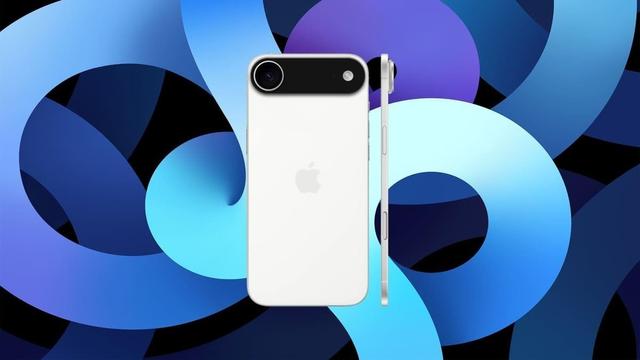
iPhone 17 Air: custodia rivela bump della fotocamera ENORME
#Accessori #Apple #CameraBump #Custodia #Design #Fotocamera #Indiscrezioni #iPhone #iPhone17 #iPhone17Air #Leak #Notizie #Novità #Rumors #Smartphone #TechNews #Tecnologia
https://www.ceotech.it/iphone-17-air-custodia-rivela-bump-della-fotocamera-enorme/
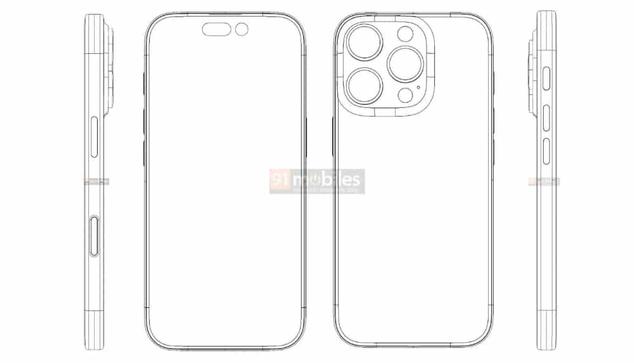
iPhone 16 Pro – Gleiches Design, neuer Button?
Auf 91Mobiles ist eine technische Zeichnung eines möglichen iPhone 16 Pro aufgetaucht. Die Bilder deuten an, dass sich am Design nicht viel ändern könnte, aber vielleicht eine neuer Button dabei ist.
Der seit dem iPhone 15 Pro eingeführte Action-Button wird nach den Zeichnu
https://www.apfeltalk.de/magazin/news/iphone-16-pro-gleiches-design-neuer-button/
#iPhone #News #CameraBump #Apple #Leak #KI #IPhone16Pro #IOS18 #WWDC2024 #91Mobiles
Xiaomi Mi 11 Ultra Review: Really Big Phone, Really Big Camera
You don’t have to be a mobile industry genius to understand which phone Xiaomi is targeting with the Mi 11 Ultra, as it’s right there in the name: Xiaomi’s squarely aiming at the Samsung Galaxy S21 Ultra with this highly capable camera, the top-spec phone in its Mi 11 device range.
It’s certainly throwing everything it has at the challenge, equipping the Mi 11 Ultra with the massive 1/1.12-inch GN2 sensor, which it jointly designed with Samsung, plus a periscope zoom, and even a second screen on the back of the phone. It’s an enticing specification, but the Galaxy S21 Ultra has set the bar very high for 2021, so can Xiaomi reach it?
Design, Build, and Camera Hardware
This is a massive phone.
It has a 6.81-inch AMOLED touchscreen set inside an 8.4mm thick glass body, with a total weight of 234 grams. That’s even heavier than the 227 gram S21 Ultra, an already giant handful of a phone. It uses Qualcomm’s top Snapdragon 888 processor and a 5,000mAh battery.
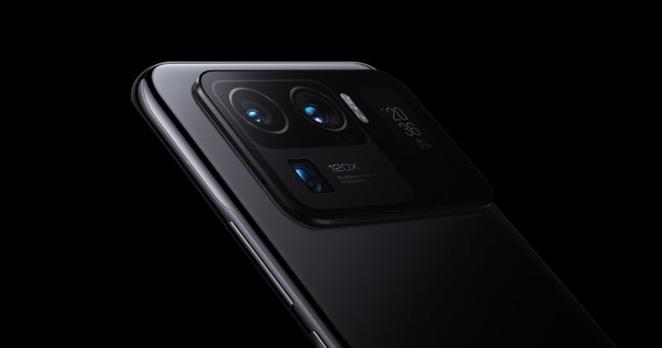
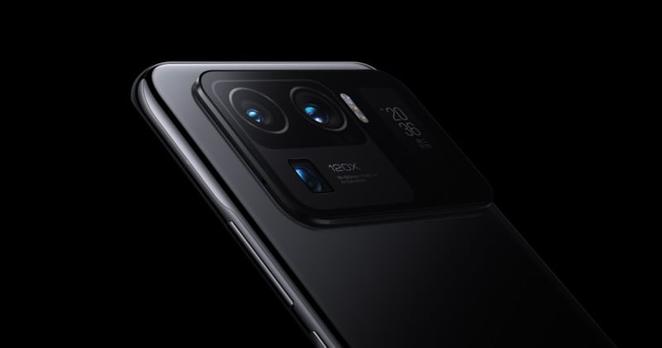
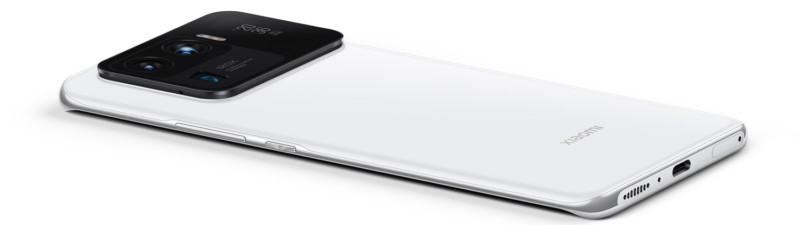
The sheer size of the Mi 11 Ultra is only emphasized by the enormous camera module on the back of the phone. It adds several additional millimeters to the thickness and stretches almost completely over a third of the rear panel.
That module contains the main 50MP GN2 sensor, with its 1/1.12-inch size, f/1.9 aperture, 4-into-1 pixel binning tech, and optical image stabilization feature. It’s alongside a 48MP IMX586 camera with an f/2.2 aperture for wide-angle duties, and above another 48MP IMX586 for the periscope zoom. This can take 5x optical zoom shots, or anywhere up to 120x digital zoom.
The other reason for the module’s size is it has a 1.1-inch, 126 x 294-pixel screen in it. The idea is for you to take selfies using the rear camera, and still frame the shot properly. It also doubles as a clock and notification screen when the phone is face down on the table. We’ll come on to how effective it is later. For now though, just know this is one of the biggest and heaviest phones you can buy today.
Camera App
Xiaomi’s camera app on the Mi 11 Ultra is the same as the one found on the Mi 11 we reviewed recently. It’s just as feature-packed, with the same AI-driven movie effect modes, the Supermoon mode, slow motion video, a long exposure mode, and a macro mode. You have to do some digging into menus to find everything it does, and that includes turning on the rear display, which doesn’t activate automatically.
While it has proven to be reliable during my time with the phone, there is noticeable shutter lag sometimes. It’s not much, but the Mi 11 Ultra is definitely slower to take photos than the Mi 11 and the S21 Ultra. It may be a consequence of the GN2 sensor -- it’s the first time it has been used on a phone, so there’s no comparison to be made yet -- but regardless, you may have to wait a beat for the camera to take some photos after tapping the shutter button.
It hasn’t stopped me from taking a photo, but it has made me take more than one in succession because I thought I hadn’t tapped the button the first time. Patience is a virtue with the Mi 11’s camera. Otherwise, the app has more than enough features to keep you occupied for ages, just be aware many of the modes are gimmicky, and you won’t use them all regularly.
Image Quality
Main camera
The Samsung GN2 sensor is the Mi 11 Ultra’s trump card and is something no other phone has. The rest of the Mi 11 Ultra’s camera specification is really no different from many other top smartphones and is actually outgunned by the Galaxy S21 Ultra. The Mi 11 Ultra’s 50MP camera really has to be something special, so is it?
It’s a fantastic all-rounder that can really surprise with its ability, but also has one frustrating issue.
Starting with the general positives, it’s very consistent and has a lovely natural tone, with strong vibrant colors and excellent dynamic range. If anything, I could live with it producing slightly more saturated photos, which is a better position to be in than the other way around.
I’ve not been disappointed by any of the photos the camera has taken in normal situations, and in almost all environments too. It gives me the confidence that it’ll take great photos. The size of the sensor means it has an incredibly deep natural depth of focus, blurring backgrounds very effectively and in a way no other smartphone camera can. There is almost no need for the artificial bokeh mode at all, it looks so fantastic.
However, this leads to the Mi 11 Ultra’s main downside — focus up close. It’s very haphazard, and will often not focus at all on something that’s only moderately close to the camera lens. Other cameras I use do not have the same problem, and it has resulted in various ruined photos because the subject is not in focus. This is also an issue with the app, as even by trying to force focus by tapping, the app does not indicate if all is well.
It’s unfortunate because the natural bokeh tempts you to get in close to some subjects, but the final photo never quite turns out how you hoped. When you and it get the distance and focus right, the results can be stunning. I’ve worked my way around this problem, but I definitely shouldn’t have to. However, it’s really the only downside to this fantastically capable camera.
Wide-angle
Xiaomi has done a great job maintaining color and balance consistency across the main and wide-angle cameras. It’s not at the same level as the Oppo Find X3 Pro, but it’s not far off. The importance of this can’t be overstated. There’s nothing worse than an expertly balanced standard photo, followed by a wide-angle with poor dynamic range, over-saturated colors, and too much edge distortion.
The Mi 11 Ultra avoids most of this. It copes well with shadow, produces natural-looking colors, and although there is some edge distortion it’s not distracting in most situations. The wide-angle shot of the tower shows the similarity in tones of the stone work and the dry ground, and the consistency of the blue sky color too.
I haven’t chosen the wide-angle camera over the standard camera -- as there’s still some variation between shots -- and while the main camera can be spectacular, the wide-angle is just very good. Perhaps this doesn’t sound like ringing praise, but it actually is, due to failings seen on other wide-angle cameras.
Zoom
The periscope telephoto camera provides a 5x optical zoom, and it’s very good indeed. The 5x zoom shot of the tower below shows masses of detail in the stone around the window, with reflections in the glass appearing naturally too. There’s little evidence of edge enhancement at the top of the tower with the bright blue sky as a background.
In the photo of the pond below, the goose is perfectly in focus and when you zoom in further there’s plenty of detail so you can see its eye, and markings on its beak. The water has texture and movement, and there’s no pixilation either. Zoom levels below 5x don’t reveal as much detail due to it being a hybrid zoom.
Above 5x and the same problems occur, and I usually settled with a 5x zoom shot, although as this can get very close to a subject it can limit opportunities. The Xiaomi app only provides a quick access 5x zoom option, making it awkward to pinch-and-zoom to other levels, and indicating it would rather you just used the optical zoom.
The module’s branding shouts about it having the ability to reach a 120x zoom level. While it can, you probably won’t bother. As expected, the results are very pixelated. Yes it can do it, and yes the subject is generally recognizable — you can see it’s a pheasant in the 120x photo, for example — but it’s not something you’d ever want to share
Portrait Mode
Here are two photos of a post, the first is taken with the Mi 11 Ultra’s main camera, and the second with its portrait mode:
Now, you tell me if it’s worth using portrait mode. I’m not sure that it is, as the main camera’s natural bokeh is so effective, and the resulting photo has far better balance and dynamic range too.
It’s going to depend on the situation which you choose, though. Pictures of people and animals sometimes worked better with portrait mode than with the main camera, so no-one should abandon it completely. However, it’s far less important for generating a pretty blurred background on the Mi 11 Ultra than it is on other smartphones.
The other advantage to portrait mode is in editing. The Xiaomi Gallery app lets you play with the depth of focus, and adjust it to your liking, something that’s not possible if the photo was taken with the main camera. There are some other editing features where you can add unusual lighting effects to portrait shots too, but I never found a situation where these looked good.
Night mode
Night mode activates automatically when the camera understands there’s not enough light for it to take a normal photo. It also assesses how long the shutter should remain open, varying in my experience between one and three seconds. The photo here was taken with a one second shutter in a dark room, and it has reproduced the colors very well, without artificially brightening the shot to an unnatural level.
While there’s plenty of detail, the focusing is a little out, a common theme with the Mi 11 Ultra when you’re taking photos indoors or of anything close up, and this includes food.
The Second screen
The second screen on the Mi 11 Ultra is not all that useful, and where it is helpful is not when using the camera. After activating it in the camera app’s menu (why doesn’t it auto start when I choose portrait mode, Xiaomi?) and turning the camera around, you can frame your selfie before using the volume button to take a picture. The trouble is, the 1.1-inch screen is too small to do anything more than simple framing.
Where it is a little more helpful is when the phone is face down and it shows the time and incoming notifications. It’s a step above being another always-on screen by showing text and more information, but it only flashes these details for a short moment, so they’re easy to miss. What the screen shows can be personalized in the Settings menu, but it can’t be forced to stay active all the time. The longest it will stay on is 30 seconds, presumably to save battery.
It’s definitely unusual, but it’s not going to change the way you use the Mi 11 Ultra in any meaningful way.
Video
I’ve really enjoyed taking video with the Mi 11 Ultra. The optical image stabilization is very effective, minimizing shake even when mounted in a car and when walking along rough terrain. The colors it produces are also lovely, and shooting wide-angle gives everything a very cinematic look. Video at 5x optical zoom can be a little shaky though, and some stutter was evident in some videos I took.
Xiaomi has a lot of special video modes, including the same Movie Effects mode seen on the Mi 11. This includes cinematic effects like a “dolly zoom” or a cloning tool. I found these really only work when people are in your video, and aren’t effective when you’re shooting something else. If you practice and have exactly the right environment and subject, I’m sure it can produce some interesting video, but most of the time you’ll find these modes gimmicky.
The Gallery app has a basic video editor where clips can be shortened, text added, and filters placed over the top. It does the job, although I could never find the right filter, and longed for a way to change aspects of the video’s look the way you can on the iPhone.
Not Quite the Usurper of the Throne
Before we go any further, no, the Xiaomi Mi 11 Ultra hasn’t usurped the Samsung Galaxy S21 Ultra as 2021’s best camera smartphone so far. However, the use of the GN2 sensor really does make it stand out, and the natural bokeh it produces can’t be replicated on any other phone around at the moment. The main camera also takes some wonderful photos you’ll be excited to share.
I also really like the video performance, the wealth of different features even if many are gimmicks, and the consistency across the cameras too. However, the second screen isn’t particularly helpful. It’s definitely not the fastest camera out there, but the difficulty focusing is frustrating, and is the main downside of the Mi 11 Ultra’s camera.
The Xiaomi Mi 11 Ultra will be available in the U.K. during April, but a price has not been confirmed. It will be available in the U.S. as an import. In China, it starts at the local equivalent of $925.
Are There Alternatives?
The Samsung Galaxy S21 Ultra is the best alternative for those wishing to stick with Android, but the Oppo Find X3 Pro is a good choice too. Let's not forget about the iPhone 12 Pro Max either, which is also a great device.
Should You Buy It?
Maybe. It’s my favorite Xiaomi camera yet, and further evidence the brand is really getting serious about mobile photography. I’d just rather it locked down the fundamentals before getting too involved in the A.I. features.
#equipment #mobile #reviews #camerabump #oppofindx3pro #samsunggalaxy21ultra #smartphone #smartphonecamera #xiaomi #xiaomimi11ultra #xiaomimi11ultrareview


The Xiaomi Mi 11 Ultra Features a Truly Gigantic Camera Bump
Xiaomi has announced the Mi 11 Ultra, a smartphone that takes the original Mi 11 that already boasted pretty great camera performance and racks it up to another level with a giant camera bump that features a 50MP wide, a 48MP ultra-wide, a 48MP telephoto, and a tiny OLED display.
The first noticeable thing about the Mi 11 Ultra is the absolutely enormous camera bump; compared to the thinness of the whole device, it's noticeably huge and what it houses is a definite upgrade over the standard Mi 11.
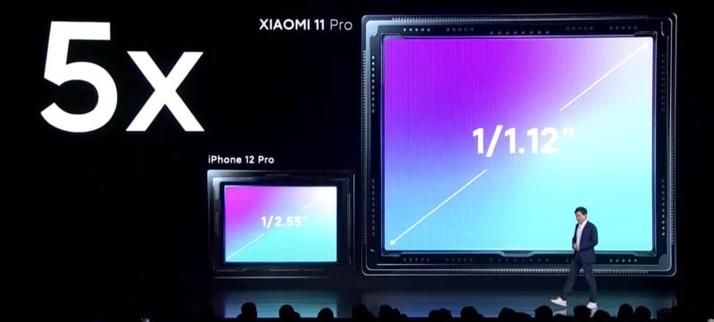
That bump houses those three cameras. First is the main wide-angle camera which houses a 1/1.12-inch 50-megapixel GN2 sensor equipped with an f/1.95 aperture lens. The GN2 was announced by Samsung earlier this year and features what the company calls Dual Pixel Pro autofocus, which it promises offers a dramatic improvement in autofocus performance.
The size of the sensor itself is dramatic: it's not far from a 1-inch sensor:
Xiaomi uses that GN2 sensor to claim the Mi 11 Ultra is capable of fast, "laser-sharp" autofocus. That main sensor also boasts dual native ISO and staggered HDR. In addition to the main camera, which is designated as a "wide" camera (85-degree field of view), Xiaomi also equipped the Mi 11 Ultra with a 48-megapixel ultra-wide and a 48-megapixel 5x periscope telephoto. Periscope technology allows for a much more powerful optical zoom and is a technology that Apple is rumored to be at least a couple of years away from implementing in its own devices. You can read more about periscope cameras here.
The 48-megapixel 1/2.0-inch sized ultra-wide has a 128-degree field of view and an f/2.2 lens. The 48-megapixel periscope camera Is the same 1/2.0-inch sensor size, but at f/4.1. It supports optical image stabilization and phase-detection autofocus, 5x optical zoom, 10X "hybrid zoom," and 120x digital zoom. All three cameras support 8K video recording and Night Mode, and the Mi 11 Ultra can also record
That giant camera bump not only houses the three aforementioned cameras, but also a dedicated OLED that can be used as an always-on display (to display time and date, for example), notification bar, or as a selfie camera viewfinder.
The phone's other specifications are otherwise pretty similar to the Xiaomi Mi 11, including the 6.8-inch 120Hz 1440p OLED display, a Qualcomm Snapdragon 888 processor, 12GB of RAM, and 256GB of storage. However, the Mi 11 Ultra gets a bigger battery at 5,000mAh and can be fast-charged (what Xiaomi refers to as "turbo charging") at 67W both wirelessly and with a cable.
The Xiaomi Mi 11 Ultra was not given a final price or release date at the time or announcement.
#mobile #news #48megapixel #50megapixel #8k #8kvideo #camerabump #dualpixelpro #mobiledevices #periscopecamera #samsungn2 #smartphone #smartphonephotography #xiaomi #xiaomimi11 #xiaomimi11ultra

 CEOTECH.IT
 apfeltalk
 petapixel (unofficial)