A4 Landscape Brand Guidelines Template for Adobe InDesign
This post contains affiliate links. We may earn a commission if you click on them and make a purchase. It’s at no extra cost to you and helps us run this site. Thanks for your support!
Achieve Stunning Brand Consistency With Your New Go-To Brand Guidelines Template
Ever wondered how some brands just look perfectly put-together, no matter where you see them? Their secret often lies in a robust set of brand guidelines. Creating these from scratch, however, can feel like a monumental task. But what if you could achieve that polished, professional look with an expertly designed brand guidelines template? Today, we’re looking at an exceptional A4 landscape brand guidelines template for Adobe InDesign, crafted by the talented graphic designer and Adobe Stock contributor, Afahmy. This isn’t just any template; it’s a pathway to defining and showcasing your brand with clarity and style.
This particular brand guidelines template is designed to make your life easier and your brand stronger. It offers a sophisticated framework, allowing you to present your brand’s visual identity in a comprehensive and visually appealing manner. Ready to explore how this tool can transform your branding efforts?
Download from Adobe Stock Please note that this template requires Adobe InDesign installed on your computer. Whether Mac or PC, the latest version is available on the Adobe Creative Cloud website—take a look here.
A Brand Guidelines Template in A4 Landscape Format by afahmy for Adobe InDesign
Download from Adobe Stock The Aesthetic: Modern Elegance Meets User-Friendly Design
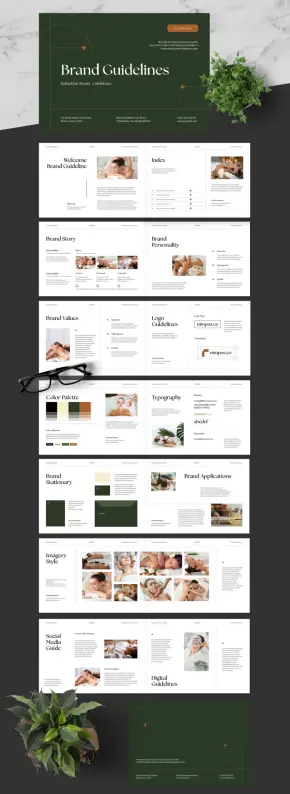
This brand guidelines template immediately captivates with its modern, elegant, and highly professional aesthetic. The style leans towards a sophisticated minimalism, utilizing a refined color palette that evokes a sense of calm and quality – think earthy greens, warm beiges, and a touch of terracotta, as seen in the preview. The typography choices are impeccable, typically pairing a classic serif for impactful headlines with a clean sans-serif for readable body text. This combination ensures your brand message is both stylish and accessible.
The A4 landscape format is a smart choice. Why landscape? It provides a broader canvas, ideal for showcasing visual elements like logos, color palettes, and imagery examples side-by-side with explanatory text. This layout feels more like a premium presentation or a coffee table book, lending an air of gravitas to your brand’s identity. The overall design feels spacious and uncluttered, allowing each element of your brand to breathe and be clearly understood.
Afahmy’s design thoughtfully incorporates sections for all critical brand components. You’ll find dedicated pages for your brand story, logo guidelines (including clearspace and variations), color palette specification (with CMYK and HEX codes), typography hierarchy, imagery style, and even mockups for brand stationery and applications. The visual examples in the template, often themed around wellness and natural beauty, demonstrate its suitability for lifestyle brands, but its clean structure makes it incredibly versatile for almost any industry.
Packed with Features: Discover This InDesign Brand Guidelines Template
What truly sets this brand guidelines template apart are its user-centric features. It’s not just about looking good; it’s about being incredibly practical. With 16 distinct and thoughtfully designed page options, you have ample flexibility to pick and choose what best represents your unique brand. This variety ensures you can create a comprehensive document without needing to design new layouts from scratch.
Seamless Customization in Adobe InDesign
Built specifically for Adobe InDesign, this brand guidelines template is a dream to customize. If you’re familiar with InDesign, you’ll find it incredibly intuitive. All images and text blocks are set up as placeholders. This means you can easily drag and drop your own photography, insert your brand’s logo, input your specific color codes, and type in your unique brand narrative. This ease of use empowers you to personalize the template thoroughly, transforming it into a document that is unequivocally yours. Think of it as a professional framework waiting for your unique content. You don’t need to be a design guru to achieve a high-end result; this Adobe InDesign template does the heavy lifting.
Print-Ready and Digitally Versatile
Understanding the varied needs of modern businesses, this brand guidelines template is prepared for both physical and digital distribution. It’s set up in CMYK color mode, ensuring that if you decide to print your brand book, the colors will be accurate and vibrant. Imagine handing a beautifully printed brand guide to a new partner or employee – it speaks volumes about your professionalism.
But the utility doesn’t stop at print. You can effortlessly export the entire document as a PDF. This makes it perfect for uploading to a company server for easy access, using as a digital presentation during onboarding or client meetings, or simply emailing to collaborators and stakeholders. This dual-purpose nature makes this brand guidelines template an incredibly valuable asset for any brand toolkit.
Why This Brand Guidelines Template is a Smart Choice
Choosing this brand guidelines template offers significant advantages. Firstly, it saves an incredible amount of time and resources. Developing a comprehensive brand guide from zero can take days, if not weeks, of design work. This template provides a professional-grade structure instantly. Secondly, it ensures consistency. A clear corporate identity guide is crucial for maintaining a unified brand presence across all touchpoints. This template helps you define and document those standards effectively.
Are you a startup looking to establish a strong visual identity from day one? Or perhaps an established business aiming to consolidate your branding? This branding kit template is adaptable to your needs. It provides a framework for a professional brand book that can grow with your company. For freelancers and agencies, this visual identity guidelines template can also be a fantastic resource to offer clients, providing them with a tangible and valuable deliverable.
Elevate Your Brand with a Cohesive Visual Strategy
A well-defined brand is more than just a logo; it’s an entire ecosystem of visual and verbal cues. This brand guidelines template helps you articulate that ecosystem. By clearly outlining rules for logo usage, color application, typography, and imagery, you empower everyone who works with your brand, from internal teams to external agencies, to represent it accurately and consistently. This consistency builds recognition, trust, and ultimately, brand equity.
Think about the impact: no more off-brand colors on a social media post, or an incorrectly stretched logo on a presentation. This brand guidelines template acts as the single source of truth, ensuring your brand always looks its best. It’s an investment in clarity and professionalism that pays dividends in the long run.
Getting Started Is Easier Than You Think
Acquiring this brand guidelines template, often available through platforms like Adobe Stock, where Afahmy contributes, is the first step. Once you have the InDesign file, open it up and begin exploring the 16 different page layouts. Familiarize yourself with the placeholder elements. Start by replacing the logo, then move on to your brand colors, inputting the exact CMYK, RGB, or HEX values. Update the typography sections with your chosen fonts and hierarchy. Populate the brand story and personality sections with your unique narrative.
Our tip? Gather all your brand assets before you start customizing. Having your logos, color codes, fonts, and key messaging ready will make the process smooth and efficient. You’ll be surprised how quickly you can create a comprehensive and “easy to customize brand guidelines template InDesign” document that looks like it was custom-designed by a top agency. Whether you need a “print-ready brand guidelines A4 landscape” document or a “digital brand guidelines PDF template,” this resource delivers.
This brand guidelines template for small business users and larger corporations alike is a testament to smart design. It’s more than just a document; it’s a tool for building a stronger, more recognizable, and ultimately more successful brand. Why not give your brand the clear, consistent, and compelling voice it deserves? This Afahmy InDesign brand guidelines template could be precisely what you need.
Download from Adobe Stock Feel free to find other amazing graphic design templates on WE AND THE COLOR.
Subscribe to our newsletter!
By continuing, you accept the privacy policy #AdobeInDesign #brandGuidelines #BrandGuidelinesTemplate #brandManual #branding #design #graphicDesign #template
 Santhosh S




 WE AND THE COLOR