Comparing Jitsi Meet And NextCloud Talk For Replacing Discord’s Calls
I think that NextCloud + Jitsi Meet replicates nearly everything Discord does, but self-hosted and without the privacy and ongoing enshittification. Enough so that I wrote a step-by-step guide on how to do it with a 10-year-old PC, and an add-on about adding a layer of security in only six clicks.
I recommended using Jitsi Meet over NextCloud Talk for audio/video conference rooms, and the lack of bots to handle some functions that are possible in Discord. I’m going to explain why I made that decision, some of the considerations that went into that recommendation, what you need to consider when choosing whether to use the public Jitsi Meet instance or self-hosting it, and what I did to make it all work anyway (as well as the bot situation).
TL;DR: Use Talk for the equivalent of text channels on Discord, use self-hosted Jitsi (either audio-only or limiting video, depending on your bandwidth) for conference rooms. Proof-of-concept bots now exist (and work) that run in a browser window that, with a virtual microphone, allow audio streaming and recording.
This is the post explaining why I’ve made the decisions I have, so you can see if they work for you. Later this week I’ll detail exactly how to get it set up for yourself and your group (including the bots).
Integration And Security
NextCloud Talk is tightly integrated with the rest of NextCloud, which allows you to do all sorts of neat things with it. Embed files, control access by user groups, automatically create meeting rooms with appointments, and more. This is very neat, and I find it really useful with the text chat portion of Talk. Jitsi is designed to be open first, which is not ideal for self-hosted situations. It’s easy to add a lobby or password to an existing room, but neither is the default on the selfhosted setup. While making a room is super simple and easy, the default setup is to allow anybody who can reach the service to fully use it. Luckily for our use case, it’s possible to set up only a few users who are allowed to make rooms while still allowing anyone to join. You want this because of the next issue…
See also How TikTok's Relationship Advice Meme Can Hurt Neurodivergent Folx... And Everyone Else. Bandwidth
I was surprised to find that just videoconferencing’s big demand was not CPU power or RAM; it’s bandwidth.
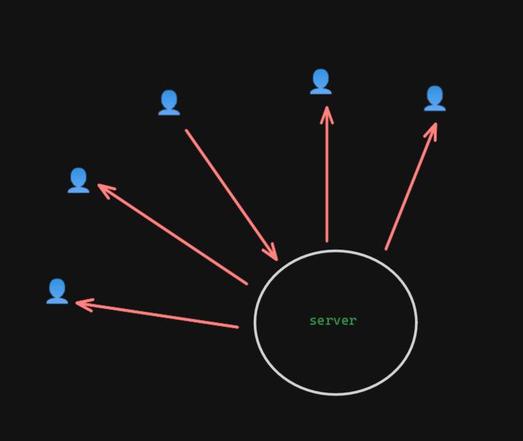
Both NextCloud Talk (with its “high performance backend” enabled) and Jitsi Meet serve as stream forwarders. If you only have two people in the call, it’s pretty straightforward – there’s a stream in and out for each participant. Two streams in, two streams out. (This is a simplification, but gets the point across.)
It’s when you start adding others that it gets problematic. Let’s say you have five people in the call and everyone’s video and mics are disabled. The server only has one stream coming in, but it has four copies of that stream going back out — twice as much as two people chatting.
And that’s with restricting everyone else. If you have two people with incoming streams, it gets even worse: two streams in, eight out. That number starts getting a LOT higher the more people you add to the call.
1-11 person seen2 people seen
This means that as a practical matter, if you are doing video with your conference calls, you need to have not just good incoming bandwidth, but outgoing as well. Jitsi recommends:
For a friends/small organization server, 1 Gbits/s will often be enough but for a serious server 10 Gbits/s is advisable.
As of June 2024, only 70% of US customers had less than 500Mbps upstream (or half that speed). That is a serious problem if you want to use something selfhosted for more than 1-1 chats, regardless of whether you use Talk or Jitsi.
Jitsi has some ways to minimize the bandwidth by limiting the resolution of the video stream, limiting how many people are visible at any given time, or even turning off video entirely. If NextCloud Talk has similar controls, I’ve not yet found them yet. That’s a big point in Jitsi’s favor for me for group conference calls.
See also List The Ways You Hurt Me, And I'll List The Ways I Hurt You Too Recording Support
Both Jitsi Meet and NextCloud Talk have “native” ways to record conferences through adding on other services, through Jibri and Talked, respectively. Both work essentially in the same way: they run another copy of a web browser that connects to the call just like a human would, and uses that to get the audio and video.
This part does take additional CPU and RAM power — to the point that both recommend running the recording service on another system than the one handling the call. If you need video recording (or sophisticated audio recording, like per-channel streams), this is where you’re going to end up looking. The added complexity and hardware demand is more than I’m aiming for with my guide, or that my group needs since we do audio-only calls anyway.
But if you just want basic audio of everyone who is on the call, keep reading.
Bot Support
I was looking for two types of bots: one type that interacted through the text chat, and one type that deals with audio streams, such as mixing in music, sound effects, or recording the audio.
The bot ecosystem around both Talk and Jitsi is pretty sparse. I also discovered some severe limitations on both sides. To access the audio or video for Talk’s conference rooms, it seems like you essentially have to run a headless browser. Once again, that adds complexity and hardware demands that I want to avoid. However, Jitsi’s public instance, because of the way that it handles traffic, means that the audio bots that I found can’t stay connected… and I wasn’t able to find a way around that. They do, however, work just fine when it’s self-hosted.
Making It Work Anyway
Rather than force either bit of software to do something it doesn’t want, I leaned into the strengths and weaknesses of each. I’m using NextCloud Talk as the equivalent of the text channels on Discord. It’s well suited for that due to its integration with the rest of NextCloud. Also, since we can have bot access to the text channel, existing bots and existing integrations can be upgraded to provide the functions I need, like responding with customizable information or a customizable stickerpicker.
See also The Wonderful Gift Of Being Wrong Because just running the conference room is not a big load on the computer itself, I installed it through Docker as well. I only had to create an account for myself, since I’m the only one who should be creating rooms. The configuration limits it to audio calls as well. I thought about limiting the number of video streams forwarded or limiting resolution, both of which Jitsi can do, but even then it would be a lot of bandwidth.
Limiting to audio means that with my table it’s estimated to average around 2.5Mbps upstream, well within my upstream bandwidth. But add 320p video and that more than doubles to an average of 5.5Mbps, and a maximum that exceeds my upstream. 720p resolution or better has even higher bandwidth requirements for the server, even if you’re limiting the number of outbound video streams. (Graphs of estimated upstream bandwidth for audio versus video resolution without any limiting are at the end of the post to give you an idea of what you might need for what you want to do.)
Luckily for me, my table does audio-only already, so that is more than sufficient for us.
By self-hosting the Jitsi server, that also means that I can use the bots I adapted to pipe in a http audio stream, connect a virtual microphone (so I can use Kenku), have the same chatbot functionality as in Talk, and record the audio stream to my local computer in a single extra browser window.
I’ll have a detailed guide later this week, but if this (plus the links in this post) is enough for you, give it a shot!
Featured Image by Alexandra_Koch from Pixabay
#audiochat #communication #discord #jitsi #nextcloud #videochat Steven Saus [he/him]
 Steven Saus
 ideatrash

 Política ConCiencia
 akahardy
 Cointastical ☑️
