remember that air-exchange based HVAC assistance stuff I used to talk about all the time like two years ago?

hasn't gone anywhere, still working.

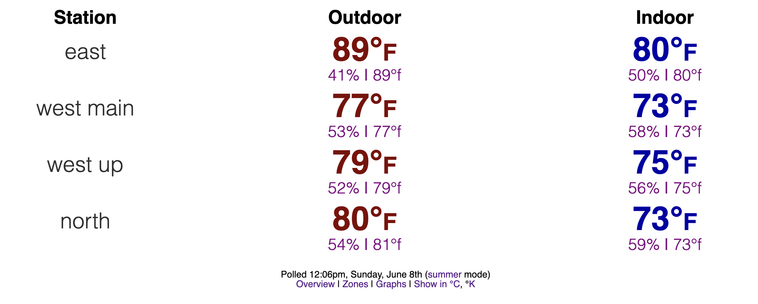
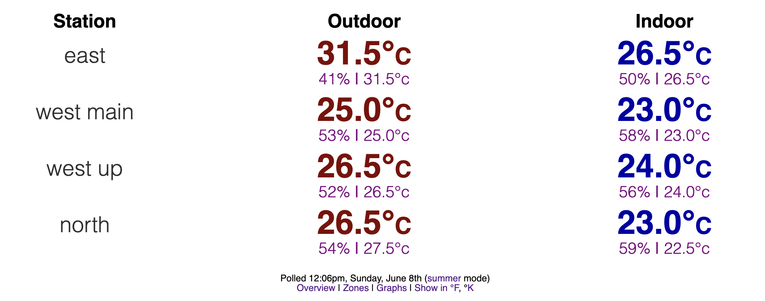
29°C composite outdoors, 23.5°C composite indoors, no AC running.

Also I should note we have a server farm and it's obviously indoors and contributing to indoor temperatures

Here's each set of sensors in °F and °C for your convenience

i keep bringing it up because people can do this and it's cost negative in less than a year

#HVAC #HVACassist #AirExchange #AmbientHVAC

huh

SAME HAT SAME HAT SAME HAT SAME HAT SAME HAT

#AmbientHVAC

That's not nice! That's not nice at ALL!

xD

#AmbientHVAC #hvac #AirFiltration

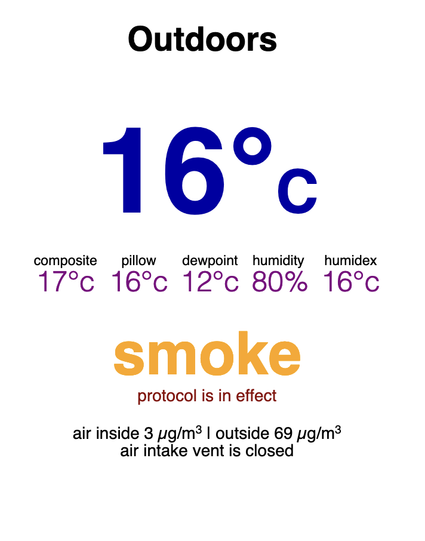
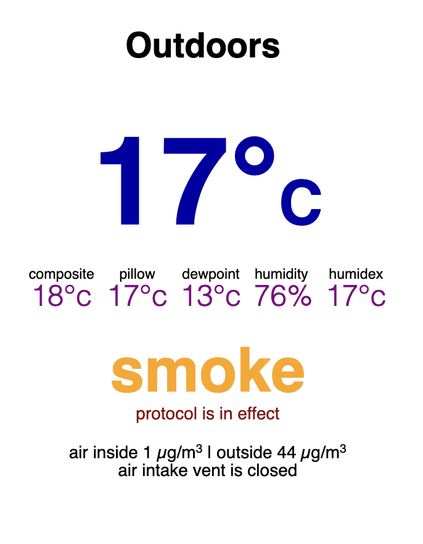
if you're wondering how firework smoke shows up in my HVAC assist system

#AmbientHVAC #hvac #AirFiltration

oh yeah, i got the new weather sensor shield painted today so it's out tonight, let's see how she do

the funny side note is that the two AA batteries in the sensor, installed two years ago and operating continuously since then, test as nearly full charge. that's what the remote software was telling me but i was having a hard time believing it. BUT WHELP

#weather #AmbientHVAC #3dprinting

wanted a couple of pics of the temperature and humidity sensor I printed before hitting it with a coat of spray paint for hopefully improved durability

#weather #ambienthvac

one down only like... six? more to go?

#hvac #AmbientHVAC #3dPrinting

chug chug chug

print print print

these are like 7 hours each because they can’t be in fast mode because they have to have decent tolerances to stack together right :/

#3dPrinting #slow #HVAC #AmbientHVAC #PHA

"fall" mode is new btw

basically means "ignore the windows and open the air-exchange system on a distributed timer for fresh air but not _too_ much fresh air"

#diy #hvac #AmbientHVAC

Here, have a really, really niche printable solution

As part of my ongoing air-exchange-based HVAC project, I have an outdoor air quality sensor from Ambient Weather (disclosure: nothing to disclose, no sponsorship, I bought it). It’s battery/solar powered, and that’s fine… except for the part where that doesn’t work here in the winter. We’re too far north and too dark.

But since it plugs in to charge and keeps working when plugged in, winner winner chicken dinner, right?

WRONG! Because first you have to take the bottom off the case, then the charge plug sticks directly out from the bottom facing down, like a goddamn Apple Magic Mouse.

I can’t fix the mouse, but I can fix this, and I have made a printable tray and rack system to let me use it that way. And, of course, I’ve put it up on Thingiverse.

I’m rather pleased with it – I think the design is pretty good – but in all honestly my favourite part is…

you know what they call positive fitment in the machining world? When two things really fit together just right?

This has that. At least with my print settings. It’s just… thonk and then it stays, and it does this with a third object I didn’t even make so had to measure out myself, and that’s just … yeah. Oh yeah. That’s the good stuff.

Ambient Weather unit held over my 3D-printed tray and rack, with the cord going through the tray and rack down to an outlet while plugged into the air sensor. Three of the four mounting rails – the ones that thonk into place – are visible.

#ambientHvac #diy

Tray and rack for Ambient Weather PM2.5 Wireless Outdoor Particulate Monitor by solarbird

This is a rack and tray for mounting an Ambient Weather PM2.5 Wireless Outdoor Particulate Monitor outdoors in a way that you can still use it while it's plugged in.Much of the time, these sensors are solar-powered, and they can be run most places entirely on solar power. However, if you are far enough north and have enough clouds, solar power is not effective any sort of device like this over the winter. Since this device works fine plugged in, the obvious solution is to either recharge it regularly, or just keep it plugged in. But in hot weather, that stresses the batteries via overheating. Also, the charge cord comes straight out the bottom of the battery compartment, creating a very difficult situation in terms of placing the device on any surface when in use. (Think Apple Magic Mouse. Same problem while charging.)Accordingly, I have designed this tray and rack system to hold the device in a reasonable position for extended periods while driving it with a USB charging cable. Originally, the idea was that you could slide the tray into the rack even with the cord plugged in, but in some plastics the rack became too flexible. So I abandoned that part of the idea. The rest is still good though, and keeping the tray still a separate object allows more refinements by other people and also keeps water flowing away from the electronics of the device.Please note there are TWO DIFFERENT RACKS. One is for use with the tray, and is for when the battery cover of the monitor has been removed and it's sitting on the tray running while charging or being powered solely by USB. This is the rack seen in the photos. It's right next to an outlet.The other rack is for use without a tray, as it is exactly the right width for the monitor when fully assembled and running on battery and solar. I have that rack out in full sun, and the monitor just sits on it. The tray mounts are not quite symmetrical and smaller than the charging rack, and the fact that it fits the fully-assembled monitor perfectly was an accident I was happy to use. ^_^ It's sitting out in as much sun as I can get it.

Thingiverse