@mcc @whitequark I run root on ZFS and #zfsbootmenu on my two primary devices (desktop and laptop) and I've been very happy. Native encryption on my laptop, compression on everything. NAS FS is also zfs and I rely on incremental snapshot send for off-site backup. Rsync used to take 15 minutes just to calculate changes that need to be sent, this is essentially instantaneous now.

So after a week with #zfs and #zfsbootmenu on my #alpinelinux install I must say both are real gems.

Example: I made a backup of my datasets on USB SSD. You just change few zfs properties and you have not only a backup but also full, working copy of your entire system in the drawer. In case something goes wrong you can boot from it and have a great rescue system with all tools you can imagine. If a tool you need is not there you just do "apk add ...".

Yesterday I migrated my #alpinelinux install to #zfs and #zfsbootmenu. It was not too difficult even though I've done it from partition to partition on one drive. Although I wouldn't recommend it to a non techy person.
I even managed to compile zfs modules for my custom LLVM compiled kernels.

So not a big deal actually.
Looking at you @vermaden 

@joel I've not used it with Slackware but I can highly recommend #ZFSBootMenu - https://zfsbootmenu.org/ They don't have an installation guide but I'm sure it can be done...
Overview β€” ZFSBootMenu 3.1.0 documentation

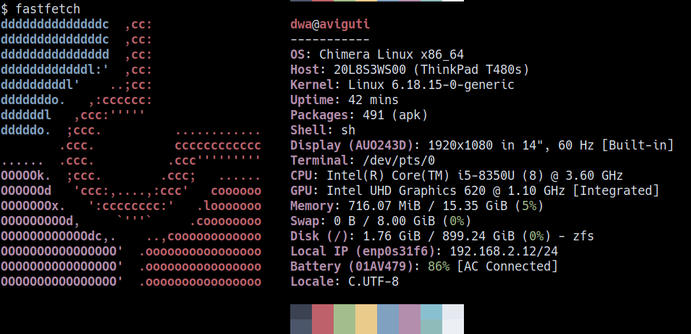
I think Chimera Linux is an intriguing mix of components: Linux kernel, FreeBSD userland, apk package manager, (non-systemd) dinit. I checked it out briefly last year. Now I want to take a second, closer look.

Installed Chimera Linux with Root-on-ZFS with ZFS native encryption and ZFSBootMenu as bootloader on a VM. Time to explore!

#ChimeraLinux #Linux #FreeBSD #apk #dinit #ZFS #ZFSBootMenu

@jannem @jimsalter aha, I suppose he followed you out! I'm enamored with it myself, must be paired with #zfsbootmenu though.
My laptop is now running #alpinelinux with #zfs on root by #zfsbootmenu. Need to fight with podman to make it works with zfs.

@mwl oh I'm the worst person to ask but here you go

personally: Debian LTS, with #ZFSBootMenu. I build my own #OpenZFS (dogfooding) but I'd have no issues running what Debian ships in the contrib repo. Setting up ZFSBootMenu is a little fiddly, but the docs are good and you only do it once

now all the "it depends", as all Linux-related answers must be. mostly, because I don't really think of OpenZFS as being a reason to choose Linux; if OpenZFS is the most important thing, then go for FreeBSD. so if you have to have Linux+OpenZFS, the choice depends on what you're doing

at minimum, something running an LTS kernel. anything that picks up a new kernel on day of release will have a bad time, because we usually don't have support for it in a stable OpenZFS release at that moment

if you don't need OpenZFS as the root/boot filesystem, then either a Redhat-ish or Debian-ish LTS. The RHEL-derivatives (Alma, Rocky) have probably the best support from upstream OpenZFS, since the big users are in education and research and those are almost exclusively RHEL. they don't ship it in their repos though; we provide package repositories for those. on the other side, Debian do ship it in their contrib repo, and their packagers work with us on the finer details, so its pretty solid

(in previous life as systems guy for a cloud service, it was Debian and locally-built OpenZFS, and it was just great)

if you do want OpenZFS as the root/boot, then I highly recommend ZFSBootMenu. it is basically an entire Linux+OpenZFS mini-distro in a UEFI binary as a bootloader, and brings things like FreeBSD-style boot environments to Linux. its is very very well thought out and understands the complications involved

I definitely _don't_ recommend GRUB for OpenZFS on root/boot, because it mostly doesn't keep up with new OpenZFS features, so you end up needing to keep a separate pool with a bunch of features disables, and you then need to take care to not `zpool upgrade` it (which, tbf, is a bit of a footgun in OpenZFS' tooling). it also doesn't really bring much to the table; iirc it doesn't understand snapshots/clones, and if you're not doing things like snapshot-before-upgrade, I'm not sure that OpenZFS root/boot is even worth the trouble

if you want OpenZFS in the installer, then options are far more limited. for general purpose Linux, I know Void Linux and CachyOS have installation options for OpenZFS. maybe Ubuntu too, though I'm never quite sure what the truth is on any given day. Void is by the same people that do ZBM, so that's very nicely integrated.

for "applicance" type things, Proxmox is popular, though I'd be more inclined to look towards TrueNAS CE because I know the OpenZFS devs there :) HexOS is an interesting-looking up-and-comer too. though really for an appliance-style usage, I'm far more likely to look towards a FreeBSD-based option (Sylve is looking _very_ interesting).

(disclosure on last para: I have in the past done paid dev work on OpenZFS for both TrueNAS and HexOS).

And yes, I dogfood #OpenZFS pre-releases on my daily driver. Though I won't upgrade on-disk formats until #ZFSBootMenu is updated to understand those features, because I still like to boot my computer sometimes!

("lucy" is the local host and pool name; I build a custom OpenZFS on each machine, with a couple of tiny uninteresting patches to smooth a couple of rough edges around build and system integration).

My ZFS snapshot and replication setup on Ubuntu ft. sanoid and syncoid

I have known about ZFS since 2009, when I was working for Sun Microsystems as a campus ambassador at my college. But it wasn’t until I started hearing Jim Salter (on the TechSNAP and 2.5 Admins podcasts) and Allan Jude (on the 2.5 Admins podcast) evangelize ZFS that I became interested in using it on my computers and servers. With Ubuntu shipping ZFS in the kernel for many years now, I had access to native ZFS!,

Here is an overview of my setup running Ubuntu + ZFS before I explain and document some of the details.

  • cube – A headless server running Ubuntu 24.04 LTS (at the time of writing) with ZFS on root and a lot of ZFS storage powered by mirror vdevs. Has sanoid for automatic snapshots.
  • Desktops and laptops in my home run (K)Ubuntu (24.04 or later; versions vary) with encrypted (ZFS native encryption) ZFS on root and ZFSBootMenu. These computers also use sanoid for automatic snapshots.

Sanoid configuration

On my personal computers, I use a minimal sanoid configuration that looks like

############# datasets #############[zroot] use_template = production recursive = zfs############## templates ##############[template_production] frequently = 0 hourly = 26 daily = 30 monthly = 3 yearly = 0 autosnap = yes autoprune = yes[template_ignore] autoprune = no autosnap = no monitor = no

On servers, the sanoid configuration has some additional tweaks, like the following template to not snapshot replicated datasets.

[template_backup] frequently = 0 hourly = 36 daily = 30 monthly = 3 yearly = 0 # don't take new snapshots - snapshots # on backup datasets are replicated in # from source, not generated locally autosnap = no

Pre-apt snapshots

While sanoid provides periodic ZFS snapshots, I also wanted to wrap apt transactions in ZFS snapshots for the ability to roll back any bad updates/upgrades. For this, I used the following shell script,

#!/usr/bin/env bashDATE="$(/bin/date +%F-%T)"zfs snapshot -r zroot@snap_pre_apt_"$DATE"

with the following apt hook in /etc/apt/apt.conf.d/90zfs-pre-apt-snapshot.

// Takes a snapshot of the system before package changes.DPkg::Pre-Invoke {"[ -x /usr/local/sbin/zfs-pre-apt-snapshot ] && /usr/local/sbin/zfs-pre-apt-snapshot || true";};

This handles taking snapshots before apt transactions but doesn’t prune the snapshots at all. For that, I used the zfs-prune-snapshots script (from https://github.com/bahamas10/zfs-prune-snapshots) in a wrapper cron shell (schedule varies per computer) script that looks like

#!/bin/sh/usr/local/sbin/zfs-prune-snapshots \ -p 'snap_pre_apt_' \ 1w 2>&1 | logger \ -t cleanup-zfs-pre-apt-snapshots

Snapshot replication

The cube server has sufficient disk space to provide a replication target for all my other personal computers using ZFS. It has a pool named dpool, which will be referenced in the details to follow.

For automating snapshot replication, I chose to use syncoid from the same sanoid package. To avoid giving privileged access to the sending and the receiving user accounts, my setup closely follows the path in https://klarasystems.com/articles/improving-replication-security-with-openzfs-delegation/.

On my personal computer, I granted my unprivileged (but has sudo πŸ€·β€β™‚οΈ) local user account the hold and send permissions on the root dataset, zroot.

sudo zfs allow send-user hold,send zrootzfs allow zroot---- Permissions on zroot --------------------------------------------Local+Descendent permissions: user send-user hold,send

On the cube server, I created an unprivileged user (no sudo permissions here 😌) and granted it the create,mount,receive permissions temporarily on the parent of the target dataset, dpool.

Then I performed an initial full replication of a local snapshot by running the following commands as the unprivileged user.

zfs send \ zroot@snapshot-name | ssh \ remote-user@cube \ zfs receive -u \ dpool/local-hostnamezfs send \ zroot/ROOT@snapshot-name | ssh \ remote-user@cube \ zfs receive -u \ dpool/local-hostname/ROOTzfs send \ zroot/ROOT/os-name@snapshot-name | ssh \ remote-user@cube \ zfs receive -u \ dpool/local-hostname/ROOT/os-namezfs send \ zroot/home@snapshot-name | ssh \ remote-user@cube \ zfs receive -u \ dpool/local-hostname/home

The -u flag in the zfs receive commands above will prevent it from trying to mount the remote dataset. The target remote dataset must not exist when running this initial full replication.

As it is not a good practice to allow unprivileged users to mount filesystems, I disabled automatic mounting by running

zfs set mountpoint=none dpool/local-hostname

as the sudo user on the target server.

Then I narrowed down the permissions of the receiving user to only its own dataset by running

zfs unallow remote-user \ create,mount,receive dpoolzfs allow remote-user \ create,mount,receive dpool/local-hostname

on the target server.

Next, I tried to test the snapshot replication by running syncoid manually like

syncoid -r \ --no-privilege-elevation \ --no-sync-snap \ zroot \ remote-user@cube:dpool/local-hostname

and it replicated all the other snapshots all on the local datasets (we had only replicated one snapshot previously).

The sanoid package in Debian and Ubuntu does not ship with a systemd timer for syncoid. So I created a user service and a timer that look like the following examples.

# ~/.config/systemd/user/syncoid.service[Unit]Description=Replicate sanoid snapshots[Service]Type=oneshotExecStart=/usr/sbin/syncoid -r --no-privilege-elevation --no-sync-snap zroot remote-user@cube:dpool/local-hostname# ~/.config/systemd/user/syncoid.timer[Unit]Description=Run Syncoid to replicate ZFS snapshots to cube[Timer]OnCalendar=*:0/15Persistent=true[Install]WantedBy=timers.target

Then I reloaded systemd, enabled and started the above timer to have everything working smoothly.

#sanoid #snapshotReplication #syncoid #ZFS #zfsbootmenu

Jim's Social Media links: