Tip #820

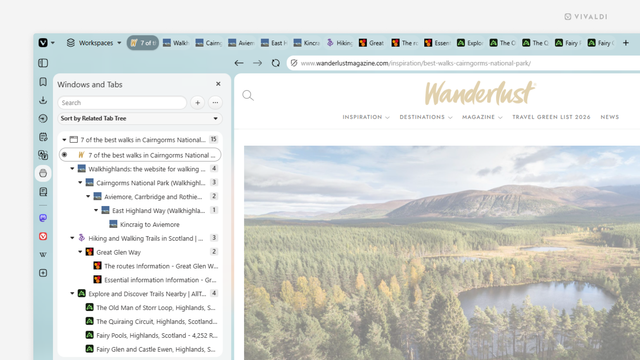
Sort tabs by relation in the Windows and Tabs Panel for a tree-style view.

If you have a ton of tabs open, viewing them in a tree-style layout allows you to get a hierarchical overview of all your browser windows, Workspaces, Tabs Stacks and Tabs. See the child-parent relation, reorder tabs, collapse/expand groups, and more.

To switch to a tree-style view in the Windows and Tabs Panel:
  • Open the Windows and Tabs Panel.
  • Click on the sorting menu between the search field and the list of tabs.
  • Select “Sort by Related Tab Tree”.
  • #Tabs #Vivaldi #VivaldiBrowser #WindowsPanel

    https://vivaldi.com/blog/tips/tip-820/

    Tip #773

    ウィンドウパネルやタブボタンから同期したタブのグループを簡単に開く方法

    複数のデバイスを使ってブラウジングをすることが多い場合、パソコンで Vivaldi を使っている時に他のデバイスの Vivaldi で開いているタブにアクセスしたいと思ったことはありませんか?

    同期したタブを開くには:

  • すべてのデバイスで同じ Vivaldi アカウントの 同期 にログインし、タブの同期が有効になっていることを確認してください。
  • ウィンドウパネル あるいは タブボタン を開く
  • 開きたいタブのグループ上で右クリックする。グループには、デバイスや選択したウィンドウ、ワークスペースタブスタック で開いているすべてのタブ、あるいは、特定の タブのセレクション など、様々なものが当てはまります。
  • コンテキストメニューで「開く」を選択する
  • タブを 1 つだけ開きたい場合には、リスト上の該当するタブを素早くクリック(ダブルクリック)してください。

    #TabButton #Tabs #vivaldi #VivaldiBrowser #WindowsPanel #同期

    https://vivaldi.com/ja/blog/tips/desktop-tips/tip-773/

    Tip #773

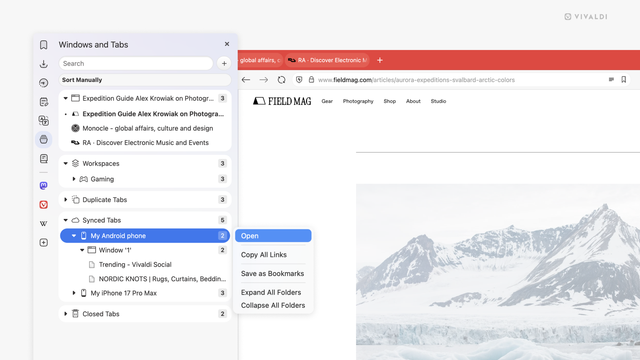
    Open a group of synced tabs easily from the Windows Panel or the Tab Button.

    When you’re browsing on multiple devices, you may find yourself in a situation where, while using Vivaldi on your computer, you need to access tabs that you have open on other devices.

    To open synced tabs:

  • Make sure you’re logged in to Sync with the same Vivaldi account on all devices, and that tab syncing is enabled.
  • Open the Windows Panel or the Tab Button.
  • Right-click on the group of tabs you want to open. It can be all tabs on the device, in a chosen window, Workspace, Tab Stack, or a precise selection of tabs.
  • Select “Open” from the context menu.
  • In case you only want to open one tab, a quick (double-)click on that tab in the list of tabs is all you need to do.

    #sync #TabButton #Tabs #Vivaldi #VivaldiBrowser #WindowsPanel

    https://vivaldi.com/blog/tips/tip-773/