 robrich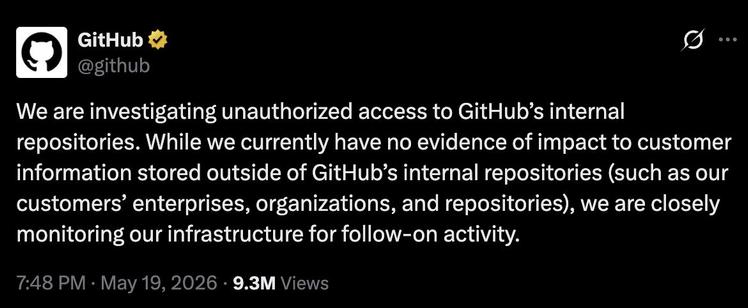
WARNING: GitHub has been breached by TeamPCP (hackers behind Shai Hulud npm hack). An infected VS Code ext. exfiltrated ~3,800 internal repos. Github's source code is on a cybercrime forum RIGHT NOW.… | Alex Turnbull | 61 comments
WARNING: GitHub has been breached by TeamPCP (hackers behind Shai Hulud npm hack). An infected VS Code ext. exfiltrated ~3,800 internal repos. Github's source code is on a cybercrime forum RIGHT NOW. How to triage ASAP 👇 If you use VS Code extensions, that's the likely next vector. The breach started from one employee device with a malicious VS Code extension. ~3,800 internal repos exfiltrated. GitHub says the attacker's claim is "directionally consistent" with their investigation. TeamPCP is the same crew that ran Mini Shai-Hulud this week, the npm worm that hit OpenAI, Mistral, UiPath, SAP, and OpenSearch in 72 hours. This happened from Microsoft's own developer, running Microsoft's own editor, installing from Microsoft's own marketplace, took down GitHub. GitHub's internal source code is now listed for $50,000 on a cybercrime forum. Critical secrets rotated overnight. No customer data accessed per their disclosure, but the attacker has the keys to the kingdom. This is the third compromise this week where the attack vector was a developer's own tooling. Context . ai → Vercel. Mini Shai-Hulud npm → OpenAI, Mistral, SAP. VS Code extension → GitHub. Your editor, package manager, and your AI tools are now the primary vector for these recent string of attacks. Here's what to do: 1 / Audit every VS Code extension 1. Open Extensions panel in VS Code 2. Remove anything you don't actively use 3. Check publisher verification on what remains — look for the blue checkmark 4. Pin extension versions in .vscode/extensions.json for shared workspaces 2 / Rotate every secret stored in code 1. Any API key, token, or credential committed to a repo — even private — assume exposed 2. Rotate first, remove from history second (git filter-repo or BFG) 3. Audit GitHub Actions secrets and environment variables 4. Check .env files in every repo you've cloned in the last 30 days 3 / Move secrets out of code permanently 1. Use a secrets manager (1Password, Doppler, AWS Secrets Manager, Vault) 2. Add pre-commit hooks (gitleaks, trufflehog) to block future commits 3. Enable GitHub secret scanning + push protection on every repo 4. Audit every contributor's commits for accidental secret pushes GitHub hosts your code and can be breached through one extension on one laptop. Your editor is now the perimeter so every extensions is a security / trust decisions. This is the new attack surface. These hacks are only getting worse and this won't be the last one. Prepare accordingly. | 61 comments on LinkedIn
 Alvin Ashcraft 🐿️
 Luke Pembleton
 U3dn
U3dn

 Qiita - 人気の記事
 STM32World
 Christoph Hermanns
 Yesterday's Rose
 Curt Olson
 Benjamin J Gilbert