 Wordmark
 AskUbuntu
Which is the true memory usage report on Ubuntu Server? Running 26.04 in VM #server #virtualbox #ram
@radiologe jup sehe das auch so, alle schulen sollten erst mal #gnu #linux (#debian dann #ubuntu) an testen, ob das für ihre zwecke ausreichend ist, man kann dann immer noch #windows in #virtualbox laufen lassen X-D verstehe die #windows fixiertheit von #schule absolut nicht #schwachsinn und #privacy am A...

 Linux Easy
Oracle aggiorna VirtualBox con importanti correzioni per Linux, CentOS 10 e Wayland. Scopri tutte le novità della versione 7.2.10. #VirtualBox #Linux #OpenSource #Virtualizzazione #KernelLinux

 9to5Linux
#VirtualBox 7.2.10 Open-Source Virtualization Software Released with Initial Support for #Linux Kernel 7.1 and Other Linux Improvements https://9to5linux.com/virtualbox-7-2-10-released-with-initial-support-for-linux-kernel-7-1

 DoctorG ♀️🏳️🌈
Virtualbox 7.2.10 (Windows 11 Host + Ubuntu 26 Guest) still broken with GPU 3D acceleration.
Sad.
 Patch Notification Robot 🔔
Oracle released #VirtualBox version 7.2.10-174163. https://www.virtualbox.org/wiki/Downloads
 Linuxiac
VirtualBox 7.2.10 ships with initial Linux kernel 7.1 support, Linux host fixes, and improvements for CentOS 10 guests.
https://linuxiac.com/virtualbox-7-2-10-adds-initial-linux-kernel-7-1-support/

 Alexandre Borges
Zombie COTables: Resurrecting Freed Memory to Escape VirtualBox:
#vulnerability #exploitation #exploit #virtualbox #cybersecurity #infosec #informationsecurity
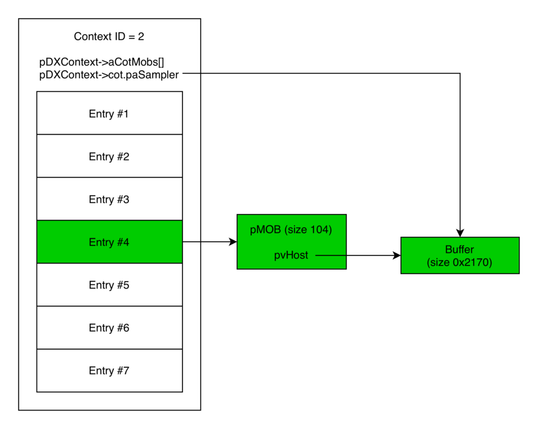
Zombie COTables: Resurrecting Freed Memory to Escape VirtualBox - Exodus Intelligence
By Luca Ginex Overview This blog post discusses a use-after-free vulnerability that we found in VirtualBox in 2025. This vulnerability was patched on Oracle Critical Patch Update – January 2026. The vulnerability was also presented, along with others, at OffensiveCon 2026. This post describes the exploitation process for the vulnerability on a Linux system. First, a ... Read more Zombie COTables: Resurrecting Freed Memory to Escape VirtualBox
 Alexandre Borges
Zombie COTables: Resurrecting Freed Memory to Escape VirtualBox:
#vulnerability #exploitation #exploit #virtualbox #cybersecurity #infosec #informationsecurity
Zombie COTables: Resurrecting Freed Memory to Escape VirtualBox - Exodus Intelligence
By Luca Ginex Overview This blog post discusses a use-after-free vulnerability that we found in VirtualBox in 2025. This vulnerability was patched on Oracle Critical Patch Update – January 2026. The vulnerability was also presented, along with others, at OffensiveCon 2026. This post describes the exploitation process for the vulnerability on a Linux system. First, a ... Read more Zombie COTables: Resurrecting Freed Memory to Escape VirtualBox
 🏳️⚧️Debian
#Linux #FreeBSD #QEMU #KVM #RockyLinux #Virtualbox
Testing FreeBSD(QEMU/KVM Virtaul Machine) run Rocky Linux by VirtualBox(Nested VM).
Testing FreeBSD(QEMU/KVM Virtaul Machine) run Rocky Linux by VirtualBox(Nested VM).
