 Uckermark MacGyver
Just discovered the awesome https://sankeymatic.com/ of @nowthis
Just what I needed to visualize a migration project 🙏

Just discovered the awesome https://sankeymatic.com/ of @nowthis
Just what I needed to visualize a migration project 🙏
(New Label features, continued)
New Feature #2 – You can make each label larger or smaller based on the amount it represents.
The Financial Results example shows how this can help draw attention to specific areas of your image.
Visit https://sankeymatic.com/build-next/ to try out both of these features. (Open the 'Labels' panel on the left.)
#DataViz #SankeyDiagrams #BuildNiceThings #SoftwareInProgress
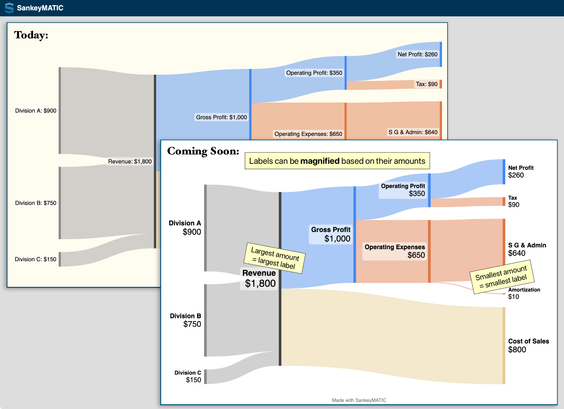
Two upcoming SankeyMATIC Label features you can try out today –
(Thread)
New Feature #1 – Names and Values can be placed on separate lines and can be given *different sizes*.
The Job Search example shows how this can allow larger & more readable labels by using the available space differently.
Visit https://sankeymatic.com/build-next/ to try it out. (Open the 'Labels' panel on the left.)
#DataViz #SankeyDiagrams #BuildNiceThings #SoftwareInProgress
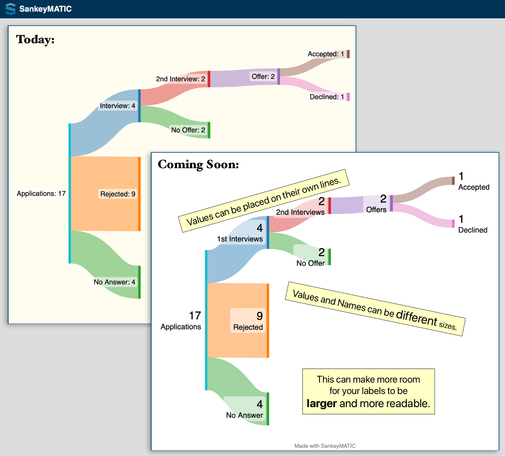
New Feature in progress:
*More control over your labels* 🎉
- Place names & values on separate lines (saving horizontal space)!
- Style names & values differently!
See the updated example diagrams – 'Job Search' and 'Financial Results' are shown here.
You can check out the new feature early at https://sankeymatic.com/build-next/
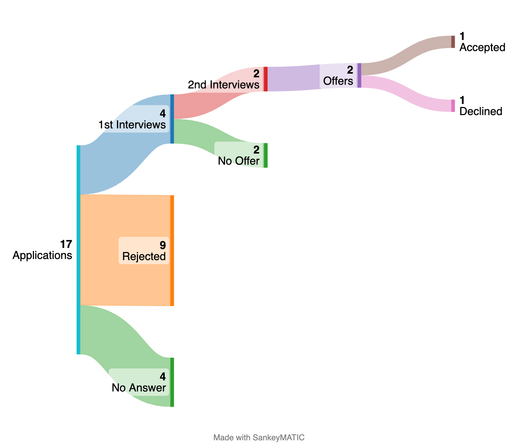
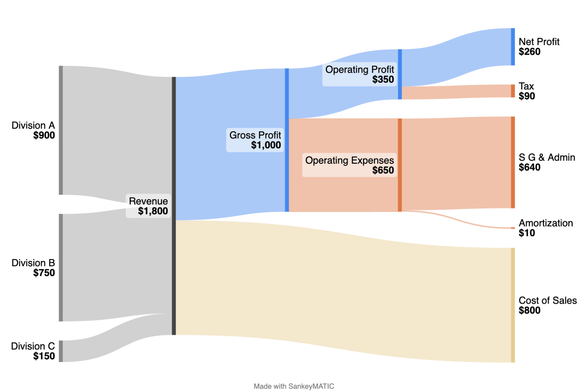
#SankeyDiagrams are great, and #SankeyMATIC by @nowthis is awesome!
https://sankeymatic.com/gallery/
Today I helped a fellow PhD student to use it, in a slight subversion of the original Sankey uses, to link some concepts that populated her research (everything weight 1).
A new feature is live!
* Save your data and settings to a plain text file.
* Upload it later and pick up exactly where you left off.
https://sankeymatic.com/build/
More details (and code) to come...

 Marcus Reynolds
 SankeyMATIC
 Alexandre B A Villares 🐍