I haven’t written much about my development approach to a project like @SankeyMATIC

It’s not TDD, not BDD, but EDD:
“Embarrassment-Driven Development”.

Basically years of conversations with myself that go like this:

- “Hey, [cool advanced feature] would be really awesome.”
- “It doesn’t support [extremely basic feature] yet though, Steve.”
- “Ouch. You’re right. That’s just embarrassing. Let’s do that first.”

…and repeat, endlessly.

#BuildNiceThings #SoftwareInProgress

(New Label features, continued)

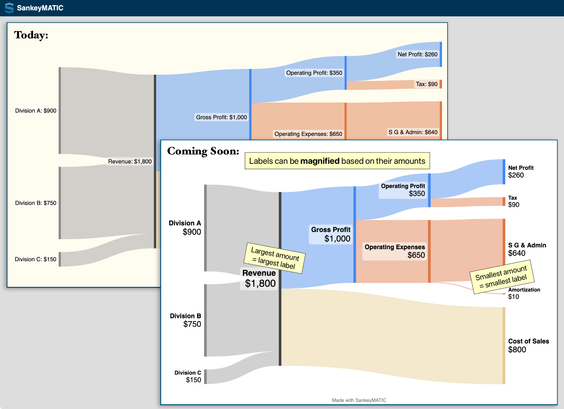
New Feature #2 – You can make each label larger or smaller based on the amount it represents.

The Financial Results example shows how this can help draw attention to specific areas of your image.

Visit https://sankeymatic.com/build-next/ to try out both of these features. (Open the 'Labels' panel on the left.)

#DataViz #SankeyDiagrams #BuildNiceThings #SoftwareInProgress

SankeyMATIC: Build a Sankey Diagram

Make beautiful flow diagrams. Export them as images or SVG.

SankeyMATIC.com

Two upcoming SankeyMATIC Label features you can try out today –
(Thread)

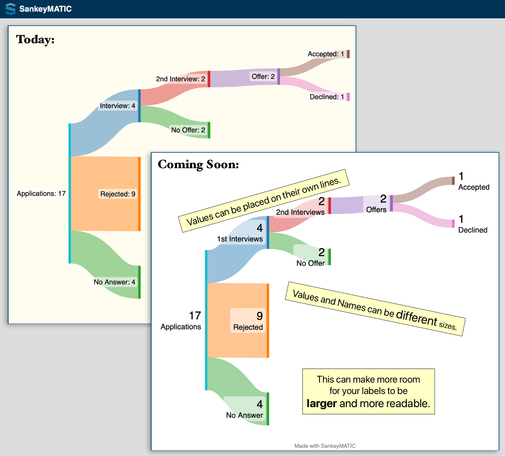
New Feature #1 – Names and Values can be placed on separate lines and can be given *different sizes*.

The Job Search example shows how this can allow larger & more readable labels by using the available space differently.

Visit https://sankeymatic.com/build-next/ to try it out. (Open the 'Labels' panel on the left.)

#DataViz #SankeyDiagrams #BuildNiceThings #SoftwareInProgress

SankeyMATIC: Build a Sankey Diagram

Make beautiful flow diagrams. Export them as images or SVG.

SankeyMATIC.com

Summing up the approach I want here (and which I try to apply in the systems I build):

If there’s something complicated/intricate/difficult even for people, I don’t want the computer to try to DO IT FOR ME.

I want the system to HELP THE HUMAN in the picture.

In the case of this theoretical site, I want a helpful formatter/analyzer to SHORTEN THE DISTANCE BETWEEN ME AND UNDERSTANDING.

There. That’s one of my statements of purpose: build things which shorten that distance.

#BuildNiceThings

Idle thought which threatens to turn into a project someday:

Is there already a site where you can take a complicated text, paste it in a blank, and:

- Parse the text’s structure and reformat it accordingly,

- highlight key terms,

- build an internal cross-reference,

And other cool things I haven’t thought of?

I kind of want this for opaque legal texts (like contracts, EULAs, laws, etc.) but honestly any complicated document might benefit from this treatment.

#TextAnalysis #law #BuildNiceThings

A new feature is live!

* Save your data and settings to a plain text file.

* Upload it later and pick up exactly where you left off.

https://sankeymatic.com/build/

More details (and code) to come...

#DataViz #SankeyDiagrams #BuildNiceThings

SankeyMATIC: Build a Sankey Diagram

Make beautiful flow diagrams. Export them as images or SVG.

SankeyMATIC.com

Fun things I’ve been learning lately about the modern ways to do things on the web:

* The Blob API!
(For generating downloadable export files on demand.)

* async Promises!
(For accepting an uploaded file and obtaining its text. Special guest star: Blob.text().)

* CSS Grid layout!
(Because I should probably remake the whole layout with it someday.)

As always, https://developer.mozilla.org/en-US/ has been invaluable for documentation and examples.

A cool feature is cooking!

#BuildNiceThings

Search

The MDN Web Docs site provides information about Open Web technologies including HTML, CSS, and APIs for both Web sites and progressive web apps.

MDN Web Docs
Working on a new geometry problem:
How best to handle flows that pass through several stages without having space made for them as they travel.
It’s looking like the thing to do will be to create _shadow_ nodes/flows which make room in each stage & connect to each other but are not included in the final render.
(I was calling them ‘ghosts’ until I remembered https://developer.mozilla.org/en-US/docs/Web/Web_Components/Using_shadow_DOM.)
#BuildNiceThings #projects
Using shadow DOM - Web Components | MDN

An important aspect of web components is encapsulation — being able to keep the markup structure, style, and behavior hidden and separate from other code on the page so that different parts do not clash, and the code can be kept nice and clean. The Shadow DOM API is a key part of this, providing a way to attach a hidden separated DOM to an element. This article covers the basics of using the Shadow DOM.