 oric_iss
"I have a dream", actually lot of dreams - "French Dreams" #SAM2695! Let's make dreams come true as real #MIDI_Synthesizer for #Oric and #OriCon 😎🎶.


SAM2695 does the 1812 finale

I've found another SAM2695 based synth module...
https://diyelectromusic.com/2025/07/15/other-sam2695-synths/

Other SAM2695 Synths
After my experiments with the XIAO ESP32-C3 MIDI Synthesizer and in particular, after looking in detail at some different SAM2695 synth modules in XIAO ESP32-C3 MIDI Synthesizer – Part 3, I’ve also found a few other neat modules that I thought worth a mention.
Warning! I strongly recommend using old or second hand equipment for your experiments. I am not responsible for any damage to expensive instruments!
If you are new to microcontrollers, see the Getting Started pages.
SAM2695 Synth Modules
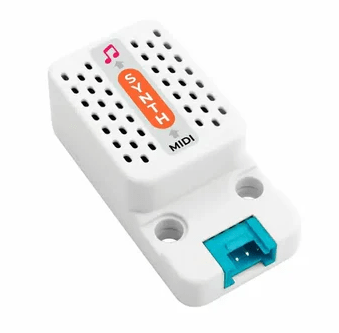
So far, in addition to the XIAO ESP32-C3 MIDI Synthesizer I’ve had a look at the M5Stack synth (see XIAO ESP32-C3 MIDI Synthesizer – Part 6) and mentioned in passing the original “GM Mini Synth” that first got me interested in the SAM2695 (see XIAO ESP32-C3 MIDI Synthesizer – Part 3).
MIDI Guy Modules
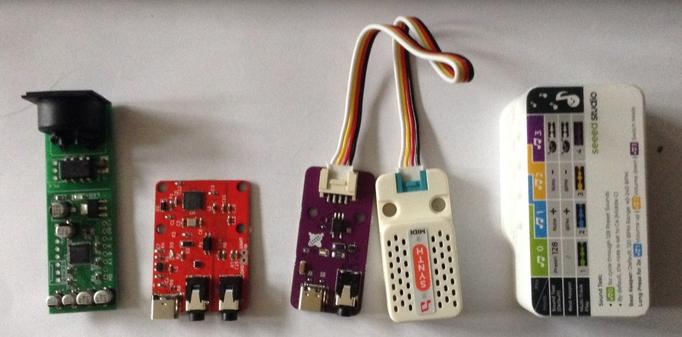
But I’ve also found the “MIDI Guy” modules on Tindie. There are two modules that are of particular interest to me:
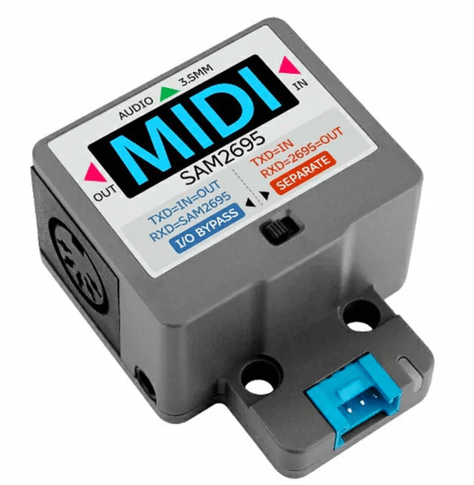
Both modules are USB-C powered and provide a MIDI interface. In the case of the “”midi-guy” “stand alone” PCB it is a MIDI interface with a Grove/M5 Stack connector to plug directly into the M5Stack MIDI Synthesizer module.
The “MIDI Guy” however incorporates a MIDI (TRS) IN interface, audio output and Dream SAM2695 synthesizer all into one single unit.
Closing Thoughts
These are both great little modules, and very inexpensive too. Mine both came with MIDI DIN to TRS converters too.
The MIDI Guy synth module also has a link to a 3D printable base plate (as shown in the photo above).
My only niggle is that the mounting holes on the MIDI interface don’t line up with the mounting holes for the M5 Stack synth module. I wonder if they did at one point and something changed…
Anyway, these are great modules. If you have a M5 stack synth, get this MIDI interface for it! It makes it so easy to use.
If you want to experiment with the SAM2695 synth, you can do a lot worse than the MID Guy module. It just has everything in a single board.
Note: I wasn’t sent or otherwise encouraged to write about these modules. I just spotted them, thought they looked interesting and bought them to try. I wasn’t disappointed.
Kevin
XIAO ESP32-C3 MIDI Synthesizer – Part 6
Expanding on my previous posts, I thought it might be interesting to see how I might be able to add some additional IO to the MIDI Synth. This is an exploration of some options there.
Warning! I strongly recommend using old or second hand equipment for your experiments. I am not responsible for any damage to expensive instruments!
These are the key tutorials for the main concepts used in this project:
If you are new to microcontrollers, see the Getting Started pages.
The Synth Grove Connector
One option to immediately explore for me was the Grove connector on the Synth – highlighted by the blue rectangle in the photo below. I’m thinking at this stage of the XIAO Expander Module (more here) and how that might give some options for easily hooking up to the Synth.
There one obvious issue with this, and one not so obvious issue.
First, of course, there is no access to this connector through the case. My initial thought was to simply remove the PCB from the case and use it as a stand-alone board. On initial inspection it seemed that there were two screws holding it down. Not so, a more thorough inspection (after remove the two screws and still not being able to remove it), revealed a third screw underneath the “light pipe” for the LEDs.
Unfortunately that light pipe is pretty well wedged into the case making removal particularly tricky. But without removing the light pipe, it isn’t possible to get to the screw at all.
I did wonder about making a hole in the 3D printed case. A better option might be to get hold of the published 3D print files and add a hole and make my own (they are available via the product page).
But both options would probably end up changing the original case somehow – even if printing my own, I still need to get the original PCB out somehow and that brings me back to the light pipe issue.
The second issue isn’t quite so obvious. In that photo we can see that the pins for the Grove connector are labelled as follows (top to bottom):
The UART on the XIAO expander board, which I’d like to use, is labelled:
Checking in with the Synth schematic, the connector is wired as follows:
SYS_MIDI connects to the MIDI_IN pin of the SAM2695, so actually connecting “TX to TX” in this instance should be ok.
5V might be an issue though, as it really does look like (to me) that it really means 5V – it is the input to the TPL740F33 that generates the 3V3 power signal, as well as feeding the amplifier directly. The datasheet of the TPL740F33 does seem to imply that if receiving 3V3 it can still generate 3V3 so it might be ok? The amplifier obviously won’t be as powerful though running off 3V3.
Anyway, for now, instead I’ve just opted to use the GPIO again, wired into the expansion sockets with the XIAO removed.
At the XIAO expander end, I’ve used the additional pins rather than the Grove connector, as they support a 5V output.
The downsides to this approach:
But I do now have access to two I2C Grove connectors, a GPIO Grove, and the RX part of the UART Grove too as well as the on-board display.
If a XIAO SAMD21 is used, then the previous code for USB to the Synth can be used directly – see XIAO ESP32-C3 MIDI Synthesizer – Part 2.
If the XIAO ESP32-C3 is used, then an additional serial MIDI connection is required. This can be connected to the Grove UART connector (using the RX pin, and leaving TX unconnected) or the RX pin of the additional 8-way pin header on the expansion board. Then the code from this will work directly: XIAO ESP32-C3 MIDI Synthesizer – Part 5.
Adding a Display and Program Control
I already have some code that has done this for a XIAO on an expansion board here XIAO SAMD21, Arduino and MIDI – Part 6.
But for this to work usefully with the Synth module, I need to adjust the routing so that MIDI goes from USB to serial, but the program change messages are also sent via serial to the synth module. That has already been address in previous parts, to I just need to merge the code with that from XIAO ESP32-C3 MIDI Synthesizer – Part 4.
This is the result.
There is a bit of jitter on the analog pot, but that is only because I’m using the original fairly simplified algorithm to detect changes. If I was fussed about it, I’d reuse the averaging class from Arduino MIDI Atari Paddles. And to be honest, a capacitor on the pot would probably go quite a long way too…
As a test, I also powered the device from the Grove UART port connecting it as follows:
And this all worked fine. So I think a Grove to Grove lead would work fine if I had access to the Synth’s Grove port.
This does mean that the exact same code can work with the M5 Synth module using a Grove to Grove lead. The downside of this, even though it is a lot simpler in connectivity terms, is that there is now external audio out like there is on the XIAO Synth.
For completeness the same code can be used with the XIAO ESP32-C3 and serial MIDI, see the photo at the start of this blog.
To turn off all USB handling in the code, the following must be commented out:
//#define HAS_USBFor other parts of the code, the Arduino abstraction for A0 maps over to the ESP32-C3 fine. The only thing to watch out for is the increased analog resolution from 10 to 12 bits, but a call to analogReadResolution(10) drops that back to the expected 10 bits.
Oh and the Serial port to use is different:
Closing Thoughts
If I can be bothered, it would be nice to actually display the General MIDI voice name on the display. The SAM2695 also has its MT-32 mode, so having some means of selecting that might be interesting too.
And so far I’ve largely only messed about with driving it on a single MIDI channel, so there is a lot more that could be done there.
Kevin
#controlChange #esp32c3 #midi #programChange #SAM2695 #samd21 #usbMidi #xiao


And whilst on the topic of SAM2695 devices, here is a short play with the M5 Stack MIDI Synth using essentially all the same principles of the set of other XIAO posts.
https://diyelectromusic.com/2025/06/28/xiao-usb-device-to-serial-midi-converter/

XIAO USB Device to Serial MIDI Converter
Having recently revisited the CircuitPython USB to Serial MIDI Router as part of XIAO ESP32-C3 MIDI Synthesizer – Part 2 it reminded me I didn’t really have a simple Arduino USB device to serial MIDI for the XIAO. So this is filling that gap.
Warning! I strongly recommend using old or second hand equipment for your experiments. I am not responsible for any damage to expensive instruments!
These are the key Arduino tutorials for the main concepts used in this project:
If you are new to Arduino, see the Getting Started pages.
Parts list
The Circuit
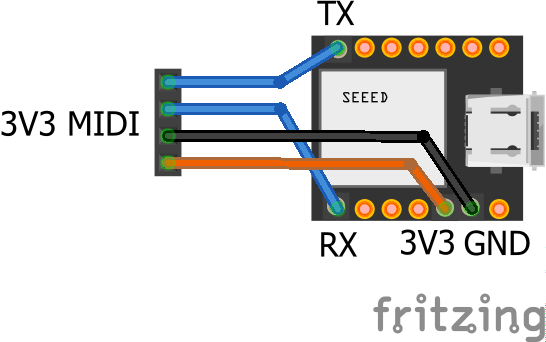
A 3V3 serial module can be hooked up to the TX/RX pins of the XIAO as shown above.
The Code
This is largely a simplification of the code used for XIAO SAMD21, Arduino and MIDI – Part 4 to use just the standard serial port and USB device MIDI.
There is one option at the top to determine how the serial port ought to be routed. There are two options:
In the other direction, USB always gets routed to the Serial port.
Closing Thoughts
Often I find I’ve missed out a simpler use-case in pursuit of a more complex one. This was one of those times so hopefully that is now fixed.
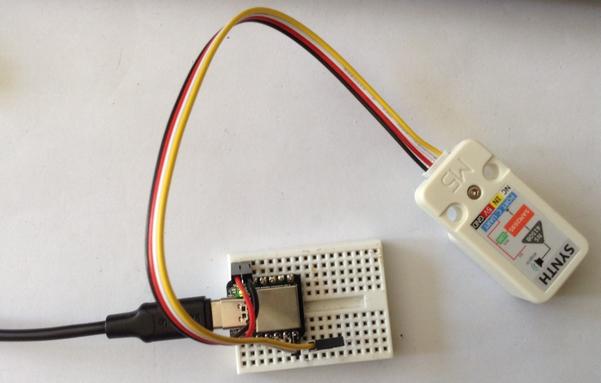
In the above photo I’m using it as a USB to serial router for my M5 Stack Synth module based on the SAM2695 that I’ve been playing with. The Synth is powered from the XIAO’s 5V and GND and connected to the TX/D6 pin. This allows me to use USB MIDI which gets routed to the M5 Synth hanging off the XIAO TX pin.
There is more on that particular synth chip here: XIAO ESP32-C3 MIDI Synthesizer – Part 3.
Kevin
XIAO MIDI Synthesizer Serial MIDI

XIAO ESP32-C3 MIDI Synthesizer – Part 5
So I was somewhat guilty that I’d replaced the XIAO microcontroller in the last couple of parts to get USB MIDI, so in this one I put the original ESP32-C3 back in and now have a version of Part 4 for serial MIDI.
https://makertube.net/w/wez7y8WrxrNgkF1F1QX2AX
Warning! I strongly recommend using old or second hand equipment for your experiments. I am not responsible for any damage to expensive instruments!
These are the key tutorials for the main concepts used in this project:
If you are new to microcontrollers, see the Getting Started pages.
The Circuit
This goes back to adding a 3V3 compatible serial MIDI board using the XIAO GPIO breakout pins as described in Part 1.
This is powered from 3V3 and GND and connected to D6/RX (which may or may not be GPIO 6).
The Code
This is all the same code from Part 4 but with the USB handling removed and the bespoke serial port writing replaced with calls into the Arduino MIDI Library using Serial0 as the MIDI device:
MIDI_CREATE_INSTANCE(HardwareSerial, Serial0, MIDI);Once again I’m relying on the fact that the serial MIDI transport has an automatic MIDI THRU enabled between RX and TX.
Closing Thoughts
Whilst the USB MIDI host solution is a lot more convenient in terms of being able to plug in MIDI controllers, the serial MIDI version is a lot easier when it comes to programming and powering the device.
The video shows a PC streaming a MIDI file to the XIAO Synth whilst I’m changing volume and voice.
Kevin

And part 4 goes back to using the XIAO SAMD21 in the XIAO Synth to create a simple synth module with buttons for voice selection and volume control.
https://diyelectromusic.com/2025/06/27/xiao-esp32-c3-midi-synthesizer-part-4/
 diyelectromusic
 diyelectromusic
 Simple DIY Electronic Music Projects