
I finally got the software installed (updating to circuit python removed my #Adafruit specific libraries, had to find those and reinstall on the #PyPortal)

Then after I got everything wired up I definitely had to cut a trace and solder a couple of pads to get it to work at 3.3v (a massive pain in the ass, the #PyPortal should come with the i2c port at 3.3v if it’s not even going to boot if you connect a device to it at 5v)
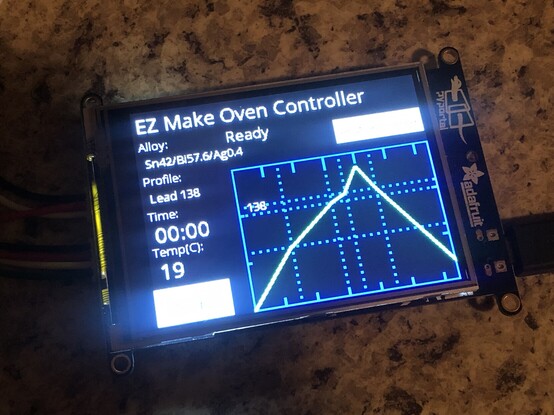

Today I fought with software for the #PyPortal. (The pyportal is the brains behind the reflow oven that I’m in the middle of making)

The #EZMakeOven page says use the latest version of circuit python. When I wiped the board and installed the latest 8.x, then installed the EZ Make oven software package, it was missing some libraries that it needed.

I eventually found an #adafruit circuit python GitHub repo, and installed that. Now, it finally works… er, well it doesn’t

1/3

Omg I love this so much.
---
RT @anne_engineer
My floppy disk has an old friend on it
#floppy #pyportal #gif #CircuitPython @MarkKomus @adafruit #maxheadroom
https://twitter.com/anne_engineer/status/1630375626682105858
Anne Barela on Twitter

“My floppy disk has an old friend on it #floppy #pyportal #gif #CircuitPython @MarkKomus @Adafruit #maxheadroom”

Twitter
Does anyone know where on can find the tech specs for the sensors on the Adafruit PyPortal? I'm trying to find the supported ranges for the built-in temp and light sensors. But I can't seem to find that anywhere. #Adafruit #PyPortal #sensors
Finally had a chance to work on my PyPortal data logger. Still futzing with the UI. This is what the main view will look like. #CircuitPython #Adafruit #PyPortal #CodingAtNight
Have been spending much of the afternoon and evening reading up on CircuitPython and Adafruit’s various helper libraries. My PyPortal app will have a few different views and I had to go old-school paper model to help me visualize how I should organize the layout with all the different views and component groups.
#CircuitPython #PaperPrototype #IoT #PyPortal #CrazySideProject

Made progress on the MVP for my IoT Logger running on a PyPortal. I’m basing this thing on what I’ve learned from the excellent Adafruit tutorials.

This thing will eventually have more sensors and the GUI will allow you to start/stop the device, and it will also show a graph of the data.

The data itself is uploaded to AdafruitIO where I can see the feed data in dashboards, etc.

And yes, I will put the code on GitHub once it’s a bit cleaner 🤓 #Adafruit #PyPortal #CircuitPython #IoT

Have been playing with one of my PyPortal devices and built a simple data logger following a tutorial on Adafruit. It works! Now it’s time to tweak and play and make it do other stuff 🤓 #Adafruit #PyPortal #data #IoT

https://learn.adafruit.com/iot-pyportal-data-logger-adafruitio-circuitpython

PyPortal IoT Data Logger with Analog Devices ADT7410, Adafruit IO and CircuitPython

Connected your PyPortal to the internet, but want to do more with your data? This guide will get your PyPortal communicating with our Internet of Things service - Adafruit IO using the easy-to-use Adafruit IO CircuitPython library. We'll be sending temperature and light data from the PyPortal to create a logger.

Adafruit Learning System
Spent over an hour trying to troubleshoot an issue with #MQTT on my #Adafruit #PyPortal and ended up updating all libraries and firmware on it only for the problem to persist. The solution? Poll the MQTT broker more often. I tried to be nice by setting it to a minute between polls. I guess it times out and disconnects. 🤦‍♂️
@IronPipe Yes, the PyPortal is definitely a capable device. I now have 2 and am looking at using them for some projects that also include the AdafruitIO service. By the way, I got the PyPortals because I couldn't get hold of the Pico WH units. But now I'm happy I got the PyPortals instead. They have so many features and a screen so it's (relatively) easy to get some cool projects going quickly without needing additional components. #PyPortal