Turns out you can build Power Apps in your Microsoft 365 tenant with Claude — Microsoft just shipped MCP tools for the Power Platform. A full app in 20–30 minutes, from a Mac.
https://marcpuricelli.cv/posts/building-power-apps-with-claude.html
#PowerApps #PowerPlatform #Microsoft365 #Claude #MCP #LowCode #mac

Building Power Apps with Claude — Marc Puricelli

Microsoft's new MCP tools for the Power Platform make it possible to co-author canvas apps with Claude — a full app built in 20–30 minutes, from a Mac.

🧩 New tutorial: Build a Sliding Picture Puzzle in Power Apps
Learn grid logic, tile movement, and interactive UI design
👉 https://towardsdev.com/a9af6835c9b5

#PowerApps #LowCode #Microsoft365 #TTMO

Power Apps is a powerhouse for rapid prototyping within the Microsoft ecosystem, but for complex development, the "seams" are becoming visible. This new analysis explores the "Complexity Ceiling" and the friction points faced by architects and developers, suggesting ways to address them.
🔗 https://www.alanbonnici.com/2026/05/the-complexity-ceiling-where-microsoft.html

#PowerPlatform #PowerApps #LowCode #Microsoft365 #SoftwareArchitecture #DevCommunity #TTMO

The Complexity Ceiling: Where Microsoft Power Apps Needs to Evolve for Complex Development

A practitioner's analysis of friction points, mental model mismatches, and the path forward for serious Power Apps development.

AI-Powered Vibe Coding Transforming Microsoft Power Apps Fast.

Discover how AI-powered Vibe Coding is revolutionizing Microsoft Power Apps development with Copilot, automation, and low-code innovation. Learn how businesses build scalable apps faster, reduce costs, and accelerate digital transformation.

#PowerApps #AICoding #VibeCoding #MicrosoftCopilot #LowCodeDevelopment

https://star-knowledge.com/blog/power-apps-with-vibe-coding-and-ai/

Power Apps with Vibe Coding and AI: Future of Apps

Build smarter apps faster using Power Apps with Vibe Coding and AI. Automate workflows and accelerate digital transformation.

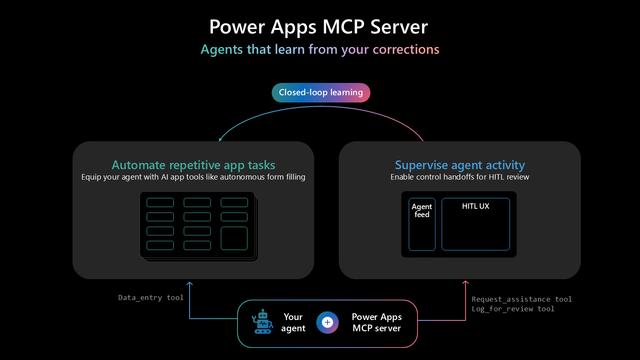
Power Apps introduces closed‑loop learning: agents now learn from real user corrections, turning feedback into org‑wide improvements. Less manual fixing, smarter automations, better accuracy over time.
#PowerApps #AI #Automation #EnterpriseAI #Copilot #MCPServer
https://www.microsoft.com/en-us/power-platform/blog/power-apps/power-apps-mcp-server-introduces-closed-loop-learning-for-enterprise-agents/
Closed-loop learning on the Power Apps MCP server

Every user correction calibrates the agent to your business, automatically. Closed-loop learning is live today on the Power Apps MCP server.

Microsoft Power Platform Blog
Power Apps introduces closed‑loop learning: agents now learn from real user corrections, turning feedback into org‑wide improvements. Less manual fixing, smarter automations, better accuracy over time. #PowerApps #AI #Automation #EnterpriseAI #Copilot #MCPServer

Closed-loop learning on the Po...
Closed-loop learning on the Power Apps MCP server

Every user correction calibrates the agent to your business, automatically. Closed-loop learning is live today on the Power Apps MCP server.

Microsoft Power Platform Blog

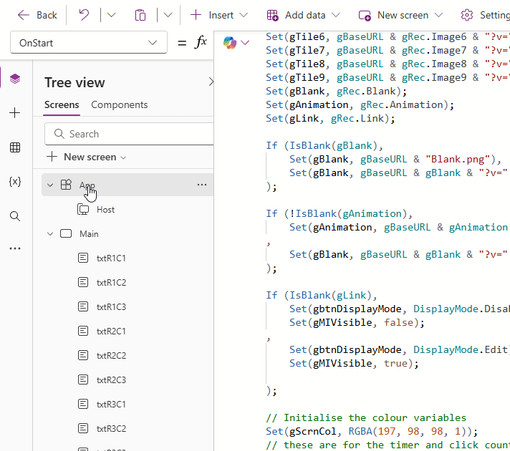
I’ve written a new tutorial on creating a sliding picture puzzle in Power Apps 🧩

This project explores: • Grid-based layouts
• Tile movement logic
• Interactive UI design

🔗 https://www.alanbonnici.com/2026/05/building-sliding-picture-puzzle-in.html

#PowerApps #LowCode #UX #AppDevelopment #TTMO

Building a Sliding Picture Puzzle in Microsoft Power Apps

This blog is about security and computing related topics with occassional hobby activities thrown in.

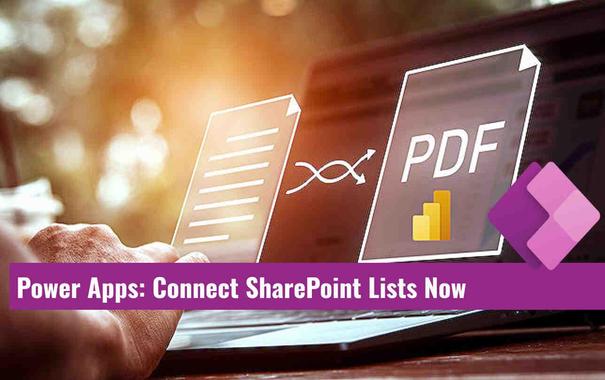
🟪 Connect SharePoint Lists to Power Apps Code Apps

Practical walkthrough for adding SharePoint as a data source in Code Apps 🚀
Dhruvin Shah demonstrates pac code add-data-source in VS Code and PAC CLI.
He builds a Patient Tracker with React and TypeScript to render live cards.
Includes connection ID retrieval models services and local preview steps.
💡 SharePoint connection via PAC CLI
🔍 Auto generated models and services
⚖️ React TypeScript patient card UI

Watch the step by step and try building your own Code App.
#PowerApps #SharePoint #PACCLI #ReactTypeScript
▶︎https://www.hubsite365.com/en-ww/citizen-developer/?id=8cddbf94-8b4c-f111-bec7-00224882d634&topic=8daf8386-bb75-ea11-a811-000d3a210788&theater=true

Power Apps のデータグリッドコントロールが凄く便利! - Qiita

はじめに Power Apps キャンバスアプリで SharePoint リスト等のデータを一覧表示するためのコントロールというと、ギャラリーコントロールかテーブルコントロールのいずれかを使うケースがほとんどかと思います。 今回、モダンコントロールに追加されたデータグリッ...

Qiita