Galaxy Watch6 receives a new January 2026 update!

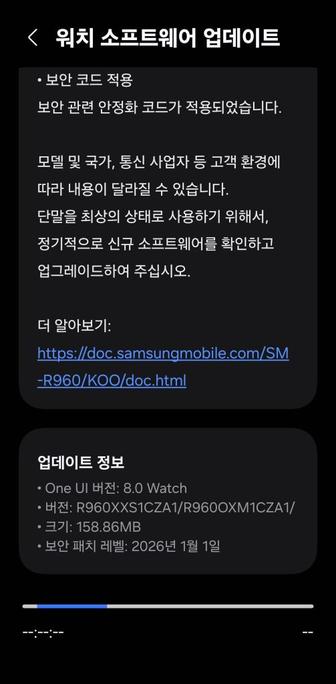
Samsung has started rolling out a new software update that upgrades the security patch level to January 1st, 2026, to the Galaxy Watch6 series, starting from Korea. The flagship watches will be updated to the following versions:

  • Galaxy Watch6 40mm (BT and Cellular, SM-R930/R935x): CZA1
  • Galaxy Watch6 44mm (BT and Cellular, SM-R940/R945x): CZA1
  • Galaxy Watch6 Classic 40mm (BT and Cellular, SM-R950/R955x): CZA1
  • Galaxy Watch6 Classic 44mm (BT and Cellular, SM-R960/R965x): CZA1

You can now update your smartwatch, but if you still didn’t receive any update, you’ll have to wait for a few days as this rollout is a gradual rollout that starts from Korea. You can periodically check for updates to see if this update has reached your device. We recommend that you update your watch manager in your phone to ensure compatibility with the latest software.

To update your watch, follow these steps:

  • With your phone
  • Open Galaxy Wearable
  • Select your watch
  • Open Watch settings
  • Navigate to Software Update
  • Tap Download and Install
  • Wait until the update shows up, then press Download
  • Wait until the update gets downloaded and copied to your watch, then press Install
  • With your watch
  • Open Settings
  • Navigate to Software update
  • Tap Download and Install
  • Wait until the update shows up, then press Download
  • Wait until it gets downloaded to your watch, then press Install

In an event that something went wrong with copying the update, disconnect your phone from your watch by turning Bluetooth off or by disconnecting it through Galaxy Wearable, then try again from your watch. Make sure to turn Wi-Fi on in your watch to download the update faster.

Make sure that both your phone and your watch are charged before performing the update, and that your internet connection is stable. Never interrupt the update process, or there could be problems later. The update process may take a few minutes to finish, and if it appears to be stuck, just wait for more minutes.

#Android #GalaxyWatch6 #GalaxyWatch6Classic #news #oneUi #OneUI6Watch #Samsung #SamsungGalaxyWatch6 #SamsungGalaxyWatch6Classic #smartwatch #Smartwatches #Tech #Technology #update #Watch #Watch6 #Watch6Classic #Wearable
Galaxy Watch4 receives the January 2026 update

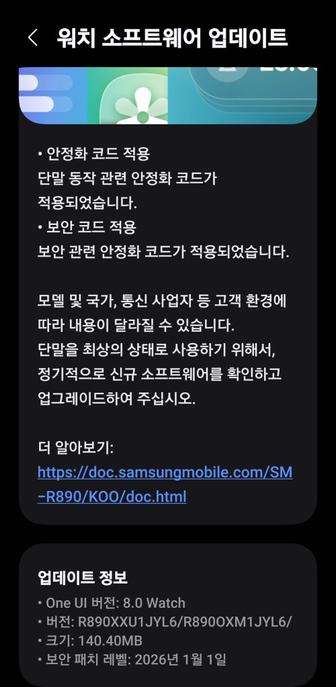
Samsung has started rolling out a new software update to the Galaxy Watch4 series, starting from Korea, as of today. It brings the January 2026 security patch, along with some stability improvements. The watches will be updated to the following versions:

  • Galaxy Watch4 40mm (BT and Cellular, SM-R860/R865x): JYL6 [KOO]
  • Galaxy Watch4 44mm (BT and Cellular, SM-R870/R875x): JYL6 [KOO]
  • Galaxy Watch4 Classic 40mm (BT and Cellular, SM-R880/R885x): JYL6 [KOO]
  • Galaxy Watch4 Classic 44mm (BT and Cellular, SM-R890/R895x): JYL6 [KOO]

You can now update your smartwatch, but if you still didn’t receive any update, you’ll have to wait for a few days as this rollout is a gradual rollout that starts from Korea. You can periodically check for updates to see if this update has reached your device. We recommend that you update your watch manager in your phone to ensure compatibility with the latest software.

To update your watch, follow these steps:

  • With your phone
  • Open Galaxy Wearable
  • Select your watch
  • Open Watch settings
  • Navigate to Software Update
  • Tap Download and Install
  • Wait until the update shows up, then press Download
  • Wait until the update gets downloaded and copied to your watch, then press Install
  • With your watch
  • Open Settings
  • Navigate to Software update
  • Tap Download and Install
  • Wait until the update shows up, then press Download
  • Wait until it gets downloaded to your watch, then press Install

In an event that something went wrong with copying the update, disconnect your phone from your watch by turning Bluetooth off or by disconnecting it through Galaxy Wearable, then try again from your watch. Make sure to turn Wi-Fi on in your watch to download the update faster.

Make sure that both your phone and your watch are charged before performing the update, and that your internet connection is stable. Never interrupt the update process, or there could be problems later. The update process may take a few minutes to finish, and if it appears to be stuck, just wait for more minutes.

#Android #GalaxyWatch4 #GalaxyWatch4 #news #oneUi #OneUI6Watch #Samsung #SamsungGalaxyWatch4 #SamsungGalaxyWatch4 #smartwatch #Smartwatches #Tech #Technology #update #Watch #Watch4 #Watch4 #Wearable

Galaxy Watch4 BT receives a new update with August 2025 security patch!

Samsung has started rolling out a new software update to the Galaxy Watch4 series, starting from Korea, which updates your watch’s security patch to August 2025 and improves some of the features in One UI 6 Watch. This is done prior to One UI 8 Watch. The flagship watches will be updated to the following versions:

  • Galaxy Watch4 40mm (BT, SM-R860): IYI1 [KOO]
  • Galaxy Watch4 44mm (BT, SM-R870): IYI1 [KOO]
  • Galaxy Watch4 Classic 40mm (BT, SM-R880): IYI1 [KOO]
  • Galaxy Watch4 Classic 44mm (BT, SM-R890): IYI1 [KOO]

You can now update your smartwatch, but if you still didn’t receive any update, you’ll have to wait for a few days as this rollout is a gradual rollout that starts from Korea. You can periodically check for updates to see if this update has reached your device. We recommend that you update your watch manager in your phone, if available, to ensure compatibility with the latest software.

To update your watch, follow these steps:

  • With your phone
  • Open Galaxy Wearable
  • Select your watch
  • Open Watch settings
  • Navigate to Software Update
  • Tap Download and Install
  • Wait until the update shows up, then press Download
  • Wait until the update gets downloaded and copied to your watch, then press Install
  • With your watch
  • Open Settings
  • Navigate to Software update
  • Tap Download and Install
  • Wait until the update shows up, then press Download
  • Wait until it gets downloaded to your watch, then press Install

In an event that something went wrong with copying the update, disconnect your phone from your watch by turning Bluetooth off or by disconnecting it through Galaxy Wearable, then try again from your watch. Make sure to turn Wi-Fi on in your watch to download the update faster.

Make sure that both your phone and your watch are charged before performing the update, and that your internet connection is stable. Never interrupt the update process, or there could be problems later. The update process may take a few minutes to finish, and if it appears to be stuck, just wait for more minutes.

#Android #GalaxyWatch4 #news #oneUi #OneUI6Watch #Samsung #SamsungGalaxyWatch4 #smartwatch #Smartwatches #Tech #Technology #update #Watch #Watch4 #Wearable

Galaxy Watch5 BT receives a new update with August 2025 security patch!

Samsung has started rolling out a new software update to the Galaxy Watch5 series, starting from Korea, which updates your watch’s security patch to August 2025 and improves some of the features in One UI 6 Watch. The flagship watches will be updated to the following versions:

  • Galaxy Watch5 40mm (BT, SM-R900): CYJ1 [KOO]
  • Galaxy Watch5 44mm (BT, SM-R910): CYJ1 [KOO]
  • Galaxy Watch5 Pro (BT, SM-R920): CYJ1 [KOO]

You can now update your smartwatch, but if you still didn’t receive any update, you’ll have to wait for a few days as this rollout is a gradual rollout that starts from Korea. You can periodically check for updates to see if this update has reached your device. We recommend that you update your watch manager in your phone, if available, to ensure compatibility with the latest software.

To update your watch, follow these steps:

  • With your phone
  • Open Galaxy Wearable
  • Select your watch
  • Open Watch settings
  • Navigate to Software Update
  • Tap Download and Install
  • Wait until the update shows up, then press Download
  • Wait until the update gets downloaded and copied to your watch, then press Install
  • With your watch
  • Open Settings
  • Navigate to Software update
  • Tap Download and Install
  • Wait until the update shows up, then press Download
  • Wait until it gets downloaded to your watch, then press Install

In an event that something went wrong with copying the update, disconnect your phone from your watch by turning Bluetooth off or by disconnecting it through Galaxy Wearable, then try again from your watch. Make sure to turn Wi-Fi on in your watch to download the update faster.

Make sure that both your phone and your watch are charged before performing the update, and that your internet connection is stable. Never interrupt the update process, or there could be problems later. The update process may take a few minutes to finish, and if it appears to be stuck, just wait for more minutes.

#Android #GalaxyWatch5 #news #oneUi #OneUI6Watch #Samsung #SamsungGalaxyWatch5 #smartwatch #Smartwatches #Tech #Technology #update #Watch #Watch5 #Wearable

Galaxy Watch6, Watch7, and Watch Ultra LTE receive August 2025 security update in India!

Samsung has just released the August 2025 security patch in India for the LTE version of Galaxy Watch6, Watch7, and Watch Ultra (2024 original and 2025 reboot). This patch enhances your smartwatch’s security to make sure that you and your data are kept secure. This aligns with the quarterly cadence of the software update scheduling for five years of security updates and four generations of system updates.

The following firmware information is available:

  • SM-L705F: L705FXXU1BYH6 [INS]
  • SM-L315F: L315FXXU1AYH1 [INS]
  • SM-L305F: L305FXXU1AYH1 [INS]
  • SM-R965F: R965FXXS1BYH1 [INS]
  • SM-R955F: R955FXXS1BYH1 [INS]
  • SM-R945F: R945FXXS1BYH1 [INS]
  • SM-R935F: R935FXXS1BYH1 [INS]

You can now update your smartwatch, but if you still didn’t receive any update, you’ll have to wait for a few days as this rollout is a gradual rollout that starts from Korea. You can periodically check for updates to see if this update has reached your device. We recommend that you update your watch manager in your phone to ensure compatibility with the latest software.

To update your watch, follow these steps:

  • With your phone
  • Open Galaxy Wearable
  • Select your watch
  • Open Watch settings
  • Navigate to Software Update
  • Tap Download and Install
  • Wait until the update shows up, then press Download
  • Wait until the update gets downloaded and copied to your watch, then press Install
  • With your watch
  • Open Settings
  • Navigate to Software update
  • Tap Download and Install
  • Wait until the update shows up, then press Download
  • Wait until it gets downloaded to your watch, then press Install

In an event that something went wrong with copying the update, disconnect your phone from your watch by turning Bluetooth off or by disconnecting it through Galaxy Wearable, then try again from your watch. Make sure to turn Wi-Fi on in your watch to download the update faster.

Make sure that both your phone and your watch are charged before performing the update, and that your internet connection is stable. Never interrupt the update process, or there could be problems later. The update process may take a few minutes to finish, and if it appears to be stuck, just wait for more minutes.

#Android #Android14 #GalaxyWatch6 #GalaxyWatch6Classic #news #oneUi #OneUI6 #OneUI6Watch #Samsung #SamsungGalaxyWatch6 #SamsungGalaxyWatch6Classic #Tech #Technology #update #Watch6 #Watch6Classic

Galaxy Watch6 receives a new August 2025 update!

Samsung has started rolling out a new software update that is rather massive to the Galaxy Watch6 series, starting from Korea. This happened according to Alfatürk on X. The flagship watches will be updated to the following versions:

  • Galaxy Watch6 40mm (BT and Cellular, SM-R930/R935x): BYH1
  • Galaxy Watch6 44mm (BT and Cellular, SM-R940/R945x): BYH1
  • Galaxy Watch6 Classic 40mm (BT and Cellular, SM-R950/R955x): BYH1
  • Galaxy Watch6 Classic 44mm (BT and Cellular, SM-R960/R965x): BYH1

You can now update your smartwatch, but if you still didn’t receive any update, you’ll have to wait for a few days as this rollout is a gradual rollout that starts from Korea. You can periodically check for updates to see if this update has reached your device. We recommend that you update your watch manager in your phone to ensure compatibility with the latest software.

To update your watch, follow these steps:

  • With your phone
  • Open Galaxy Wearable
  • Select your watch
  • Open Watch settings
  • Navigate to Software Update
  • Tap Download and Install
  • Wait until the update shows up, then press Download
  • Wait until the update gets downloaded and copied to your watch, then press Install
  • With your watch
  • Open Settings
  • Navigate to Software update
  • Tap Download and Install
  • Wait until the update shows up, then press Download
  • Wait until it gets downloaded to your watch, then press Install

In an event that something went wrong with copying the update, disconnect your phone from your watch by turning Bluetooth off or by disconnecting it through Galaxy Wearable, then try again from your watch. Make sure to turn Wi-Fi on in your watch to download the update faster.

Make sure that both your phone and your watch are charged before performing the update, and that your internet connection is stable. Never interrupt the update process, or there could be problems later. The update process may take a few minutes to finish, and if it appears to be stuck, just wait for more minutes.

#Android #GalaxyWatch6 #GalaxyWatch6Classic #news #oneUi #OneUI6Watch #Samsung #SamsungGalaxyWatch6 #SamsungGalaxyWatch6Classic #smartwatch #Smartwatches #Tech #Technology #update #Watch #Watch6 #Watch6Classic #Wearable
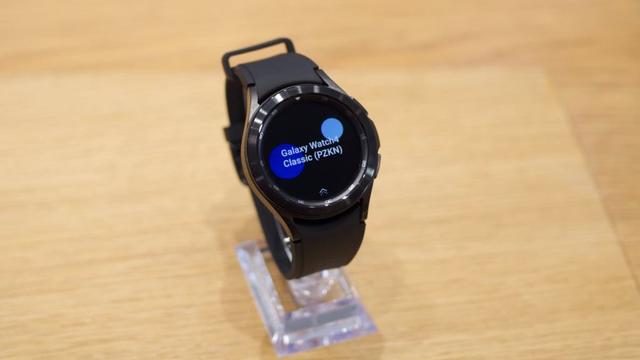
Galaxy Watch6 receives a new August 2025 update!

Samsung has started rolling out a new software update that is rather massive to the Galaxy Watch6 series, starting from Korea. This happened according to Alfatürk on X. The flagship watches will be…

Aptivi

Galaxy Watch6 LTE will be updated in Canada soon!

After Samsung rolled out the stability update to the Galaxy Watch7 series, Samsung has started rolling out a new software update that is rather massive to the Galaxy Watch6 series in the USA, Canada, India, Saudi Arabia, the UAE, and more, starting from the Bluetooth variant. The cellular versions might take longer to receive the update, though.

According to our tests on our BT version of the Galaxy Watch6 that got the update, the battery life has significantly improved! Not only will your battery last longer on usage, but suspend will no longer consume too much battery.

The LTE version of the flagship watches will be updated to the following versions in Canada on May 21st:

  • Galaxy Watch6 40mm (Cellular, SM-R935F): BYD1
  • Galaxy Watch6 44mm (Cellular, SM-R945F): BYD1
  • Galaxy Watch6 Classic 40mm (Cellular, SM-R955F): BYD1
  • Galaxy Watch6 Classic 44mm (Cellular, SM-R965F): BYD1

You can update your smartwatch once it gets released, but if you still didn’t receive any update, you’ll have to wait for a few days. You can periodically check for updates to see if this update has reached your device. We recommend that you update your watch manager in your phone to ensure compatibility with the latest software.

To update your watch, follow these steps:

  • With your phone
  • Open Galaxy Wearable
  • Select your watch
  • Open Watch settings
  • Navigate to Software Update
  • Tap Download and Install
  • Wait until the update shows up, then press Download
  • Wait until the update gets downloaded and copied to your watch, then press Install
  • With your watch
  • Open Settings
  • Navigate to Software update
  • Tap Download and Install
  • Wait until the update shows up, then press Download
  • Wait until it gets downloaded to your watch, then press Install

In an event that something went wrong with copying the update, disconnect your phone from your watch by turning Bluetooth off or by disconnecting it through Galaxy Wearable, then try again from your watch. Make sure to turn Wi-Fi on in your watch to download the update faster.

Make sure that both your phone and your watch are charged before performing the update, and that your internet connection is stable. Never interrupt the update process, or there could be problems later. The update process may take a few minutes to finish, and if it appears to be stuck, just wait for more minutes.

#Android #GalaxyWatch7 #GalaxyWatch7 #news #oneUi #OneUI6Watch #Samsung #SamsungGalaxyWatch7 #SamsungGalaxyWatch7 #smartwatch #Smartwatches #Tech #Technology #update #Watch #Watch7 #Watch7 #Wearable

Software Update Schedule

All dates are approximate and subject to change. Please note posted dates reflect when the update is targeted for release but can take a few weeks to roll out to all devices.   Device Target date Update Information Moto Edge (2024) Apr 9 Security Update Moto Edge (2023) Apr 21 Security Update Google...

Galaxy Watch4 receives a new update globally!

After Samsung rolled out the stability update to the Galaxy Watch7, Watch6, and Watch5 series, Samsung has started rolling out a new software update that is rather massive to the Galaxy Watch4 series in the USA, Canada, India, and more. The cellular versions might take longer to receive the update, though. The flagship watches will be updated to the following versions:

  • Galaxy Watch4 40mm (BT and Cellular, SM-R860/R865x): IYCD
  • Galaxy Watch4 44mm (BT and Cellular, SM-R870/R875x): IYCD
  • Galaxy Watch4 Classic 40mm (BT and Cellular, SM-R880/R885x): IYCD
  • Galaxy Watch4 Classic 44mm (BT and Cellular, SM-R890/R895x): IYCD

You can now update your smartwatch, but if you still didn’t receive any update, you’ll have to wait for a few days as this rollout is a gradual rollout that starts from Korea. You can periodically check for updates to see if this update has reached your device. We recommend that you update your watch manager in your phone to ensure compatibility with the latest software.

To update your watch, follow these steps:

  • With your phone
  • Open Galaxy Wearable
  • Select your watch
  • Open Watch settings
  • Navigate to Software Update
  • Tap Download and Install
  • Wait until the update shows up, then press Download
  • Wait until the update gets downloaded and copied to your watch, then press Install
  • With your watch
  • Open Settings
  • Navigate to Software update
  • Tap Download and Install
  • Wait until the update shows up, then press Download
  • Wait until it gets downloaded to your watch, then press Install

In an event that something went wrong with copying the update, disconnect your phone from your watch by turning Bluetooth off or by disconnecting it through Galaxy Wearable, then try again from your watch. Make sure to turn Wi-Fi on in your watch to download the update faster.

Make sure that both your phone and your watch are charged before performing the update, and that your internet connection is stable. Never interrupt the update process, or there could be problems later. The update process may take a few minutes to finish, and if it appears to be stuck, just wait for more minutes.

#Android #GalaxyWatch4 #GalaxyWatch4 #news #oneUi #OneUI6Watch #Samsung #SamsungGalaxyWatch4 #SamsungGalaxyWatch4 #smartwatch #Smartwatches #Tech #Technology #update #Watch #Watch4 #Watch4 #Wearable

Galaxy Watch7 and Watch6 Manager Update (April 2025)

Today, Samsung has rolled out the Galaxy Watch7 Manager and the Galaxy Watch6 Manager update globally as they’re working on an update for both smartwatches. You can now download the update th…

Aptivi

Galaxy Watch5 receives a new update globally!

After Samsung rolled out the stability update to the Galaxy Watch7 and the Watch6 series, Samsung has started rolling out a new software update that is rather massive to the Galaxy Watch5 series in the USA, Canada, India, and more. The cellular versions might take longer to receive the update, though. The flagship watches will be updated to the following versions:

  • Galaxy Watch5 40mm (BT and Cellular, SM-R900/R905x): CYCD
  • Galaxy Watch5 44mm (BT and Cellular, SM-R910/R915x): CYCD
  • Galaxy Watch5 Pro 45mm (BT and Cellular, SM-R920/R925x): CYCD

You can now update your smartwatch, but if you still didn’t receive any update, you’ll have to wait for a few days as this rollout is a gradual rollout that starts from Korea. You can periodically check for updates to see if this update has reached your device. We recommend that you update your watch manager in your phone to ensure compatibility with the latest software.

To update your watch, follow these steps:

  • With your phone
  • Open Galaxy Wearable
  • Select your watch
  • Open Watch settings
  • Navigate to Software Update
  • Tap Download and Install
  • Wait until the update shows up, then press Download
  • Wait until the update gets downloaded and copied to your watch, then press Install
  • With your watch
  • Open Settings
  • Navigate to Software update
  • Tap Download and Install
  • Wait until the update shows up, then press Download
  • Wait until it gets downloaded to your watch, then press Install

In an event that something went wrong with copying the update, disconnect your phone from your watch by turning Bluetooth off or by disconnecting it through Galaxy Wearable, then try again from your watch. Make sure to turn Wi-Fi on in your watch to download the update faster.

Make sure that both your phone and your watch are charged before performing the update, and that your internet connection is stable. Never interrupt the update process, or there could be problems later. The update process may take a few minutes to finish, and if it appears to be stuck, just wait for more minutes.

#Android #GalaxyWatch5 #GalaxyWatch5 #news #oneUi #OneUI6Watch #Samsung #SamsungGalaxyWatch5 #SamsungGalaxyWatch5 #smartwatch #Smartwatches #Tech #Technology #update #Watch #Watch5 #Watch5 #Wearable

Galaxy Watch7 and Watch6 Manager Update (April 2025)

Today, Samsung has rolled out the Galaxy Watch7 Manager and the Galaxy Watch6 Manager update globally as they’re working on an update for both smartwatches. You can now download the update th…

Aptivi