 Ombre
OmbreI’ve played a bit of https://replicant.space lately. It’s an API-based game, and I was very curious about it. I’ve had an idea about a web game featuring a fully-fledged API for a while, but never got around doing much about it, and now my dream has come true thanks to @mercutio !
What’s this game about ?
Being an API-only game is quite an experience. Apart from a good documentation (both "human-friendly" and made-for-automated-discovery), and a tutorial covering the basics, there is no user-friendly interface. All of the interaction take place using HTTP requests (mostly GET and POST).
Unless someone develops a user-friendly frontend, this will remain nerd stuff. That’s what makes it cool. However, it could also be a fun playground to learn about APIs, and I could even see teachers basing their courses around it.
Starting the game
Registering for an account requires sending a POST request to an API endpoint. I then got an email with a confirmation link, which leads to a page containing the precious API token I then used to authenticate every request. At this point, I was simply using cURL.
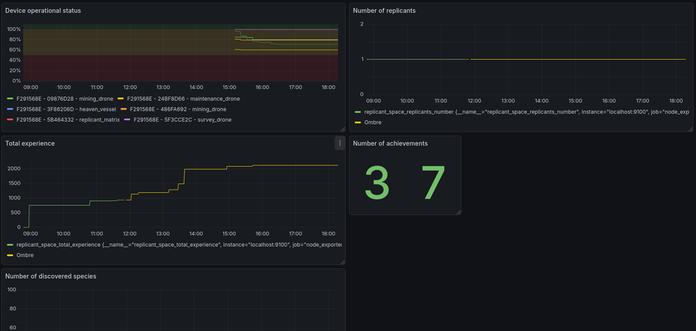
Once being registered, I knew I couldn’t simply start to play. I had to setup Prometheus to scrape some precious metrics. I initially settled on two : my total experience points, and my number of replicants. I then added more as I played.
I started playing by following the quickstart. I got my bearings in NANKI, travelled the system, mined resources, built some drones… This is when I stopped using curl in favour of Nushell. It’s basically a shell with some API and data processing built-in. This was a nice way to get more used to it, and I really took advantage of the pretty formatting of nu. Later, I started writing nu scripts to automate some things (deploying and stowing swarms of drones).
My first impressions
I’ve just started, and this is the point of view of someone used to APIs, but not to this game in particular. There are also many features (trading, species…) I haven’t used yet. The first thing to say it’s that Tony has made sure to have some nice documentation to follow. This is probably the single most important feature to have for a game like this one. There is also a Postman collection offered, but this is not something I’ve used before. I may explore this way later. I expect this would help beginners a lot.
However, I’ve had an issue when sending POST request at first. I pasted the ones from the quickstart, changing only the values, and got 400 Bad request in return. It turns out I had forgotten to specify a content-type, which should be set to application/json. While this is not specific to this game, it could be nice to have a reminder in the docs.
On the same topic, I tended to leave trailing slashes at first, which returned 422 HTTP errors.
Otherwise, the game runs fine. The API limits are quite generous. For now, I expect most of my requests spikes to be when managing drone swarms (one request per drone at least) and my metrics script (10 requests at once every ten minutes).
As for the game itself, I expected to have a small proof of concept, with a relatively narrow set of features. But while it’s probably not as massive as Eve Online, there are definitely lots to do. I’ve only touched on the basics, but there are many cool things I’ve yet to experiment. And there’s always the "automation metagame", where scripting things is cool in itself. Thanks a lot to Tony for creating this fun niche game !
Metrics
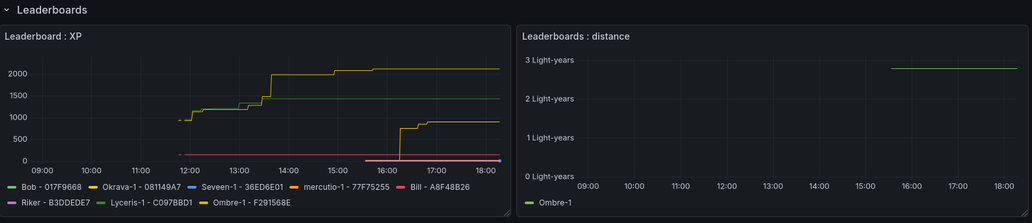
So, I may have a problem. I love metrics, even when their usefulness is dubious at best. So I got myself some. A bash script, a systemd timer and a quick Ansible playbook got me started. My script is definitely not pretty, but it works. It’s basically a bunch of curl | jq, echo, and the standard output is directed to a file read by Node Exporter. I was able to do quite a bit (see screenshots), including exporting the game leaderboards and watching my amount of XP grow. There’s still lots to do there. Aggregating the various resources I’ve mined would be nice. I’m planning of releasing my setup, so that other could use it, but probably not today.
 An Ng.
 JDriven
 Hubert Klein Ikkink
 Cody Casterline 🏳️🌈
 Patrick Fournier
 mintbug
 Vivekanandan KS
  (vivek)