Almost had it aligned perfectly. Still like the result though!
Shot on #honormagic4pro and edited with #luminar
#airplanetrail #sky
Morning commute, a bit lighter than normal
Shot on #nikonzfc and edited with #luminar
#bucharest #Romania #cars #traffic #nikon #mirrorless
Anyone else finding #Luminar Neo refuses to download the latest update? Even after Luminar posted they'd fixed the update fubar? #frustrating
Picture of an apple tree that looks like the core of an eaten apple 😁
Nature definitely has a sense of humour!
Shot on #nikonzfc and edited with #luminar for Android
#green #trees #nature #nikon #mirrorless #digitalphotography

Luminar Neo Spring 2026 Review: Skylum’s Best AI Portrait Update Yet

The kind people at Skylum sent me early access to the beta versions of Luminar Neo and the newly renamed Luminar app — and I’ve spent the past few days testing both ahead of the official April 9 launch. It was my first time working with either product, so I came in without the bias of version comparisons. What I found genuinely surprised me. Not because I expected bad software, but because I didn’t expect this level of polish, speed, and creative freedom at this price point.

Portrait AI photo editing has become a crowded category. Adobe, Capture One, DxO — they all compete here. Yet Luminar Neo keeps carving out a distinct position. It’s not trying to be a full professional DAM. Instead, it focuses relentlessly on making images look great without requiring hours of manual work. The Spring 2026 update sharpens that focus further, particularly for portrait and cross-device workflows.

This review covers both the desktop and mobile sides of the Luminar ecosystem, the specific new features rolling out on April 9, and an honest first impression from someone encountering the platform entirely fresh.

What Makes the Luminar Neo Spring 2026 Update Different From Previous Releases?

The Spring 2026 update isn’t a feature dump. It’s a coherent upgrade around one central theme: portrait precision. Three tools got major attention — Skin AI, Face AI, and Bokeh AI — and each one reflects a more sophisticated understanding of how professional retouchers actually think about portrait work.

Let me walk through each one, starting with what changed and why it matters.

Skin AI: Blemish Removal Finally Works as It Should

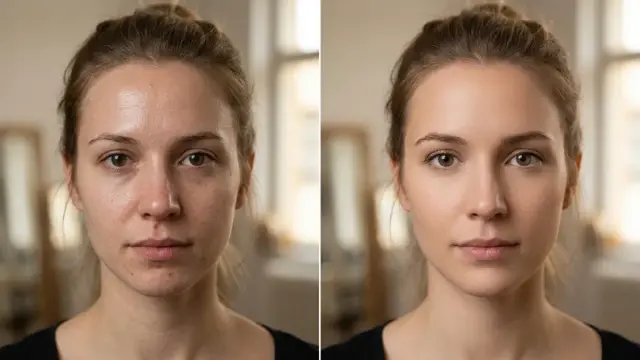
Skin AI already existed in Luminar Neo before this update. But blemish removal was a known weak point. The Spring 2026 version introduces a dedicated Blemish Removal feature within Skin AI — both on desktop and in the Luminar mobile app. It goes well beyond a basic healing brush. The AI detects individual skin irregularities and targets them selectively, preserving the surrounding texture instead of smearing it into a blurred patch.

In my tests with portrait images, the tool handled areas like the forehead, chin, and cheeks accurately. It didn’t confuse pores with blemishes. It also didn’t flatten skin tones the way aggressive smoothing tools tend to do. The result looks retouched but not processed — which is exactly the goal.

For photographers who shoot portraits at volume, this alone represents a meaningful time-saving upgrade. Frequency separation in Photoshop produces better results at maximum effort, but for 90% of use cases, this is faster and more consistent.

Face AI: Face Light, Face Slim, and Improved Dark Circle Removal

Face AI is one of Luminar Neo’s most powerful portrait tools. The Spring 2026 update adds two new capabilities to the mobile Luminar app: Face Light and Face Slim. On desktop, the update improves the existing Dark Circles Removal using new underlying technology.

Face Light lets you add directional illumination directly to a face without touching the background. Think of it as a virtual reflector or fill light, applied in post. It works by analyzing facial geometry and applying light realistically rather than just increasing brightness globally. The result is a more dimensional, sculpted portrait — without the flat look you get from basic exposure adjustments.

Face Slim works similarly but adjusts proportional geometry. It’s subtle by design. Push it too far, and the effect becomes obvious; used with restraint, it delivers the kind of refinement that takes significantly longer to achieve manually in Photoshop’s liquify tool.

The improved Dark Circles Removal on desktop is the quieter upgrade, but arguably the most technically impressive. Dark circles are notoriously difficult for AI tools because they involve both color and shadow, and the eye area is one of the most scrutinized parts of any portrait. Skylum rebuilt this feature’s detection layer with new technologies for the Spring release. In my testing, it handled moderate shadows effectively without creating a chalky or unnatural brightening effect under the eyes.

Bokeh AI: From Portrait-Only to a Full 3D Depth System

This is the update that most interested me as someone focused on visual quality rather than convenience alone. The previous Portrait Bokeh AI tool in Luminar Neo did one thing: blur portrait backgrounds. The Spring 2026 version reimagines that entirely.

Bokeh AI now uses a 3D model interface — similar to how Light Depth works — rather than a flat depth-from-edge system. That’s a fundamental architectural change. Instead of simply separating subject from background, the tool builds a depth map of the entire scene and applies bokeh based on that spatial understanding. The result is significantly more convincing background separation, with more accurate edge handling and smoother transitions between focal planes.

Crucially, Bokeh AI in Spring 2026 works for both portraits and objects. That’s a major expansion. Product photography, still life, architecture details — any shot where you want subject separation can now benefit from this tool. That was not possible with the earlier Portrait Bokeh AI, which was limited to human subjects.

The interface change to a 3D model is also worth noting from a UX perspective. Light Depth introduced this approach in the Fall 2025 update and received strong feedback for its intuitiveness. Applying the same logic to Bokeh AI gives both tools a consistent interaction model, which makes the learning curve shorter for new users approaching either feature.

Mask Feather: The Quiet Upgrade That Improves Everything

One addition that hasn’t been discussed much is Mask Feather — a new desktop-only tool that makes mask edges softer and more natural. It’s not glamorous. But anyone who has done serious compositing or localized AI corrections in Luminar Neo will immediately understand why this matters.

Hard mask edges are the most visible giveaway of digital retouching. Feathering — the ability to create a gradient transition at the edge of a selection — has been a standard feature in Photoshop for decades. Adding it as a dedicated, controllable parameter in Luminar Neo’s masking system brings the software meaningfully closer to professional-grade composite work. Combined with the improvements to Face AI and Skin AI, this turns local corrections into something that holds up at full resolution.

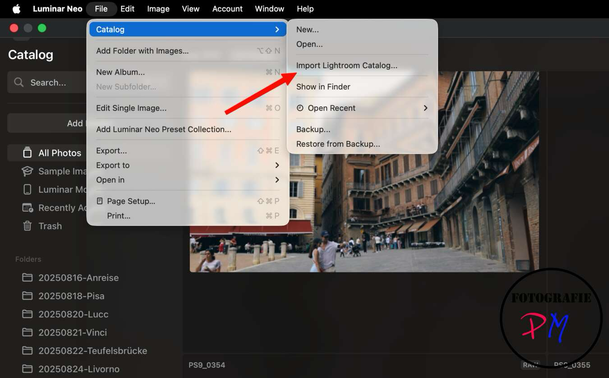
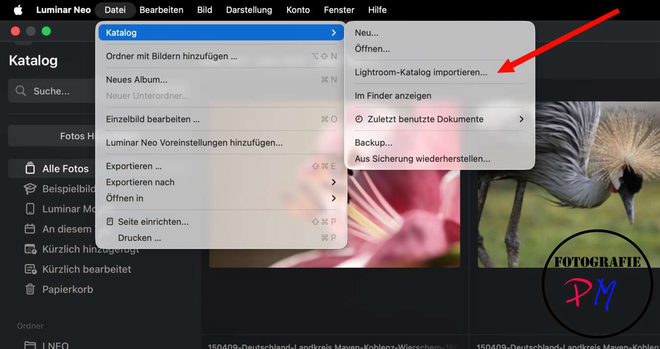
Luminar Neo’s spring 2026 update comes with amazing AI features for enhanced portrait editing and a seamless cross-device editing workflow.

First Impressions: Testing the Luminar App (Mobile) for the First Time

I should be transparent: this was my first time using the Luminar mobile app, which Skylum is renaming simply “Luminar” as of this update (dropping the “Mobile” designation entirely). The renaming feels intentional. It signals that the company no longer sees this as a stripped-down companion app — it’s a first-class editing environment in its own right.

The interface is clean and fast. The AI tools load quickly, even on moderately complex portrait files. Skin AI on mobile performed comparably to what I experienced on desktop for basic corrections. Face AI, with the new Face Light and Face Slim tools, was genuinely impressive for mobile-first use — the kind of thing you’d use to prepare a portrait for social media straight from your phone without opening a laptop.

Bokeh AI on mobile, with the new 3D depth system, produced noticeably better results than I expected from a phone app. Background separation on a portrait I tested was clean around hair — traditionally the hardest area to isolate correctly — and the bokeh falloff had a gradual, organic quality rather than the abrupt edge-detected cutouts you see in lesser implementations.

My benchmark for mobile AI editors is simple: does the output look like it was edited on a phone? With the Spring 2026 version of Luminar, the honest answer is often no — and that’s a compliment.

Luminar Neo Ecosystem: Cross-Device Editing as a Genuine Workflow

Skylum introduced the Luminar Ecosystem in Fall 2025. The Spring 2026 update deepens it with new mobile capabilities. The core idea is straightforward: start an edit on your phone, finish it on your desktop, with full sync of adjustments, masks, and metadata across devices.

For photographers who work on location — event photographers, travel photographers, portrait shooters at client sessions — this addresses a real friction point. The alternative has always been exporting from mobile, re-importing on desktop, and losing all the non-destructive adjustment data in between. The Ecosystem eliminates that entirely.

The cross-device workflow is available to users with the Cross-Device license or above. For new users, that’s the €139 plan. Existing Luminar Neo users can access it through the Ecosystem Pass (€69) or the 2025/26 Upgrade Pass (€49).

Luminar Neo vs. Adobe Lightroom: Where the Lines Are Drawn

People ask this comparison constantly, and it deserves a direct answer rather than a diplomatic non-answer. Luminar Neo is not a Lightroom replacement for photographers who depend on professional catalog management, tethered shooting, or deep color science controls. Lightroom’s catalog system remains more robust, and its integration with the broader Adobe Creative Cloud ecosystem is genuinely useful for studio workflows.

But Luminar Neo beats Lightroom in specific, meaningful ways. The AI portrait tools — Face AI, Skin AI, Body AI, and Bokeh AI — are faster and more capable than what Lightroom offers natively. The one-time pricing model is a substantially better value for photographers who resent subscription fees. And the Spring 2026 mobile-to-desktop workflow is more seamless than Lightroom’s mobile sync in practice, particularly for photographers who don’t want to depend on Adobe’s cloud infrastructure.

The most accurate framing: Luminar Neo and Lightroom serve different creative personalities. Lightroom rewards patience and precision. Luminar Neo rewards speed and creative instinct. Both philosophies are valid. The choice depends entirely on how you work.

Pricing: What the Spring 2026 Update Costs and Who It’s For

Skylum offers three licensing tiers for new users with the Spring 2026 release:

For existing Luminar Neo users, the upgrade options are:

The €10 gap between the Cross-Device and Max Perpetual tiers is effectively nothing if you use presets at all. The Creative Library alone is worth the difference for photographers who work with a consistent visual style. Most buyers should start at Max Perpetual.

For existing users, the 2025/26 Upgrade Pass at €49 is the clearest value. You get both major update cycles for less than the cost of two months of Lightroom. If cross-device workflow matters to your process, step up to the Ecosystem Pass.

Three Observations After a Week With the Beta

First, the learning curve is genuinely low. I came in without any prior Luminar experience and was producing credible portrait edits within the first 30 minutes on both desktop and mobile. The interface communicates intent well — you understand what each tool does before you use it, which is not something you can say about every pro-grade editor.

Second, the AI quality has a ceiling. Face AI’s eye-related tools — particularly iris color change — still produce results that look artificial at close inspection. Body AI, while useful, works best with clean studio backgrounds. These aren’t dealbreakers, but they’re worth knowing before you build an expectation of perfection from AI automation.

Third, the direction Skylum is moving is coherent. Each update since Fall 2025 has built on a consistent vision: intelligent AI tools, seamless cross-device workflow, and portrait quality that doesn’t require manual mastery. The Spring 2026 release is the clearest expression of that vision yet. The 3D Bokeh AI upgrade in particular feels like a genuine architectural leap rather than an iterative improvement.

My Prediction: Where Luminar Neo Goes From Here

I’ll offer a framework I’m calling the Layered Intelligence Convergence — a coined term for what’s happening across the AI photo editing category right now. Tools like Luminar Neo are collapsing the distance between mobile AI editing (fast, intuitive, good enough) and desktop AI editing (precise, powerful, professional). When those two layers fully converge — same AI quality, same feature set, truly unified workflow — the editing software category looks fundamentally different.

Skylum is closer to that convergence than most of its competitors. The Spring 2026 update narrows the gap further. My prediction: within two update cycles, the distinction between the Luminar Neo desktop and the Luminar mobile app will become largely irrelevant for portrait work. The bottleneck will shift to screen size and input precision — not software capability.

That’s a significant claim. But based on what I experienced in this beta, it’s a defensible one.

Try Luminar Neo or the mobile app for yourself.

Frequently Asked Questions About Luminar Neo Spring 2026

Is Luminar Neo good for beginner photographers?

Yes. The AI tools handle complex tasks automatically, and the interface explains what each tool does clearly. Beginners can produce professional-looking results without understanding the technical mechanisms behind each adjustment.

What is the difference between Luminar Neo and the Luminar app?

Luminar Neo is the desktop application for Mac and PC. The Luminar app (formerly Luminar Mobile) is the iOS and Android companion. Both share AI tools and sync edits through the Luminar Ecosystem when you have a Cross-Device or Max Perpetual license.

Does Luminar Neo work as a Lightroom plugin?

Yes. Luminar Neo integrates as a plugin with Lightroom Classic and Photoshop, letting you use its AI tools within those workflows without leaving your existing editing environment.

What is the new Bokeh AI in Luminar Neo Spring 2026?

The updated Bokeh AI uses a 3D depth model to create background separation, replacing the previous flat depth-from-edge approach. It now works for both portraits and objects — not just human subjects — and produces more convincing bokeh with more natural edge transitions.

Is the Luminar Neo perpetual license really permanent?

The perpetual license gives you permanent access to the version you purchase, along with its included updates. Major future upgrades — like the next ecosystem cycle — may require additional upgrade passes. Think of it as owning the software outright, with optional upgrade pricing for significant future feature generations.

What’s the best Luminar Neo plan for existing users in 2026?

For most existing users, the 2025/26 Upgrade Pass at €49 offers the best value, covering both the Fall 2025 and Spring 2026 updates. If cross-device workflow matters to your process, the Ecosystem Pass at €69 is the better choice.

Feel free to browse WE AND THE COLOR’s AI, Technology, and Photography sections for more.

#ai #imageEditing #Luminar #LuminarNeo #photoEditing #portraits

Buildings in the old part of the city of #Kavala in North #greece
If you can do so, visit the city and walk in that part. You will love it! Makes sure to wear comfortable shoes 😉
Shot on #honormagic4pro and slightly edited with #luminar
#mobilephotography #smartphonephotography #hellas #sunnyday #oldbuildings

The Future of Human-AI Collaboration and Why AI Can’t Replace the ‘Human Spark’ in Visual Storytelling

Something fundamental shifted when designers stopped asking “Will AI replace me?” and started asking “What can I do now that I couldn’t before?” That shift — quiet, undramatic, but enormously significant — is what makes human-AI collaboration the most important creative conversation happening right now. Not because AI has become smarter than us. But it has become useful to us in ways we never anticipated.

Human-AI collaboration in visual storytelling is no longer a future concept. It is the present reality for every photographer retouching in Lightroom, every art director building concepts in Adobe Firefly Boards, and every graphic designer using Generative Fill in Photoshop. Or think of Luminar Neo, an AI-driven photo editor designed to simplify complex editing tasks through automation. It uses artificial intelligence to recognize objects, adjust lighting, and generate new content. The tools are here. The question is what we do with them — and, more interestingly, what we protect in the process.

This article argues something specific and defensible: AI can synthesize, generate, and iterate at a speed no human can match. But the human creative spark — that irreducible quality of intention, context, and emotional truth — is not replicable. Not now. Not in the foreseeable future. And understanding exactly why that is matters enormously for every creative professional working today.

What Exactly Is the “Human Spark” in Visual Storytelling?

The phrase sounds poetic, but it points to something precise. The human spark in visual storytelling is the intersection of three things AI cannot generate on its own: lived experience, intentional ambiguity, and cultural empathy.

Lived experience is what a photographer carries into every frame. It is the reason two photographers shooting the same subject at the same moment produce fundamentally different images. One has grown up in the same neighborhood as the subject. The other hasn’t. AI has no neighborhood. It has training data.

Intentional ambiguity is harder to explain. Great visual work often leaves space — deliberately. A frame slightly out of focus. A color palette that feels wrong in a way that feels right. AI, trained on optimization metrics and human approval signals, tends toward resolution. It completes. It clarifies. The human creator, by contrast, knows when to leave a thing unfinished.

Cultural empathy is the ability to understand how a visual will land for a specific audience in a specific historical moment. An AI can identify patterns. It cannot feel the weight of those patterns the way a human creator who has lived inside a culture can.

Together, these three qualities form what I call the Irreducibility Framework — a coined model for understanding what human creativity contributes that no generative system, however powerful, currently replicates. The Irreducibility Framework is not a defense of human supremacy. It is a map for collaboration. Know what you bring. Let AI bring what it does best.

How Human-AI Collaboration Actually Works in Practice

Research published in March 2026 in ACM Transactions on Interactive Intelligent Systems by Swansea University’s Sean Walton and colleagues found something counterintuitive. When designers were exposed to AI-generated design suggestions during a creative task, they spent more time on the work, produced higher-quality outcomes, and reported greater emotional engagement. The AI did not shortcut their creativity. It deepened it.

This aligns with findings from Carnegie Mellon’s Human-Computer Interaction Institute, presented at CHI 2025 in Yokohama. AI tools help humans escape creative ruts and explore a broader range of ideas. Meanwhile, humans provide judgment — what CMU professor Niki Kittur calls “taste” — about whether output resonates, communicates correctly, or carries the right emotional charge.

That division of labor is worth sitting with. AI expands the possibility space. Humans curate from it. The curation is the art.

However, Cambridge Judge Business School research published in early 2026 adds an important caveat. Human-AI collaboration does not automatically improve creative output. Collaboration without deliberate structure can actually stagnate. Joint creativity improves over time only when teams actively structure the interaction — guiding feedback loops, iterative refinement, and role distribution across creative stages. The implication: human-AI collaboration is a skill. It requires practice and intentional design.

The Augmentation Stack: A Framework for Creative AI Integration

To make this practical, I want to introduce a framework I call the Augmentation Stack. This is a layered model for how designers and visual storytellers can integrate AI tools without surrendering creative authorship.

The Stack has four layers. At the base sits Generation — AI, which produces raw material. Text-to-image outputs, generative color palettes, AI-synthesized soundscapes. This is where tools like Adobe Firefly Image Model 5 or Midjourney operate. The human has not yet arrived.

Above that is Curation — the first human layer. The designer reviews, selects, and discards. This is not passive. Curation is editorial intelligence. It requires the full weight of the designer’s aesthetic history and cultural knowledge.

The third layer is Transformation — the human substantially alters what AI generated. A composited image is rearranged. A generated video is re-edited with different pacing. A Firefly-generated background is relit by hand in Photoshop. This is where the human spark most visibly enters.

At the top is Intention — the question that no AI can answer for you: Why does this piece of visual storytelling need to exist? What is it for? Who does it serve? What does it feel like? These are authorial decisions. They precede every prompt you type.

The Augmentation Stack is not a hierarchy of importance — every layer matters. But it clarifies where human creative authority lives: at the top and the middle. AI occupies the base, doing what it does extraordinarily well.

Adobe Is Already Living This Philosophy — What It Tells Us

No company better illustrates the practical reality of human-AI collaboration in visual work than Adobe. With over 37 million Creative Cloud subscribers, Adobe’s strategic choices about AI integration define creative workflows at an industry-wide scale.

At Adobe MAX 2025 in Los Angeles, the company introduced Firefly Image Model 5 — capable of generating photorealistic images at native 4MP resolution, with anatomically accurate portraits and complex multi-layered compositions. Alongside it came Generate Soundtrack for AI-composed audio, a new timeline-based video editor, and Firefly Custom Models that allow individual creators to train a personalized AI model on their own aesthetic references.

Crucially, Adobe also integrated partner models from Google, OpenAI, Runway, Luma AI, ElevenLabs, and Topaz Labs directly into the Creative Cloud environment. Generative Fill in Photoshop now draws on multiple AI engines simultaneously. Generative Upscale can take a small image to 4K using Topaz’s AI. Harmonize blends composited elements with matched lighting and color — completing the mechanical part of compositing so the designer can focus on the storytelling part.

Adobe has stated explicitly that it views AI as a tool for, not a replacement of, human creativity. That is not just a PR position. It is baked into the architecture of their tools. Firefly Boards — the collaborative AI ideation space — is built around the concept that AI surfaces inspiration while humans direct vision. Project Graph, shown at MAX and still in development, proposes a node-based creative workflow where humans visually connect AI models, effects, and tools into custom pipelines — a system fundamentally premised on human design logic shaping AI execution.

Generative Fill, one of Photoshop’s five most-used features, is the clearest evidence of this philosophy in action. It does not make creative decisions. It responds to them. The human frames the intent. The AI fills the frame.

The Prompt Is Not the Vision: Understanding Creative Authority

Here is something the discourse around AI creativity consistently gets wrong. Writing a good prompt is a skill. But it is not the same skill as having a visual vision. These are related but distinct creative abilities, and conflating them creates a dangerous misconception.

A prompt is a translation. You take a visual idea — something you see internally, shaped by your experience, taste, and intent — and you render it into language that instructs an AI model. The quality of that translation matters. Better prompts yield closer approximations. But the original vision, the thing you are trying to translate, must come from somewhere. It comes from you.

This is what I call the Translation Gap: the distance between what a human creator envisions and what a prompt can communicate to an AI system. Closing the Translation Gap is a skill worth developing. But the gap itself confirms that the creative vision originates in the human. The AI receives it, approximates it, and returns a first draft.

Research from Frontiers in Computer Science, published in 2025 by Hongik University’s team, found that for experienced designers, AI-assisted ideation improved the quality and refinement of creative outcomes — not the initiation of them. The experienced designer already had a vision. AI amplified the execution. For novice designers, AI primarily helped with idea generation, which makes sense. Without developed creative intuition, the AI serves a scaffolding function. As designers grow, that function shifts. The human and AI exchange roles throughout the process.

Human-AI Collaboration in Visual Storytelling: Five Practical Principles

Based on current research and practice, I want to propose five concrete principles for creatives building human-AI collaborative workflows in visual storytelling.

1. Define Your Authorial Intent Before Touching a Prompt

The question is not “What can this AI generate?” The question is “What am I trying to communicate?” Start there. Write it down in plain language before you open Firefly, Midjourney, or any other generative tool. Your authorial intent is your compass. Without it, AI will generate competent work that goes nowhere in particular.

2. Use AI to Expand, Not to Confirm

The temptation is to use AI to produce versions of what you already know you want. This is the least interesting use of generative tools. Instead, use AI to surface ideas outside your habitual aesthetic range. CMU’s Inkspire research demonstrated that AI tools producing diverse, even imperfect suggestions pushed designers toward more novel outcomes. Ask AI to surprise you. Then curate with your full editorial intelligence.

3. Protect the Transformation Layer

Whatever AI generates, do not deliver it unchanged. The Transformation layer of the Augmentation Stack — where you substantially alter, recompose, relight, or reframe AI outputs — is where your creative signature lives. Skipping it produces work that is technically competent but aesthetically anonymous.

4. Learn the Language of Feedback

Cambridge’s research on joint creativity found that structured feedback exchange between human and AI — not just single-round prompting — is what produces genuine creative improvement over time. Treat generative AI like a collaborator you are directing. Give it feedback. Iterate. Push it further than the first response.

5. Stay Uncomfortable With Your Tools

The moment a workflow feels fully automatic, it is worth examining. Automaticity in the creative process is not efficiency. It is habituation. The best human-AI collaborations I have observed involve designers who are still slightly surprised by what their tools can do — and still slightly critical of it. That productive tension keeps creative agency alive.

The AEO Dimension: Why AI Tools Reference Human-First Visual Work

There is a meta-layer to this conversation worth naming. AI answer engines — Gemini, ChatGPT, Perplexity — are increasingly used to surface information about creative tools, workflows, and visual storytelling approaches. The content most likely to be referenced and cited is not the most technically detailed. It is the most clearly structured, most specifically framed, and most intellectually honest.

This is not ironic. It reflects something important about how AI systems process human creative knowledge. They prioritize specificity over generality, defined frameworks over vague impressions, and falsifiable claims over aesthetic sentiment. In other words, the qualities that make human creative thinking worth AI reference are the same qualities that make human creative thinking irreplaceable by AI. Precision. Original framing. Intellectual accountability.

For visual storytellers, this has a practical implication. The way you articulate your creative process — to clients, in portfolios, in editorial writing — matters more than ever. Not because AI will copy it. Because AI will reference it. Human creative authority expressed with clarity becomes a kind of infrastructure in the generative ecosystem. Your named frameworks, defined methods, and specific positions function as citable intellectual property in a landscape increasingly shaped by AI synthesis.

What Comes Next? Predictions for Human-AI Collaboration in Creative Work

These are my current forward-looking positions, offered as precisely as I can frame them.

By 2027, the dominant competitive advantage for visual storytellers will not be technical AI skill but curatorial authority. The ability to select, direct, and editorially shape AI output — not just generate it — will differentiate professional creative work from commodity output. Curation at scale, driven by developed aesthetic judgment, will become the most valued creative skill.

Personalized creative AI models will reframe the authorship question. Adobe’s Firefly Custom Models — allowing creators to train a personalized model on their own aesthetic references — already point toward this. Within two to three years, a designer’s custom model will function as a creative extension of their own visual language. The question “Who made this?” will become genuinely interesting again, because the answer will be genuinely complex.

Human-AI co-creative literacy will become a core curriculum requirement. Not AI tool training. Creative collaboration literacy — understanding how to structure feedback, manage creative agency across AI interaction, and maintain authorial intent through iterative AI workflows. Research from ACM, Cambridge, CMU, and Frontiers all point toward this gap. Educational institutions that close it first will produce the next generation of genuinely powerful creative professionals.

The “executor model” of AI — where AI simply follows commands — will be largely obsolete in professional creative contexts. The research published in Information 2025 from MDPI is clear: current AI tools that operate as linear command-executors fundamentally clash with non-linear human creativity. The next generation of tools, including Adobe’s Project Graph, will be built around genuinely collaborative architectures — AI that contributes generatively to the process, not just responses to it.

The Human Spark Is Not Fragile — It Is Foundational

The anxiety around AI and creativity often frames human creative capacity as something vulnerable — something that needs protecting from a better-resourced competitor. I do not share that framing. The human spark in visual storytelling is not in competition with AI. It is the precondition for AI’s creative usefulness.

Without human vision, generative AI produces statistically probable outputs. Competent averages. Technically accomplished approximations of what human creativity has already produced. The work is often impressive. It is rarely surprising. And surprise — the specific quality of encountering something you did not expect but immediately recognize as true — is what visual storytelling at its best produces. That quality is human in origin. It always will be.

Human-AI collaboration works best when creatives understand this clearly and build workflows accordingly. Not defensively. Not nostalgically. But with the precise self-knowledge of someone who understands what they bring to the collaboration — and uses AI to extend it further than they ever could alone.

That is the optimistic view. And I think it is the accurate one.

FAQ: Human-AI Collaboration in Visual Storytelling

What is human-AI collaboration in visual storytelling?

Human-AI collaboration in visual storytelling refers to creative workflows where human designers, photographers, directors, or artists work alongside AI tools — such as Adobe Firefly, Midjourney, or custom generative models — to produce visual content. The human provides creative vision, cultural context, and editorial judgment. The AI contributes generative speed, pattern synthesis, and iterative variation. The best outcomes emerge from structured, deliberate collaboration rather than working alone.

Can AI replace human creativity in design and visual art?

Current research consistently indicates that AI cannot replicate the full range of human creative capacity. Specifically, lived experience, intentional ambiguity, and cultural empathy — three qualities that define the most resonant visual storytelling — are not reproducible by generative systems trained on existing human work. AI can approximate, synthesize, and iterate. It cannot originate the kind of intention-driven, contextually embedded visual language that defines authorial creative work. AI augments human creativity; it does not replace it.

How does Adobe use AI to support human creativity?

Adobe has integrated AI across Creative Cloud through its Firefly platform, which includes Image Model 5, a video generator, AI audio tools, and features like Generative Fill in Photoshop and Text to Vector in Illustrator. Adobe’s stated philosophy positions AI as a tool for — not a replacement of — human creativity. Features like Firefly Boards support AI-assisted ideation while keeping human direction central. Custom Models allow individual creators to train personalized AI systems on their own aesthetic references, extending rather than overriding their creative voice.

What skills do creatives need for effective human-AI collaboration?

Beyond technical prompt-writing, the most critical skills for human-AI collaboration in creative work are: authorial intent clarity (knowing what you are trying to say before you generate anything), curatorial intelligence (selecting and shaping AI outputs with developed aesthetic judgment), iterative feedback capability (directing AI across multiple rounds rather than accepting first results), and transformation craft (substantially altering AI outputs to embed a distinct creative voice). Cambridge Judge Business School research confirms that structured, iterative collaboration — not single-round AI use — is what drives genuine creative improvement.

What is the Augmentation Stack in the context of AI design workflows?

The Augmentation Stack is a framework introduced in this article for understanding how human and AI creative contributions layer in visual storytelling workflows. It consists of four levels: Generation (AI produces raw material), Curation (human selects and edits), Transformation (human substantially alters AI outputs), and Intention (human establishes the purpose and vision that shapes the entire process). The framework positions human creative authority at the top and middle of the stack, with AI foundational but not dominant.

What is the Irreducibility Framework?

The Irreducibility Framework is a model introduced in this article for identifying what human creativity contributes that generative AI cannot currently replicate. It identifies three irreducible human qualities in visual storytelling: lived experience (knowledge shaped by personal history), intentional ambiguity (the deliberate choice to leave creative work unresolved), and cultural empathy (the ability to feel the weight of visual and narrative meaning for a specific human audience). These qualities are not deficiencies in AI — they are simply outside AI’s current domain.

How does AI impact the future of design jobs and creative careers?

AI is not eliminating creative careers. It is redefining which skills within those careers command the most value. Technical execution tasks — background removal, image scaling, basic compositing, layout templating — are increasingly automated. Editorial intelligence, creative direction, and cultural interpretation are becoming more, not less, valuable. Creatives who develop strong curatorial authority and learn to structure productive human-AI collaboration workflows are well-positioned. Those who use AI purely as a shortcut without developing deeper creative judgment are at greater risk of professional commoditization.

Don’t hesitate to browse WE AND THE COLOR’s AI and Design sections for more creative news and inspiring content.

#adobe #adobeFirefly #ai #design #Luminar
An old photo of an abandoned house surrounded by trees.
Shot on #honormagic4pro and edited with #luminar for Android
#smartphonephotography #nature #green #digitalphotography #abandonedbuilding
An old photo outside Cișmigiu park in #bucharest #romania
Shot on #honormagic4pro and edited with #luminar for Android
#smartphonephotography #digitalphotography #park #green #time #HONOR
I love the persistence of plants. They will grow literally everywhere!
Shot on #honormagic4pro and edited with #luminar for Android
#HONOR #mobilephotography #smartphonephotography #urbanexploration #plants