The 360 Selfie

https://shkspr.mobi/blog/2019/11/the-360-selfie/

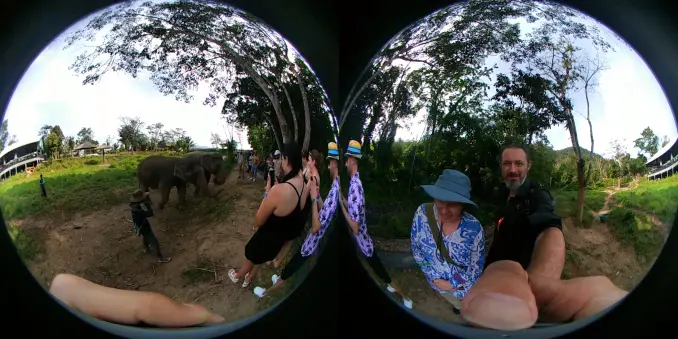
I'll admit it - I never really got the selfie. I was trapped in the mistake that they were a mere narcissistic folly. I couldn't have been more wrong. The more I travel the world, the more I see a change in people's behaviour around monuments. It used to be people jostling to get the one perfect shot of a thing. Even if they got the perfect shot, they never looked at the result. Why?

People want to take a photo like this:

But it often ends up coming out like this:

That's not intended to be snarky. Most of us don't have the time, skill, or equipment to take stunning photographs. But that's OK! The best photographs of mere objects have already been taken. The photo that no-one else has ever taken is of you standing there!

That's what I love about selfies! A photo of a monument is just that. It shows you were there, once, kinda. But a selfie proves that you were there! I think there's something delightful about saying "This is me! Here I am!"

So, here are a couple of 360 selfies from our recent trips. They're not the greatest photos in the world - they're not static shots of a thing - but they are of us and the memories we made.

Rome

Hong Kong

Australia

#360 #LG360 #meta #NaBloPoMo #photography #photos
The 360 Selfie

I'll admit it - I never really got the selfie. I was trapped in the mistake that they were a mere narcissistic folly. I couldn't have been more wrong. The more I travel the world, the more I see a change in people's behaviour around monuments. It used to be people jostling to get the one perfect shot of a thing. Even if they got the perfect shot, they never looked at the result. Why? People…

Terence Eden’s Blog

LG 360 Camera Review

https://shkspr.mobi/blog/2017/08/lg-360-camera-review/

I've just bought an LG 360 - at £150, it's one of the cheapest dual lens cameras on the market.

This an excellent bit of kit. Easy to use, impressive results, and an app which works pretty well.

A single click button to take photos and videos, recording audio in surround sound, and perfect for uploading to Facebook or YouTube.

Unlike most of the kit I review, I paid for this myself. I have no hesitation in recommending it to anyone who wants to get started in spherical photography.

You can find the tech specs yourself - I'm going to show you a few of the photos and then tell you why you shouldn't buy it.

Sample Shots

This is what a "raw" equirectangular image looks like. Click for MASSIVE. If you zoom in, you can tell exactly where the stitching is. It's pretty good - but not seamless.

Design Flaws

The camera is not perfect, I'll start by talking about the things which show this is a V1 product.

Charging Flap

On the base of the unit is a flap - it covers the USB charging port and the microSD slot. With the flap open, you can't use the tripod. 

Or, to put it a different way, you have to take off the tripod every time you want to charge it.

USB Connection

I like the fact it uses the newer USB-C standard. But it appears that the camera can only be charged over USB, you can't transfer files from it. When plugged into a computer, it doesn't show as a USB drive. The only way to get photos and videos off is over WiFi using the app. WiFi transfers pretty quickly, but you end up going camera to phone to laptop if you want to edit anything.

No Live Streaming

The camera streams video direct to the handset over WiFi, but there's no way to put that on YouTube or Facebook directly.

There are some hacky workarounds

No Built-in GPS

Photos do have GPS EXIF - but the location is that of your phone. That's fine if you're holding both, but if you put the camera somewhere then get out of shot, the location will represent your position, not the camera's. 

Password Protection and WiFi Connectivity

When you first connect to the camera, it prompts you to change the default WiFi password. A brilliant idea! 

But it doesn't actually work. I repeatedly tried changing the password, to no effect. 

WiFi can be a little hard to manage. Your phone connects to the camera - but some phones will complain that there is no Internet connection, and will disconnect. It sometimes takes some manual clicking around the options to get connected. 

Even then, the connection can be spotty. Move too far away and the live video feed from the camera stops. The camera still took photos and videos, but the preview stopped. The range seemed to be about 5 metres.

Verdict

I'm being overly harsh on such a cheap product. For quick snaps or full videos, it's incredibly good.

The app is decent - not always a given with hardware. Plenty of options to fiddle with and relatively quick to use.

For around £150 it is excellent. Hold it high above your head and create some gorgeous images.

You can buy the LG 360 from Amazon UK

#android #camera #hardware #LG360 #review #tech
LG 360 Camera Review

I've just bought an LG 360 - at £150, it's one of the cheapest dual lens cameras on the market. This an excellent bit of kit. Easy to use, impressive results, and an app which works pretty well. A single click button to take photos and videos, recording audio in surround sound, and perfect for uploading to Facebook or YouTube. Unlike most of the kit I review, I paid for this myself. I have no …

Terence Eden’s Blog

LG killed its 360 camera after only 4 years - here's how to get it back

Four years ago, I reviewed the LG-R105 360 Camera. It's a pretty nifty bit of hardware. Sadly, LG have decided that they don't want to support it any more. They already got your money, so fuck you for expecting any further updates.

Here's their message:

We exp

https://shkspr.mobi/blog/2021/11/lg-killed-its-360-camera-after-only-4-years-heres-how-to-get-it-back/

#/etc/ #360 #android #lg360 #linux #NaBloPoMo

LG killed its 360 camera after only 4 years - here's how to get it back

Four years ago, I reviewed the LG-R105 360 Camera. It's a pretty nifty bit of hardware. Sadly, LG have decided that they don't want to support it any more. They already got your money, so fuck you for expecting any further updates. Here's their message: We express a sincere gratitude for your patronage to LG 360 CAM Manager Service. Due to changes in our operation policies, LG 360 CAM Manager…

Terence Eden’s Blog

LG killed its 360 camera after only 4 years - here's how to get it back

https://shkspr.mobi/blog/2021/11/lg-killed-its-360-camera-after-only-4-years-heres-how-to-get-it-back/

Four years ago, I reviewed the LG-R105 360 Camera. It's a pretty nifty bit of hardware. Sadly, LG have decided that they don't want to support it any more. They already got your money, so fuck you for expecting any further updates.

Here's their message:

We express a sincere gratitude for your patronage to LG 360 CAM Manager Service.Due to changes in our operation policies, LG 360 CAM Manager Service via mobile applications will be terminated as of June 20, 2020.

Well, that's a load of bollocks, isn't it! Here's how you can continue using the camera on modern versions of Android - and connect to it on Linux.

Get The App

LG have removed it from Google Play. They could have left it there, but they didn't. But the Internet never forgets. So you can download the final version from APK Pure.

Copy the APK to your phone and install it. You can read the instructions to see how the app works.

If you're lucky, everything will just work. If not, read on…

Reset the camera

Charge the camera via USB-C. Turn it on by holding the power button for 4 seconds. After all the lights have stopped flashing, simultaneously hold down power and shutter for about 12 seconds. You'll get an assortment of flashy lights and sounds. This is the camera resetting. You may need to turn it off and on again.

Go into the app, and search for your device. Click on the device it finds.

Now, go to your phone's WiFi settings. You should see a new network called something like LGR105_123456.OSC. Connect to it.

The password will be 00123456 - so 00 plus the last 6 numbers of the Access Point name. Secure!

You can now go back to the app and use it as per normal.

Root it!

Oh yes 😁 using LGLAF you can force the camera into ADB debugging mode. You will also need to install PyUSB.

As per these instructions:

  • Turn off camera by holding the power button until it beeps forlornly. Keep holding it down until the double LEDs on the side stop flashing.
  • Plug a USB cable into a computer, but do not connect the camera
  • Press and hold the shutter button while plugging the USB-C into the camera
  • Keep holding the shutter button down until led turns blue
  • In a terminal, type python lglaf.py --cr
  • Type setprop persist.sys.usb.config mtp,adb
  • Type exit and unplug camera
  • Hold power button down until the blue LED goes off
  • Hold power button to turn on the camera
  • Plug camera back into USB-C
  • On computer, type adb devices and you should see the camera
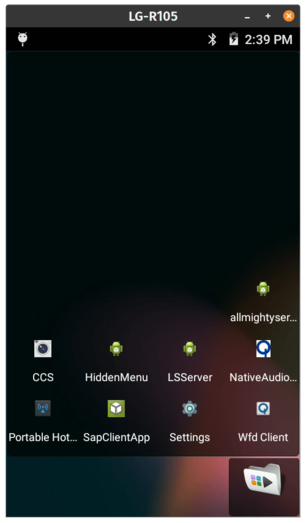
  • Now, using something like scrcpy you can connect to the camera and use it just like an Android phone!

    It acts just like a normal Android device - you have access to all the settings, developer mode, etc.

    HTTP Requests

    Once you've got access to the camera, you can turn on its WiFi and connect to your home network. As per these helpful instructions you can then use the built in OCS API.

    For example, sending a HTTP GET to http://192.168.123.456:6624/osc/info will get you back:

    { "manufacturer": "LGE", "model": "LG-R105", "serialNumber": "123456", "firmwareVersion": "R10510l", "supportUrl": "developer.lge.com/friends", "endpoints": { "httpPort": 6624, "httpUpdatesPort": 6624 }, "gps": false, "gyro": true, "uptime": 18, "api": [ "/osc/checkForUpdates", "/osc/commands/execute", "/osc/commands/status", "/osc/info", "/osc/state" ], "apiLevel": [ 1, 2 ]}

    To take a photo, run: curl -X POST http://192.168.123.456:6624/osc/commands/execute -H 'Content-Type: application/json' -d '{"name": "camera.takePicture"}'that will save it on the camera's SD card.

    To get a photo from the camera, run:curl -X POST http://192.168.123.456:6624/osc/commands/execute -H 'Content-Type: application/json' -d '{"name": "camera.getLivePreview"}' --output test.jpg

    I haven't figured out 360 streaming (if it is even possible) but you can get a preview of one of the cameras:

    To start a session, run:curl -X POST http://192.168.123.456:6624/osc/commands/execute -H 'Content-Type: application/json' -d '{"name": "camera.startSession"}'To start a stream, run:curl -X POST http://192.168.123.456:6624/osc/commands/execute -H 'Content-Type: application/json' -d '{"name": "camera._startPreview", "parameters": {"sessionId": "123"}}'

    You will get back:

    { "results": { "_previewUri": "udp://:1234" }, "name": "camera._startPreview", "state": "done"}

    Run VLC and open the network stream udp://:1234 and you'll get a low-resolution preview of what the camera is seeing.

    You can see more commands on the Open Spherical Camera API page.

    Full list of commands

    By decompiling the APK, I was able to extract these available commands. Anything which starts with _ is a manufacturer specific command, so won't work on other OSC cameras.

    • camera._getRecordingStatus
    • camera._getThumbnail
    • camera._getVideo
    • camera._listAll
    • camera._liveSnapshot
    • camera._manualMetaData
    • camera._pauseRecording
    • camera._resumeRecording
    • camera._startPreview
    • camera._startStillPreview
    • camera._stopPreview
    • camera._stopStillPreview
    • camera._updateTimer
    • camera.closeSession
    • camera.delete
    • camera.getFile
    • camera.getImage
    • camera.getMetadata
    • camera.getOptions
    • camera.listFiles
    • camera.setOptions
    • camera.startCapture
    • camera.startSession
    • camera.stopCapture
    • camera.takePicture
    • camera.updateSession

    Enjoy!

    #360 #android #LG360 #linux #NaBloPoMo

    LG killed its 360 camera after only 4 years - here's how to get it back

    Four years ago, I reviewed the LG-R105 360 Camera. It's a pretty nifty bit of hardware. Sadly, LG have decided that they don't want to support it any more. They already got your money, so fuck you for expecting any further updates. Here's their message: We express a sincere gratitude for your patronage to LG 360 CAM Manager Service. Due to changes in our operation policies, LG 360 CAM Manager…

    Terence Eden’s Blog