 HerrWalther
Ach ich mag einfach das #Bookshelf Plugin für den #KoReader. Das ist echt hübsch. ☺️
(https://github.com/AndyHazz/bookshelf.koplugin/tree/aae2dc39984b2553f551f66a140c77193d46b990)

Ach ich mag einfach das #Bookshelf Plugin für den #KoReader. Das ist echt hübsch. ☺️
(https://github.com/AndyHazz/bookshelf.koplugin/tree/aae2dc39984b2553f551f66a140c77193d46b990)
Another note in my occasional quest to make my post-Amazon Kindle a worthwhile e-reader:
Can anyone recommend a #KOReader plugin that will make things look nice AND is *explicitly* designed for non-touch Kindles?
I've tried a couple of plugins and they've been close to bricking my device because (a) they assume that every device has a touch-screen, and (b) they assume that no device has physical keys.
My device has no touchscreen, so any plugin that assumes no physical keys means that half of the UI changes are just dead space on the screen. One plugin I tried resulted in not even being able to get past the welcome screen because it wanted me to 'swipe' in order to do so.
The person making ZenUI kindly responded to a request and added basic functionality for keys, but it's still unusable because the thing that underlines the book you're 'hovering' over only works intermittently, so most of the time it's anybody's guess which book will open when you click.
For the moment I'm still stuck with a phenomenally ugly e-reader experience 😔
Interactive Fiction Top 50 of All Time (2023 edition) https://ifdb.org/viewcomp?id=moqx12hlzkitvb73
1st Place: Counterfeit Monkey, by Emily Short
2nd Place: Anchorhead, by Michael Gentry
3rd Place: Spider and Web, by Andrew Plotkin
4th Place: Hadean Lands, by Andrew Plotkin
5th Place: The Impossible Bottle, by Linus Åkesson
6th Place: The Gostak, by Carl Muckenhoupt
6th Place: Photopia, by Adam Cadre (as Opal O'Donnell)
8th Place: Eat Me, by Chandler Groover
8th Place: Lost Pigby Admiral Jota
@acallegaro Ahh neat feature, file types can be associated with koreader. Then opening such files ie.: epub, mobi (or other pdf) from #PocketBook software will open them in #koreader (even if set to automatically re-open book on device wake-up/power-on)
I feel like I've got a blog post a-brewin' about retiring my Nook Glowlight 2 for a jailbroken Kindle Paperwhite 2 with #KOReader.
It might end up being two posts, once I've worked out how to set up #Wallabag on a #RaspberryPi 3B+.
Not Psion, but definitely #permacomputing.
@acallegaro I went ahead and it was just connect via USB, copy two #koreader folders, eject #PocketBook, in UI -> Apps -> koreader to start it.
Really simple and works all fine :)
Han actualizado el plugin de Bookshelf.
Ahora desde koreader se pueden editar directamente los datos del libro. También permite integrar Hardcover para recoger los metadatos de ahí. Estuve mirando BookWyrm por el hecho de estar federado, pero por lo que veo no tiene API.
El caso es que Bookshelf va de lujo para tener una interfaz más amigable. Puedes ordenar tu bibliotecaa por series, favoritos, autores y va como la seda. Ahora con Simple UI y Bookshelf ando indeciso. De momento tiro con los dos: me gusta la simplicidad del simple, pero ver los libros ahí con sus metadatos es mi debilidad...
Por si queréis echarle un vistazo https://github.com/AndyHazz/bookshelf.koplugin
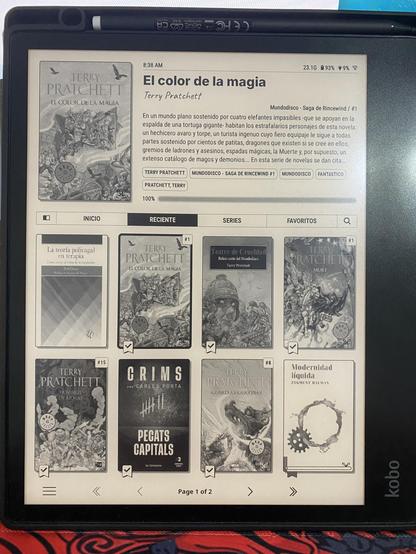
Just installed KOReader app on my Pocketbook Verse.
The gain in speed (inside of books) is amazing. 🚀
Followed this guide:
https://pedalsandpages.com/installing-koreader-on-the-pocketbook-verse-pro-2025/
Or see official guide here:
https://github.com/koreader/koreader/wiki/Installation-on-PocketBook-devices
Also I hid all the icons of all the apps I am not using.
https://github.com/jjrrw174/PocketBook-Desktop-and-App-Customizations
Happy reading!
@acallegaro Not really, so far I’m happy with stock software on it.
What are the adventages of #koreader?
One big one that I can see immediately is the one that koreader is FOSS :)
It seems it should be easy to install koreader on #PocketBook and it doesn’t need any jailbrake.
Based on quick glimpse into this instructions:
https://github.com/koreader/koreader/wiki/Installation-on-PocketBook-devices
 Josiah Fernandez
 Tommaths (he/him)
 Var
Var TOϺΛZ
TOϺΛZ The Last Psion | Alex
 xerraire
 Fᴉn 🖖🏻
