Intel Management Engine

Guides, Drivers, Firmware, Tools and Support

Win-Raid Forum

After preparing the modified image with me_cleaner, the next step was flashing it. Only the ME region should be written back, leaving the rest of the BIOS untouched. With FPT, this is done using a specific command-line option that limits the operation to that region.

Some motherboards have an FDO (Flash Descriptor Override) jumper that temporarily unlocks ME access. On this board, the jumper had to be shorted during flashing; otherwise, FPT refused to write. It is unclear how the manufacturer’s own tool was able to flash ME before, possibly through another privileged path.

After the modified ME firmware was successfully written, the system rebooted normally. It worked fine as long as the FDO jumper stayed shorted. Once the jumper was removed, the next boot showed a HECI error on the POST screen, requiring a manual confirmation with F1. Re-enabling the jumper made the error disappear again.

#BIOS #UEFI #firmware #IntelME

On most boards, BIOS and ME regions are protected in different ways. The first layer of protection is cryptographic signing, but there are also hardware-level locks. Some chipsets use special BIOS variables called Protected Range Registers that completely disable writes to certain regions.

In other cases, the board must be switched into a special state called manufacturing mode before flashing is allowed. How this is done depends on the board — sometimes through a hidden jumper, sometimes through an internal setting.

Working around these protections safely requires reading the exact documentation for the board and the chipset. The same method rarely works twice.

On my board, the Intel ME firmware is generation 8.x, which is supported by me_cleaner. The manufacturer provides BIOS and ME together in a single image, so me_cleaner can process it directly.

The FPT tool also supports the flash chip used here. That makes it possible to dump and reflash only the ME region, leaving the rest of the BIOS untouched.

#BIOS #UEFI #firmware #IntelME

Kind of wanting a #thinkpad #c13yoga #chromebook now. You can put #coreboot on it thanks to #mrchromebox. And Linux support is apparently good thanks to #chrultrabook.
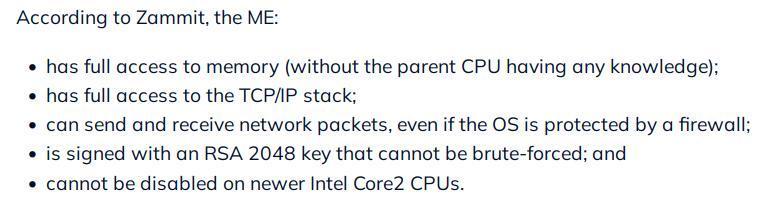
I'm just hesitating about any #IntelME, or #AMDPSP in this case. Not sure I want that on my laptop and don't think you can neuter it (yet)
Is the Intel Management Engine a backdoor? | TechRepublic

Is Intel's Management Engine a backdoor for security groups and hackers, or just a feature created to aid businesses? Jack Wallen dives in and draws his conclusions.

TechRepublic
Почти на любой не особо древней материнской плате можно использовать NVMe-диск M.2 вставленный через PCI-адаптер (PCI x4) в какой-нибудь из нескольких PCI-слотов (желательно с четырьмя и более каналами).
В таком случае SATA-диски проигрывают по скорости в несколько раз, даже при наличии на материнской плате поддержки лишь древней второй версии #PCIe (PCIe v.2). На вполне конкретных примерах вместо 390 Мб/с наблюдается стабильные 1,7 Гб/с.

Загрузка системы на NVMe
Обычно, людей останавливает тот момент, что BIOS (точнее EFI) древних материнских платах не позволяет загружаться с NVMe-дисков, но это не является проблемой в случае таких систем как линуксы.
Т.е. сама по себе система (ОС) может располагаться на nvme-диске, но загрузчик системы с #initramfs и образом ядра при этом на совершенно другом диске или же вообще на вынимаемом носителе.
Для запуска системы нужен boot-раздел весьма скромный по размерам, хватит и 200-300 мегабайт. И располагаться таковой boot-раздел может хоть на flash'ке, хоть на SD-карточке или же быть разделом на SATA-диске.

Как работает загрузка ОС?
При включении питания #UEFI, оно же #EFI, читает записи в своей энергонезависимой памяти #NVRAM в поисках информации о том, какие EFI System Partition (ESP) на каких носителях следует использовать в каком порядке.
#ESP это обычный раздел (partition) с файловой системой FAT16 или FAT32, которую прекрасно понимает EFI-система и на ней смотрит файлы являющиеся загрузчиками сродни: #rEFInd, #GRUB или #systemd-boot
Так же, в качестве загрузчика может быть и специально собранный образ ядра ОС — например, т.н. EFI boot stub.

Или проще добавить поддержку #NVMe?
Иногда вполне реально научить комп грузиться с NVMe. Надо взять «Intel ME Tools» и снять дамп SPI Flash чипа на материнской плате, а в снятый образ EFI-системы добавить NVMe-драйвер (через «UEFI Tool»). После чего, уже пропатченный образ записывается обратно в SPI Flash чип на материнской плате.

Доводилось такое выполнять, используя «Flash Programming Tool» (fpt.exe) из пакета «Intel ME Tools» и это не из под Windows, а из под #FreeDOS. Создавая загрузочную флешку через dd и докидывая на неё один файл «fpt.exe».
Не сказать чтобы удобно, но дампить и шить из под Windows требует сперва установить и саму эту ОС и нужные драйвера от материнской платы вместе с Intel ME/AMT. И выходит, что в ряде случаев проще и быстрее лишние пару раз загрузиться с флешки.

В более поздних версиях «Intel ME Tools» для более новых материнских плат (чипсетов, PCH) появился вариант «Flash Programming Tool» и для линухов. Ненаглядный «flashrom» в ряде случаев бесполезен, может снять дамп лишь с одного из чипов, коих обычно две штуки. Т.е. вместо 12 Мб сделает дамп лишь 8 Мб, то же FPT во время работы показывает с какого SPI-чипа сколько снято или в него записано.

#nvme #nvmessd #linux #hardware #intel #IntelME #lang_ru @Russia
Hubzilla.de

requesting support from anyone with intimate knowledge on IME (Intel ME) and random OEM BIOS switches and extensions, as i dont have that extensive knowledge

ive stumbled upon a motherboard that seemingly has a fuck ton of stuff set to defaults and shipped with various extensions, notably a lot of the BIOS serial numbers and models are just, generic and not correct

more importantly however, there exists options to temporarily disable IME, although this resets upon full shutdown, confirming with intelmetool -m i get a "Can't find ME PCI device" error when this is enabled, and normal information otherwise

does this imply that, the ME truly is very disabled, or is it just gaslighting?

further, there's an "Unconfigure ME" option, which i have no clue what does, and the description talks about resetting the MEBx password (the IME BIOS extension)


#coreboot #ime #intelme #bios #help

🔋 Disabling the Intel Management Engine (ME) leads to battery draining in suspend mode due to modern standby (S0ix). In this guide, we will workaround this issue by setting up a suspend-then-hibernate policy.

https://novacustom.com/prevent-battery-draining-while-suspending-with-me-disabled-linux/

#coreboot #ime #intelme #s0ix #laptopbattery

Prevent battery draining while suspending with ME disabled (Linux) - NovaCustom

Disabling the Intel Management Engine (ME) leads to battery draining in suspend mode. In this guide, we will workaround this issue.

NovaCustom
Enabling Intel AMT For BIOS-over-WiFi

Intel ME, AMT, SMT, V-Pro… All of these acronyms are kind of intimidating, all we know about them is that they are tied to remote control technologies rooted deep in Intel CPUs, way deeper th…

Hackaday
Intel Management Engine (ESPAÑOL)

PeerTube