 Linuxiac
Fwupd 2.0.18 adds reboot prompts, major speed improvements for firmware searches, and support for new HP, Lenovo, and Synaptics hardware.
https://linuxiac.com/fwupd-2-0-18-brings-reboot-notifications-faster-firmware-searches/


Fwupd 2.0.18 adds reboot prompts, major speed improvements for firmware searches, and support for new HP, Lenovo, and Synaptics hardware.
https://linuxiac.com/fwupd-2-0-18-brings-reboot-notifications-faster-firmware-searches/
I cannot emphasize enough how crucial the Win-Raid Forum is for finding information about Intel Management Engine. Bookmarking here the main forum section and several pinned or long-standing reference threads.
Topics: Intel Management Engine
Drivers, Firmware and Tools for ME 16+
Disable & Remove Intel Ibex Peak ME 6.0 Ignition firmware
Unlock Intel Flash Descriptor Read/Write Access Permissions for SPI Servicing
Intel (CS)ME, (CS)TXE, (CS)SPS, GSC, PMC, PCHC, PHY & OROM Firmware Repositories
Clean Dumped Intel Engine (CS)ME/(CS)TXE Regions with Data Initialization
ME Analyzer: Intel Engine Firmware Analysis Tool Discussion
Intel (Conv.Sec.) Trusted Execution Engine: Drivers, Firmware and Tools
Intel (CS) Management Engine: Drivers, Firmware and Tools (2-15)
After preparing the modified image with me_cleaner, the next step was flashing it. Only the ME region should be written back, leaving the rest of the BIOS untouched. With FPT, this is done using a specific command-line option that limits the operation to that region.
Some motherboards have an FDO (Flash Descriptor Override) jumper that temporarily unlocks ME access. On this board, the jumper had to be shorted during flashing; otherwise, FPT refused to write. It is unclear how the manufacturer’s own tool was able to flash ME before, possibly through another privileged path.
After the modified ME firmware was successfully written, the system rebooted normally. It worked fine as long as the FDO jumper stayed shorted. Once the jumper was removed, the next boot showed a HECI error on the POST screen, requiring a manual confirmation with F1. Re-enabling the jumper made the error disappear again.
On most boards, BIOS and ME regions are protected in different ways. The first layer of protection is cryptographic signing, but there are also hardware-level locks. Some chipsets use special BIOS variables called Protected Range Registers that completely disable writes to certain regions.
In other cases, the board must be switched into a special state called manufacturing mode before flashing is allowed. How this is done depends on the board — sometimes through a hidden jumper, sometimes through an internal setting.
Working around these protections safely requires reading the exact documentation for the board and the chipset. The same method rarely works twice.
On my board, the Intel ME firmware is generation 8.x, which is supported by me_cleaner. The manufacturer provides BIOS and ME together in a single image, so me_cleaner can process it directly.
The FPT tool also supports the flash chip used here. That makes it possible to dump and reflash only the ME region, leaving the rest of the BIOS untouched.
If you ever need to rebuild or share a python project’s dependencies cleanly, here’s a quick workflow I like:
Create a minimal requirements.txt using pipreqs (instead of pip freeze, which dumps everything):
pip install pipreqs
python -m pipreqs.pipreqs .
For comparison, the pip-freeze way (often too noisy):
pip freeze > requirements.txt
Download all required packages into a local folder (handy for offline installs):
pip download -r requirements.txt -d packages_dir
Then install from that local folder:
pip install -r requirements.txt --no-index --find-links packages_dir
Finally, a HTML tag is used here to get subscript "H2SO4" andhere a superscript with markdown syntax.
Finally, a HTML tag is used here to get subscript "H<sub>2</sub>SO<sub>4</sub>" and^here a superscript with markdown syntax.
Now about links 🔗
A link in Markdown is made with a title in square brackets, immediately followed by the link in parentheses:[title](link)
Examples:
This same post, but in markdown:
# Now about __links__ 🔗

A link in Markdown is made with a title in square brackets, immediately followed by the link in parentheses:
`[title](link)`

Examples:
- [The post that inspired this](https://neuromatch.social/@elduvelle/109628712961958917)
- [Documentation for Glitch-soc](https://glitch-soc.github.io/docs/), the fork adding all these fancy features
- [Online Markdown editor & tutorial](https://www.markdowntutorial.com/lesson/1/), great for testing before you hit “Toot” and hope for the best 😅
#MastodonTips Did you know you can format your posts with #Markdown? At least in [our server](https://neuromatch.social) and all others that run on the 'glitch' variant of Mastodon. To activate it by default: Settings > Preferences > Other > Default format for toots > Markdown Quick tutorial in the thread below; additional tips welcome! 🔽 1/
Too bad there is no preview when writing markdown post.
Formatted toot example - Level 1 title
Allowed formatting - Level 2 title
Standard text + bold + italics + underlined + strikethrough
Level 3 title
This is some quote.
A numbered list
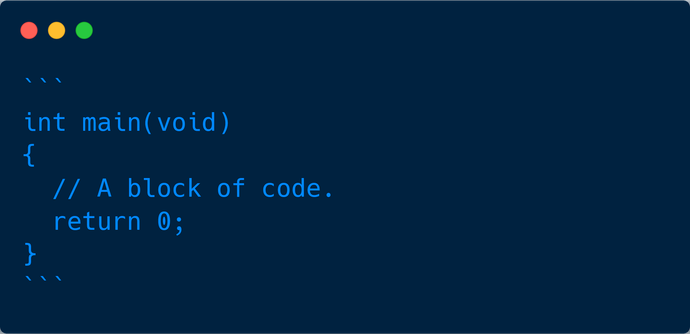
Now some code
Nice inline highlight: python scritp.py
int main(void)
{
  // A block of code.
  return 0;
}
Now everything but last block of code in a block of code
(It is in attached image)
Too bad there is no preview when writing markdown post.

# Formatted toot example - Level 1 title
## Allowed formatting - Level 2 title
Standard text + __bold__ + *italics* +  _underlined_ + ~~strikethrough~~

### Level 3 title
- Make a list
 - like
  - this

> This is some quote.

### A numbered list
1. First item
2. Second item
 - Sub-item.
 - Another one.
3. __One__, *Two*, _Three_

## Now some code
Nice inline highlight: `python scritp.py`