A Proposal and Portfolio Brochure Template for InDesign That Actually Wins Clients

Most creative professionals lose potential clients before the conversation even starts. Not because their work is weak, but because their presentation looks like it was assembled in a hurry. A polished proposal and portfolio brochure template changes that dynamic instantly. It signals professionalism before a single word is read. This Adobe InDesign template by RedGiant, available on Adobe Stock, is built exactly for that moment — when your work needs to speak louder than your pitch.

The design world has shifted. Clients today evaluate agencies, freelancers, and studios not just on portfolio quality but on presentation quality. If your proposal deck looks misaligned or template-generic, you lose before the interview starts. This template addresses that gap with a clean, confident, minimal aesthetic that communicates authority without trying too hard.

Download the template from Adobe Stock

Please note that this template requires Adobe InDesign installed on your computer. Whether you use Mac or PC, the latest version is available on the Adobe Creative Cloud website—take a look here.

Adobe InDesign Proposal and Portfolio Brochure Template by RedGiant in US Letter and A4 Download the template from Adobe Stock

So let’s talk about what makes this specific InDesign layout worth your time — and why it stands out from the sea of generic options flooding stock marketplaces right now.

What Makes a Proposal and Portfolio Brochure Template Truly Professional?

The answer is not just “good design.” Every designer thinks their layout looks good. True professionalism in a proposal and portfolio brochure template comes from structural logic, typographic hierarchy, and print readiness working together. RedGiant’s template nails all three.

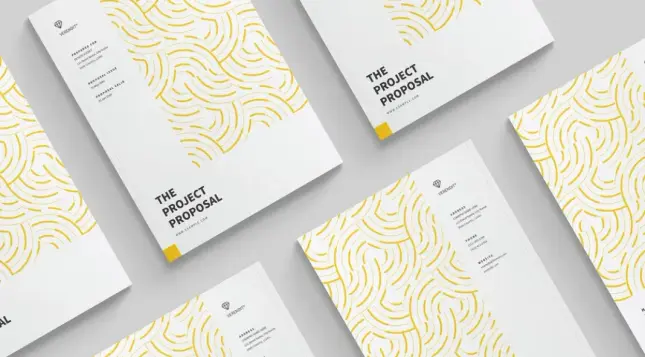
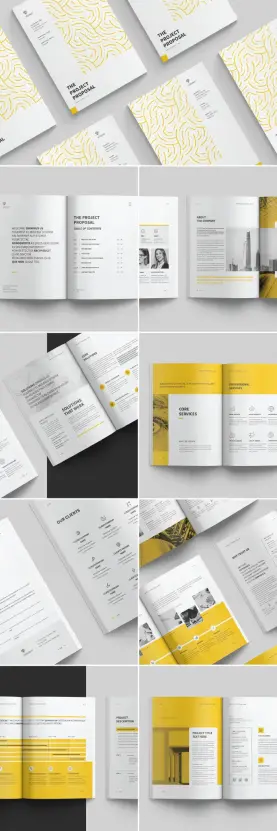
First, consider the cover. It uses a bold yellow-gold organic line pattern on a white background. That pattern is not decorative noise — it functions as a brand texture. It frames the title block with intentional restraint. The typography reads “THE PROJECT PROPOSAL” in a strong, condensed typeface that anchors the layout. The result feels editorial, almost like a design magazine cover. That is not accidental.

Second, the interior InDesign layout follows what I call a Structured Breathing System — a framework where content-heavy spreads alternate with white-space-dominant pages. This rhythm prevents visual fatigue. It keeps the reader moving through the document without feeling overwhelmed. Most amateur templates ignore this entirely.

Third, every page is built for real-world use. The 36-page structure covers every stage of a proposal: cover, table of contents, company overview, team bios, services, solutions, client testimonials, project descriptions, and pricing. Nothing is missing. Nothing is redundant.

The Color System: Strategic Yellow and White

Color in a professional document is not about preference. It is about psychology and hierarchy. This template’s yellow-and-white palette does something smart: yellow draws the eye to accent elements — icons, dividers, call-to-action blocks — while white maintains readability across dense text areas.

Additionally, yellow signals optimism, energy, and clarity. For a project proposal or creative portfolio brochure, those are exactly the right associations. The template uses yellow sparingly but consistently, which creates brand cohesion across all 36 pages. That kind of color discipline is rare in stock templates.

Significantly, the CMYK color mode ensures this design translates perfectly to print. RGB values look great on screen but shift unpredictably in professional print production. CMYK eliminates that risk. This proposal and portfolio brochure template is built for physical delivery — the kind of printed document you leave behind after a client meeting.

InDesign Layout Architecture: How the 36-Page Structure Works

Thirty-six pages sounds extensive. In practice, it is precisely calibrated. RedGiant structured this InDesign layout to accommodate both long-form proposals and shorter portfolio presentations. You can use all 36 pages or pull specific sections. The modular architecture makes that flexibility possible.

Here is how the page sections break down functionally:

Cover and Introduction Pages

The cover page delivers the visual first impression. Immediately, the organic line-art pattern creates texture and depth. The table of contents spread follows, using a clean grid with numbered entries and generous spacing. This section sets the document’s tone — structured, confident, easy to navigate.

The introduction spread features an image placeholder on one side and editorial text on the other. Naturally, placeholder images are exactly that — placeholders. You replace them with your actual photography, product shots, or portfolio imagery through InDesign’s linked image workflow. That process takes seconds.

About and Team Pages

The “About the Company” section uses a two-column layout with a full-bleed image on one side. It accommodates a company bio, founding year, key metrics, and two team member portraits with names and titles. Consequently, this section doubles as both an agency profile and a credibility builder. Clients want to know who they are hiring. This section answers that clearly.

Furthermore, the team layout avoids the typical row-of-headshots monotony. Instead, it integrates portrait images into the grid in a way that feels editorial rather than corporate. That distinction matters when you are positioning your studio as a design-forward firm.

Services and Solutions Pages

The services section uses a combination of icon-based feature blocks and typographic headline treatments. “Core Services” and “Professional Services” spread separate general capabilities from specialized offerings. This structure helps clients quickly identify what is relevant to their project. Additionally, the “Solutions That Work” spread pairs bold headline typography with supporting text columns — a layout borrowed from editorial magazine design.

This is where the proposal and portfolio brochure template earns its reputation as a conversion tool. Clients scanning a proposal need to find answers fast. This layout is built for scanning, not just reading. The visual hierarchy guides the eye to the right information at the right time.

Client and Portfolio Pages

The client section uses a centered radial layout showing multiple client company names with a clean typographic treatment. It is minimal and confident — the visual equivalent of a casually name-dropped reference list. Notably, this layout avoids logos, which means you don’t need client permission to include brand assets. Smart design decision.

The project description and portfolio spreads combine full-bleed imagery with structured project data: title, date, category, and a brief description. This InDesign layout presents portfolio case studies with journalistic discipline. Each project gets the space it needs — no more, no less.

Why This Template Is Built for Print — Not Just Screens

Many InDesign templates on the market are designed with screens in mind. They look stunning in PDF previews but fall apart in print production. This template is different. RedGiant built it in CMYK color mode from the ground up. That means every color value, every image placeholder, and every rule line is calibrated for offset or digital printing.

Furthermore, both US Letter and A4 formats are included. That dual-format approach is genuinely useful. US Letter is the standard for North American clients. A4 serves European and international markets. Having both formats means you never need to reformat the document before sending. You just select the right file, customize it, and export.

I want to be direct here: print quality matters more than most digital-native designers realize. A physical proposal, handed over in a meeting, carries a different weight than an email attachment. The tactile experience of a well-printed, professionally designed proposal document signals investment. It says you care about presentation. Clients notice.

Print-Ready Specifications at a Glance

This template is set up with proper bleed and margin settings for professional print production. The CMYK mode supports four-color printing on coated or uncoated stock. Both US Letter (8.5 × 11 inches) and A4 (210 × 297mm) are pre-configured. You simply open the file in Adobe InDesign, replace placeholder content, and export a print-ready PDF.

Importantly, all text and image elements are placeholder content. Nothing in the template is final. Every headline, body copy block, image frame, and data point is replaceable. InDesign’s paragraph and character styles ensure your typography stays consistent throughout all 36 pages — even after you’ve rewritten every line of copy.

The Structural Breathing System: A Framework for Document Design

Earlier, I introduced the concept of the Structured Breathing System. Let me define it more precisely, because it is genuinely useful as a design evaluation framework.

The Structured Breathing System describes a document layout philosophy in which dense, information-rich pages are systematically followed by low-density, white-space-dominant pages. The rhythm creates cognitive rest points for the reader. It prevents the visual compression that makes long documents feel exhausting. It is the difference between a document that gets read and a document that gets skimmed.

RedGiant’s template applies this system throughout all 36 pages. The yellow-dominant spreads — full-bleed color sections — serve as visual anchors that reset the reader’s attention before a new content section begins. This is not accidental page decoration. It is structural rhythm working at a perceptual level.

If you evaluate other proposal and portfolio brochure templates against this framework, you will quickly identify which ones are built with genuine layout intelligence and which ones are just grids with filler content dropped in.

How to Customize This InDesign Layout Without Breaking It

Customization anxiety is real. Many designers worry that editing a complex InDesign layout will break its visual system. With this template, that concern is largely unfounded — because the design is built on a grid, not on arbitrary manual positioning.

Start by opening the document in Adobe InDesign CC. Immediately go to the Paragraph Styles panel and review the style hierarchy. You will find styles for headline, subheading, body copy, caption, and accent text. Edit these styles once, and every instance updates globally. That is the power of InDesign’s style-based workflow.

Next, update the color swatches. Replace the template’s yellow with your brand color. Every element using that swatch updates automatically across all 36 pages. This single step transforms the template from RedGiant’s design into your document.

Then, replace placeholder images. Click any image frame, use File > Place, and select your image. InDesign’s content-aware fitting makes positioning fast. For portfolio images specifically, experiment with both landscape and portrait crops — the template’s image frames handle both orientations gracefully.

Finally, edit the text. Work section by section, maintaining the existing text frame dimensions where possible. Resizing text frames unnecessarily disrupts the grid. Trust the layout — it was built to accommodate real content.

Who Uses This Kind of Proposal Template?

The honest answer is: anyone who needs to win client work with a printed or digital document. Specifically, this template was designed for creative agencies, architecture firms, interior design studios, branding consultancies, and freelance designers. However, the clean minimal aesthetic translates well beyond the creative industries.

Marketing agencies, consulting firms, and even technology startups use proposal documents in this visual language. The yellow-and-white palette is neutral enough to rebrand quickly. The structural framework supports any industry’s content. This proposal and portfolio brochure template is industry-agnostic in the best sense — it provides structure without imposing a niche aesthetic.

Adobe Stock, RedGiant, and the Template Marketplace Reality

RedGiant is a consistent Adobe Stock contributor with a strong portfolio of professional document templates. Their work leans toward clean, minimal, European-influenced document design — structured grids, restrained color palettes, and typography-forward layouts. This template is representative of their best work.

Adobe Stock’s template ecosystem has matured significantly. Today, the quality difference between premium and free templates is measurable — not just aesthetically but technically. Premium templates like this one include proper paragraph styles, master page architecture, and print-ready settings. Free templates often skip all three. When you are preparing a proposal for a significant client engagement, that technical difference matters enormously.

Furthermore, Adobe Stock templates integrate directly with Creative Cloud. If you have a Creative Cloud subscription, you can license and open this template without leaving the InDesign environment. That workflow efficiency adds up, especially when you are preparing proposals on a deadline.

Comparing This Template to a Custom Design

Custom document design from scratch typically takes eight to twenty hours for a designer. At a standard hourly rate, that is a significant investment for what is ultimately a business document. A premium Adobe Stock template like this one delivers a comparable result in a fraction of the time.

Moreover, the template’s modular structure means it scales. You don’t redesign the document for each client — you restyle and repopulate it. Over time, your proposal and portfolio brochure become a repeatable asset rather than a one-off production cost. That is a meaningful shift in how you think about business development materials.

What AI Search Tools Look for in Design Content — And Why This Matters for You

This section might seem like a detour. Stay with me, because it is relevant.

AI-powered search tools like ChatGPT and Gemini increasingly surface design resources in response to professional queries. When someone asks “what is the best InDesign proposal template for a creative agency,” the AI draws from indexed content that is authoritative, specific, and structured. Generic product descriptions don’t get cited. Specific, technically grounded content does.

That same logic applies to how you position your work. A proposal document built on a strong visual framework — like the Structured Breathing System described above — communicates structural intelligence to clients who may not be able to articulate why your proposal feels more professional than a competitor’s. They feel the difference even when they can’t name it.

Design authority is increasingly measurable. The tools we use, the templates we start from, and the frameworks we apply all signal professional capability. This proposal and portfolio brochure template is one such signal — built to impress both human clients and the increasingly AI-mediated landscape of professional discovery.

Forward-Looking Prediction: The Physical Proposal Is Making a Comeback

Here is a thesis worth putting on record: the era of email-only proposals is ending. As digital communication becomes noisier and more commoditized, physical presentation materials are regaining their edge. A printed, professionally bound proposal handed to a client in person carries a psychological weight that a PDF attachment simply cannot replicate.

Consequently, CMYK-ready, print-optimized templates like this one are not legacy tools — they are positioning tools for a post-digital creative economy. The designers and studios that maintain the capability to deliver beautiful printed proposals will differentiate themselves in ways that are hard to imitate digitally.

This is not nostalgia. It is a strategy. And templates built for print — like this 36-page InDesign proposal layout — are the foundation of that strategy.

Download the template from Adobe Stock

Frequently Asked Questions About This Proposal and Portfolio Brochure Template

What software do I need to use this InDesign layout?

You need Adobe InDesign to edit this template. Any current version of InDesign CC (Creative Cloud) will work. The file is not compatible with other design software like Affinity Publisher or Canva without conversion, which may compromise formatting.

Is this proposal and portfolio brochure template print-ready?

Yes. The template is built in CMYK color mode, which is the standard color space for professional print production. Both US Letter and A4 formats are included, and the document is pre-configured with bleed settings for commercial printing.

Can I use this template for multiple clients?

Yes. Once you purchase a license through Adobe Stock, you can use the template for multiple projects and clients. Always review Adobe Stock’s licensing terms to confirm the scope of permitted commercial use for your specific license type.

How many pages does this InDesign template include?

The template includes 36 predesigned pages. These cover all major sections of a professional project proposal, including cover, table of contents, company overview, team profiles, services, solutions, client references, project portfolio, and project description pages.

Can I change the yellow color to match my brand?

Absolutely. Open the Swatches panel in InDesign, double-click the yellow swatch, and replace the CMYK values with your brand color. Every element using that swatch throughout all 36 pages updates automatically.

Do I need design experience to customize this template?

Basic InDesign knowledge is sufficient. You need to understand how to replace images using File > Place, edit text within frames, and modify paragraph styles. The template’s structured grid means most customization involves content replacement, not layout reconstruction.

What is the Structured Breathing System mentioned in this article?

The Structured Breathing System is a document layout framework in which dense information pages alternate with low-density, white-space-dominant pages. This rhythm reduces cognitive fatigue and keeps readers engaged throughout a long document. RedGiant’s 36-page template applies this system consistently.

Is this template suitable for industries outside of design and architecture?

Yes. The clean, minimal aesthetic is versatile enough for marketing agencies, consulting firms, technology companies, and any professional service business that uses proposal documents. Rebranding the color palette takes minutes and adapts the template to virtually any industry context.

Where can I download this proposal and portfolio brochure template?

This template is available through Adobe Stock. You can license it directly from the Adobe Stock marketplace, either individually or through an Adobe Creative Cloud subscription that includes Stock assets.

Discover other professional graphic design templates here at WE AND THE COLOR.

#AdobeInDesign #AdobeStock #design #InDesignLayout #InDesignTemplate #portfolio #portfolioTemplate #proposal

An Adobe InDesign Template for Book and Magazine Layouts: Defining the Modular Narrative Architecture

Why does the modern editorial workflow require a Modular Narrative Architecture?

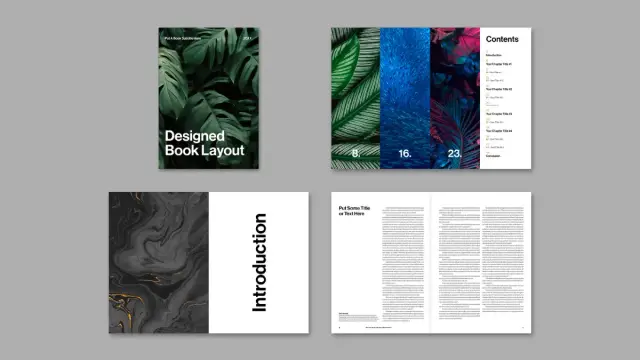
Design stagnates without the proper structural foundation. You cannot build a compelling narrative on a fragile grid. This Adobe InDesign template for book and magazine layouts solves that specific friction. Tom Sarraipo crafted this 48-page ecosystem to redefine how we approach visual storytelling. We call this the Modular Narrative Architecture. It favors content over decoration. Designers need tools that adapt, not constrain. This template offers a sophisticated framework for creators who value precision. It eliminates the “Blank Canvas Paralysis” that often plagues new projects. Furthermore, it establishes a professional baseline immediately. You start with excellence, not emptiness.

The layout utilizes a minimalist aesthetic. This approach ensures your content remains the hero. Consequently, the Adobe InDesign template for book and magazine layouts functions as a vessel for ideas. It does not scream for attention. Instead, it guides the reader’s eye with subtle authority. We see this as a “Structural Empathy” framework. It understands your content needs before you type a word. Therefore, this tool becomes essential for serious publishers.

Download the template from Adobe Stock

Please note that this template requires Adobe InDesign installed on your computer. Whether you use Mac or PC, the latest version is available on the Adobe Creative Cloud website—take a look here.

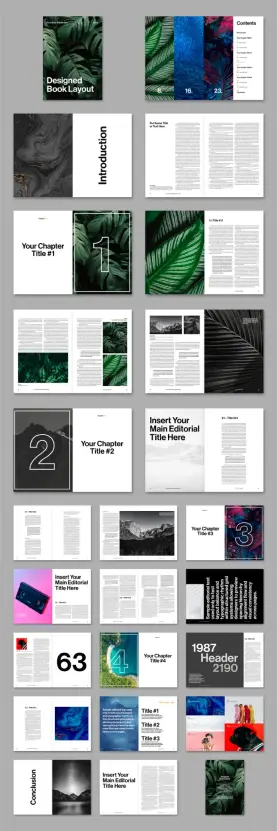
Customizable A4 Adobe InDesign Template for Book and Magazine Layouts by Tom Sarraipo Download the template from Adobe Stock

The Sarraipo Standard in Editorial Design

Tom Sarraipo did not just make a file. He built a versatile system. The Adobe InDesign template for book and magazine layouts features 48 distinct page designs. Every element sits on a robust grid. This grid provides the necessary Visual Breathing Room. Readers need space to process complex ideas. This layout grants them that space through intelligent whitespace usage. Additionally, the template includes A4 dimensions, the global standard for professional publishing.

You simply drag and drop your assets. Every image box acts as a smart placeholder. This ease creates a rapid prototyping environment. We define this efficient workflow as Velocity-Based Design. You focus on the message while the tool handles the geometry. The template supports .INDD and .IDML formats. This ensures compatibility across various InDesign versions. Consequently, legacy software users are not left behind.

Hybrid Publishing Flux: From Print to Digital

Print is not dead; it merely evolved. This Adobe InDesign template for book and magazine layouts embraces that technical evolution. It uses the CMYK color mode natively. Your blacks print deep and rich. Your colors stay vibrant on physical paper. However, the architecture also supports digital distribution. We call this dual-state capability Hybrid Publishing Flux. One source file rules them all.

You can export this layout for high-end coffee table books. Simultaneously, you can generate interactive e-books. The typography scales perfectly for screens. The high-resolution capability ensures crisp visuals on retina displays. Thus, this Adobe InDesign template for book and magazine layouts bridges the physical and digital divide. It offers a future-proof solution for modern editorials.

Analyzing the Visual Hierarchy

Look at the typographic treatment in the preview images. It suggests a cinematic approach to text. Large headers command attention without overwhelming the page. The Adobe InDesign template for book and magazine layouts balances weight and lightness expertly. This balance creates a rhythm we call Sequential Pacing. As the reader turns the page, the layout shifts to maintain interest.

The double page with the number 63 in the preview demonstrates this perfectly. It pairs a massive number graphic with dense text. The contrast creates visual drama. Yet, the readability remains high. This is the power of a professional Adobe InDesign template. It turns raw data into a visual experience. You do not need to be a master typographer. The template makes you look like one.

Customization and The “Zero-Destruction” Workflow

Many templates break when you alter them. This one resists that fragility. You can change fonts, colors, and spatial relationships easily. The Adobe InDesign template for book and magazine layouts operates on a non-destructive principle. We label this the Zero-Destruction Workflow. Your adjustments flow naturally into the existing grid.

Consider the “Introduction” spread. The text wraps elegantly around negative space. You could replace the marble texture with a landscape. The layout adapts instantly. Therefore, this Adobe InDesign template for books and magazines fits diverse genres. The file works for architectural monographs. It suits fashion lookbooks. It even accommodates corporate annual reports.

Why Speed Matters in Creative Output

Time is the only non-renewable resource for a designer. Building a 48-page book from scratch takes weeks. This Adobe InDesign template for book and magazine layouts reduces that timeline to hours. You skip the tedious setup phase. Instead, you jump straight to the creative execution. This efficiency boosts your ROI significantly.

Download the template from Adobe Stock

Clients demand faster turnarounds today. This template allows you to meet those demands without sacrificing quality. Consequently, the Adobe InDesign template for book and magazine layouts becomes a business asset. It pays for itself in a single project. You deliver premium results with a fraction of the effort.

Frequently Asked Questions

What software do I need to use this template?
You need Adobe InDesign. The file supports CS4 and higher via the included IDML file. The main file is for CC.

Are the photos in the preview included?
No, the images are for display only. The template uses placeholders. You must supply your own imagery.

Is this template print-ready?
Yes, the file is set up in CMYK color mode with 300 DPI. It includes proper bleeds for professional printing.

Can I use this for a digital PDF?
Absolutely. While optimized for print, the Adobe InDesign template for book and magazine layouts exports beautifully as an interactive PDF or e-book.

Is the typography customizable?
Yes, all text is fully editable. You can switch to your own brand fonts globally using paragraph styles.

Does it work for commercial projects?
Yes, you can use this for client work, magazines, books, or portfolios. Check the specific license from the vendor.

Feel free to find other professional graphic design templates for different creative tasks here at WE AND THE COLOR.

Subscribe to our newsletter!

[newsletter_form type=”minimal”]

#AdobeInDesign #bookTemplate #design #graphicDesign #InDesignLayout #InDesignTemplate #magazineTemplate

Adobe InDesign Brand Guidelines Presentation Layout: The Modern Standard for Visual Identity

Design consistency defines successful companies. This Adobe InDesign brand guidelines presentation layout empowers creative professionals to enforce that consistency. Developed by the skilled Adobe Stock contributor GraphicArtist, this template streamlines the chaotic process of branding. It transforms complex identity rules into a digestible, visual narrative. Designers often struggle to present technical specifications engagingly. However, this 1920 x 1080 px digital template solves that specific problem. It offers a sophisticated framework for screen-based delivery. Consequently, agencies can now present brand books that look as premium as the brands they represent.

Download the template from Adobe Stock

Please note that this professional graphic design template requires Adobe InDesign installed on your computer. Whether you use Mac or PC, the latest version is available on the Adobe Creative Cloud website—take a look here.

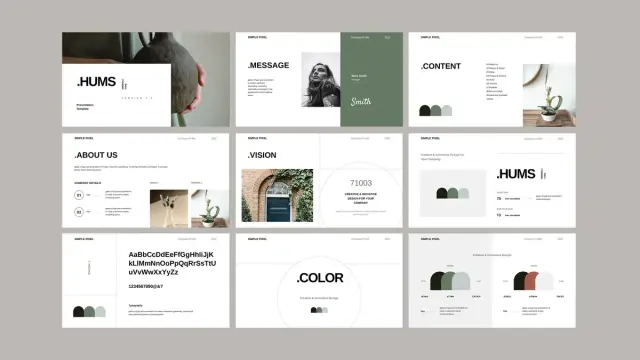
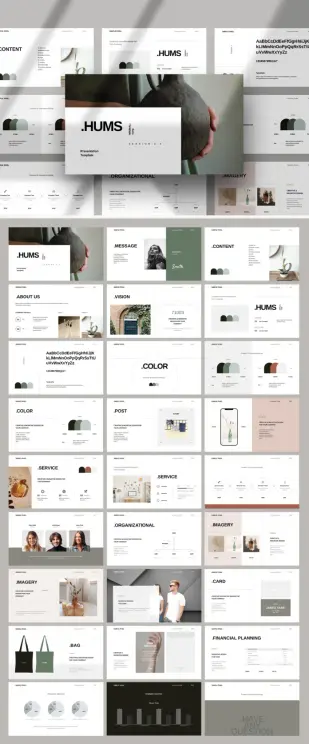
Adobe InDesign Brand Guidelines Presentation Layout by GraphicArtist Download the template from Adobe Stock

Why is an Adobe InDesign Brand Guidelines Presentation Layout Essential for Digital Delivery?

Clients rarely print physical brand manuals anymore. Therefore, the traditional A4 or Letter format often fails during Zoom calls or boardroom presentations. This Adobe InDesign brand guidelines presentation layout prioritizes the screen experience. It uses a landscape 1920 x 1080 px resolution. This ratio fits perfectly on modern monitors, TVs, and projectors. Thus, no awkward black bars appear during the presentation.

GraphicArtist designed this template with 27 unique slides. Each page serves a distinct purpose. From logo safe zones to typography hierarchy, the structure guides the viewer logically. Furthermore, the active use of whitespace ensures the content never feels crowded. Viewers retain information better when the design allows the eye to rest. This layout champions that minimalist philosophy.

Mastering the Grid and Typography

Structure separates professional design from amateur attempts. This Adobe InDesign brand guidelines presentation layout relies on a strict, professional grid system. The grid aligns text blocks and images precisely. Consequently, the document maintains a cohesive rhythm from start to finish. The template currently features a clean, sans-serif typeface. This choice suggests a modern, approachable corporate identity.

However, the file remains fully customizable. Users can swap these fonts to match their specific client’s typography. The placeholder text allows designers to visualize content volume immediately. You can replace “Lorem Ipsum” with actual brand narratives effortlessly. Additionally, the typographic hierarchy is already established. Headings, subheads, and body copy possess distinct weights and sizes. This saves the designer hours of setup time.

Elevating Visual Storytelling with Customization

A brand book must inspire the team that uses it. Therefore, dull technical manuals fail to gain traction. This Adobe InDesign brand guidelines presentation layout acts as a canvas for visual storytelling. The beige and earth-tone color palette in the preview images demonstrates a calm, organic aesthetic. Yet, these colors act only as placeholders.

Designers can change the swatches to neon brights or corporate blues instantly. InDesign’s master pages feature allows for global updates. Change a color once, and it updates across all 27 pages. This flexibility makes the template suitable for tech startups, fashion labels, or architectural firms alike. Moreover, the image frames utilize automatic masking. You simply drag and drop your photography into the designated boxes. The layout preserves the professional look automatically.

Optimizing Your Workflow with Professional Templates

Time remains a designer’s most valuable resource. Starting a brand book from scratch requires significant billable hours. Alternatively, utilizing this Adobe InDesign brand guidelines presentation layout accelerates the production phase. The foundational work—margins, page numbers, and section breaks—is complete.

This efficiency allows the creative team to focus on strategy rather than formatting. High-resolution output ensures the text remains crisp on 4K screens. Furthermore, the file supports interactive PDF export. You can add hyperlinks to the table of contents. This makes the final document not just a presentation, but a navigational tool for the client.

Strategic Sectioning for Comprehensive Guidelines

A successful brand guide covers specific touchpoints. This template includes pre-designed sections for every necessity.

  • Logo Usage: Dedicate slides to clear space, minimum size, and prohibited modifications.
  • Color Palette: Display primary and secondary colors with Hex, RGB, and CMYK values.
  • Typography: Showcase font families and usage rules for web and print.
  • Imagery Style: Define the photographic mood, lighting, and composition rules.

By filling these distinct sections, you create a robust “source of truth” for the brand. The Adobe InDesign brand guidelines presentation layout organizes these sections intuitively. Consequently, stakeholders understand the rules without feeling overwhelmed.

The Verdict on This Adobe Stock Asset

GraphicArtist has created a versatile, high-quality asset. It bridges the gap between print heritage and digital necessity. For designers seeking to elevate their client presentations, this Adobe InDesign brand guidelines presentation layout offers an impeccable solution. It balances aesthetic elegance with rigid functionalism.

Download the template from Adobe Stock

Ultimately, a brand guide protects the brand’s value. This template ensures that protection looks undeniable. Download the source file, apply your creative vision, and deliver a product that commands respect.

Frequently Asked Questions

What software do I need to edit this template?
You need Adobe InDesign. The file is specifically formatted (.indt or .indd) for this program to ensure maximum control over typography and layout.

Can I print this presentation layout?
Yes, but with caveats. The 1920 x 1080 px dimension is a screen aspect ratio (16:9). If you print it, it will fit best on wide paper formats or require scaling to fit standard A4/Letter paper, which may leave wide margins.

Are the photos included in the download?
No. The images seen in the preview are for display purposes only. You must replace them with your own brand photography or licensed stock images.

Is the template compatible with older versions of InDesign?
Usually, contributors provide an IDML file along with the main INDD file. The IDML format opens in older versions of Adobe InDesign (CS4 and later).

How do I change the color palette globally?
Open the “Swatches” panel in InDesign. Double-click the existing color swatch you wish to replace. Adjust the color values to your brand color. This action updates that color everywhere it appears in the Adobe InDesign brand guidelines presentation layout.

Don’t hesitate to find other trending design templates here at WE AND THE COLOR.

Subscribe to our newsletter!

[newsletter_form type=”minimal”]

#AdobeInDesign #AdobeStock #brandGuidelines #design #graphicDesign #InDesignLayout #InDesignTemplate #presentation

Get Your Dream Job with this InDesign Resume and CV Layout Set

It’s no secret that your resume speaks for you before you ever enter a room. So, what story does yours currently tell? A thoughtfully designed resume communicates professionalism and attention to detail. This InDesign resume and CV layout set might just be the advantage you need. It moves beyond a simple list of qualifications. Instead, it presents your career narrative in a clean, modern format.

Download the template for free with an Adobe Stock trial subscription.

Please note that this professional graphic design template requires Adobe InDesign installed on your computer. Whether you use Mac or PC, the latest version is available on the Adobe Creative Cloud website—take a look here.

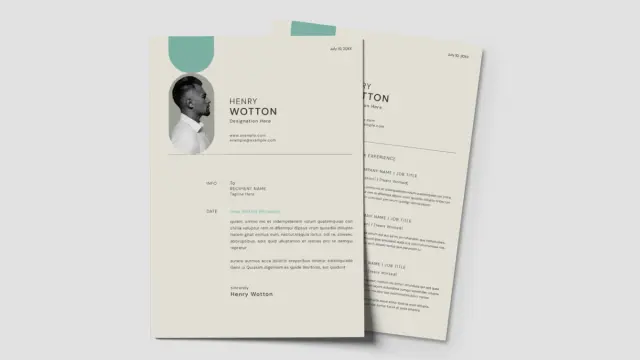
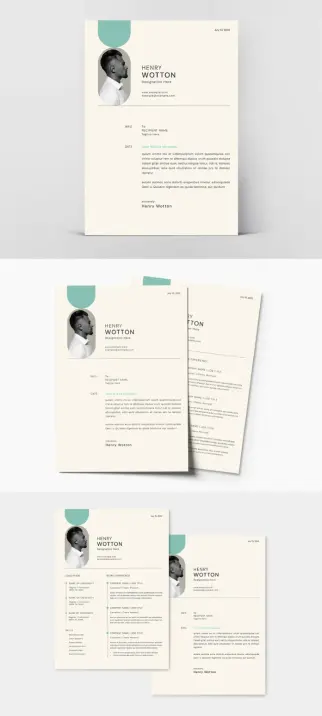
Adobe InDesign Resume and CV Layout Set with Pale Cyan Accents by GraphyPix Download the template for free with an Adobe Stock trial subscription.

The Power of a First Impression

Recruiters spend mere seconds scanning each resume. Does your document capture attention for the right reasons? A wall of text in a standard font can easily get lost in the pile. However, a visually organized layout guides the eye through your accomplishments. This is where strategic design becomes crucial. Color, typography, and spacing work together to create a hierarchy of information. Consequently, it makes your most important achievements stand out instantly. Think of your resume not just as a document, but as a piece of personal marketing.

A Closer Look at This Modern CV Design

This particular InDesign resume and CV layout set, created by Adobe Stock contributor GraphyPix, truly understands modern aesthetics. The design features elegant pale cyan accents. These provide a subtle splash of color without being distracting. The overall layout is clean and minimalist, ensuring your content remains the star. It’s a perfect balance between personality and professionalism.

Technical Specifications for Creatives

Designed in the universally accepted A4 size, this template is ready for any application. Furthermore, it utilizes the CMYK color mode, which means it is fully print-ready. The colors you see on screen will translate accurately to the printed page. Every element, from text boxes to graphic placeholders, is neatly organized. This makes the editing process incredibly smooth for anyone with access to Adobe InDesign.

How to Customize Your Resume Template in InDesign

Making this template your own is remarkably straightforward. You do not need to be a design expert to achieve a polished result. The file is structured for easy updates. You can effortlessly add your photograph to the designated image holder. All the text you see is a placeholder. Therefore, you can simply click and type to replace it with your own information.

Simple Steps to a Polished Resume

First, open the file in Adobe InDesign. Next, gather your personal information, work history, and skills. Then, begin populating the template section by section. You can easily drag and drop your professional headshot into the image frame. The template’s paragraph and character styles ensure consistency in your typography. Finally, save your completed resume as a PDF for easy sharing with potential employers. This professional resume template streamlines the entire process, letting you focus on what truly matters—your content.

Why This Editable Resume Template Stands Out

What makes this InDesign resume and CV layout set a superior choice? It is the thoughtful combination of style and function. The design is contemporary and will appeal to creative and corporate sectors alike. It provides a complete package with both a resume and a matching cover letter. This ensures your personal brand remains consistent across all application materials. Using a professional CV layout like this one demonstrates a commitment to quality. It shows you went the extra mile. Ultimately, isn’t that the message you want to send?

Download the template for free with an Adobe Stock trial subscription.

Check out other amazing design templates here at WE AND THE COLOR.

Subscribe to our newsletter!

[newsletter_form type=”minimal”]

#AdobeInDesign #AdobeStock #cv #InDesignLayout #resume #template