 Reunig Kozh
GNOME, le bureau ultramoderne

GNOME, le bureau ultramoderne
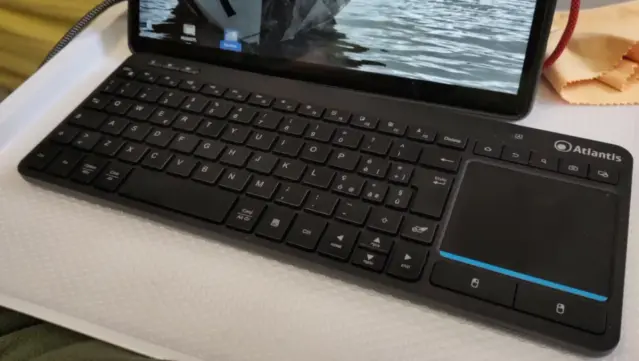
Atlantis KD3116 keyboard
Full post here. https://rene.seindal.dk/2026/05/05/atlantis-kd3116-keyboard/
Looking for a compact keyboard with an integrated touchpad, I found the Atlantis KD3616 keyboard.
It is an Italian brand, and I'm not sure if this keyboard is available outside Italy.
What sold it to me, was the promise of three finger gestures on the touchpad, which I use a lot in Gnome, to switch between desktops and open and close the overview.
It does, kind of, but it also doesn't.
GNOME 50 Tokyo arrives for Linux
https://fed.brid.gy/r/https://nerds.xyz/2026/03/gnome-50-tokyo-arrives-for-linux/
GNOME 50, codenamed Tokyo, is now rolling out to Linux distributions with a long list of practical improvements. From new parental controls and accessibility upgrades to faster file management and smoother Wayland performance, this release focuses on refining the desktop experience rather than reinventing it.
GNOME 50 “Tokyo” Desktop Environment Officially Released, This Is What’s New
GNOME 50 Release Candidate Arrives with HDR Screen Sharing Support
Best of LINMOB Live #1: postmarketOS GNOME on the PinePhone

GNOME 49.4 Released with Improvements for Nautilus, GNOME Shell, and Mutter
GNOME 50 Desktop Environment Enters Public Beta Testing with More New Features
@HeliaXyana when people ask me what Linux to try, I always recommend #LinuxMint or #Fedora. They are my top choices because they are community-run not corporate owned, and they are both extremely well designed, they both have lots of software in their package repositories, they come with everything a new user could ever need in an operating system already built-in, and (most of all) are both ridiculously stable and predictable, to a degree that you wouldn’t have thought possible of a computer operating system.
By the way, to make LinuxMint look and feel like as “pretty” as Fedora, it’s just one command: sudo apt-get install task-gnome-desktop, then logout and login again. Done.
To make Fedora look and feel as “ugly” LinuxMint, it’s just one command: sudo dnf install @cinnamon-desktop, then logout and login again. Done.
But personally, I find #CinnamonDE to be beautiful, it is my daily driver.
#tech #software #Linux #DesktopEnvironment #Gnome #GnomeDesktop
 René's old blog
 NERDS.xyz – Real Tech News for Real Nerds [Unofficial]
 Page Asgardius
 Steve has ☕️ for brains
 Ramin Honary