LibreOffice verbessert die Schriftarten‑Ersetzung – wichtig für alle, die Dokumente zwischen Windows, macOS und Linux austauschen

Bereits am 12.11. berichtete LibreOffice zuletzt über das "Font Replacement", die Schriftarten-Ersetzung.
Microsoft tauschte seine Standard‑Schriftarten für westliche Sprachen komplett aus. Statt der bekannten Schriften wie Calibri, Candara oder Segoe verwendet das Unternehmen jetzt die neue Schrift Aptos. Dieser Wechsel wirkt sich direkt auf die Darstellung von Office‑Dateien aus, wenn sie auf anderen Betriebssystemen geöffnet werden. Die Entwickler von LibreOffice reagieren darauf,..

https://maniabel.work/archiv/244

#LibreOffice #FontFix #FossApps #BeDiS

LibreOffice – FontFix – maniabel.work

Entdecken Sie, was Sie für die Sicherheit und den Schutz Ihrer Daten selbst tun können. <meta charset=

🚀 If you’re facing font issues in #Mastodon, enable "Use system's default font" in Preferences > Appearance. 🖥️ Details: https://github.com/mastodon/mastodon/issues/36003

#MastodonTips #FontFix #TechHelp #SystemSettings #CommunitySupport

Typing 'find' or 'office' replaces some characters with strange symbols · Issue #36003 · mastodon/mastodon

Steps to reproduce the problem Open a chat textarea (e.g., in Mastodon). Type the word find (without spaces, e.g., "fi"). Observe that the input is replaced by the symbol ⋔ (pitchfork) instead of d...

GitHub

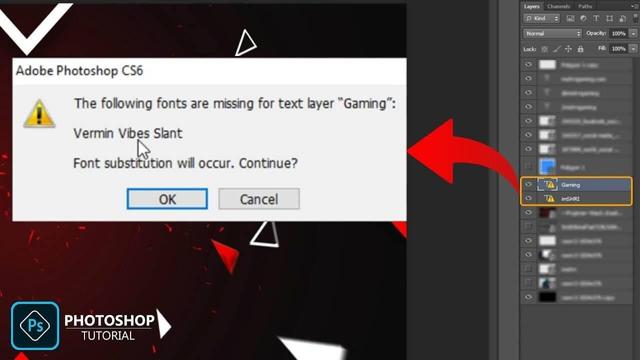
Fonts missing in your text layer in Adobe Photoshop? Our guide offers quick fixes to resolve this error and get back to designing with the right typefaces. Fix it fast and keep your projects on track! 🖋️🔧 #AdobePhotoshop #DesignTips #FontFix

https://pupuweb.com/how-to-quickly-resolve-fonts-are-missing-in-the-text-layer-error-in-adobe-photoshop/

How to quickly resolve “fonts are missing in the text layer” error in Adobe Photoshop - PUPUWEB

Missing fonts in your Photoshop project? Don't panic! Here's a quick and easy solution to get your design back on track: Jot down the name of the missing

PUPUWEB