Apparently wiping the failed drive to send back to Seagate takes a while. I'm using the three-pass from diskutil in macOS where it writes all 0s, then all 1s, then random data.

This has been running since last night and it's only half way through pass 2!

#CosplayAsSysadmin
#NAS
#DriveFailure
#CheckYourBackups

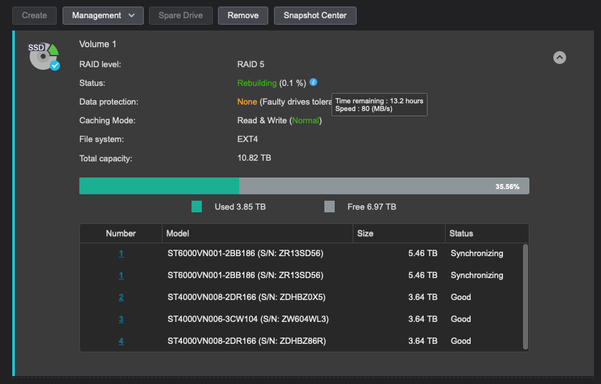
Now for the nerve-racking period of time when the volume is rebuilding...

#CosplayAsSysadmin
#NAS
#DriveFailure
#CheckYourBackups

Wow, two failing HDDs in one calendar year, I wonder if the batch is bad.

I bought all four of the original drives at one time and I think they all had the same lot code.

I wish ASUSTOR was a bit more active about sending me SMART failure notifications, this one I found because I was looking for something else in the ADM interface.


#CosplayAsSysadmin
#NAS
#DriveFailure
#CheckYourBackups

I had to buy some power extension cables since it is very hard to plug the Zigbee controllers directly into the back of my UPS.

Unfortunately I'll have to shutdown my NAS again to get everything all connected, though it will be a good time to also add a power monitor and install the new array of HDDs on my hypervisor system.

It must be a maintenance night for my home network!

#CosplayAsSysadmin

Using the VI startup time profiler switch is super useful. I normally don't have issues with VI or VIM but on one system at work, it can take forever to open.

I wonder why sourcing my vim rc file is taking 15 seconds? Seems like network share access problems, causing my VIM window to take almost 20 seconds to load.

#CosplayAsSysadmin
#VIM

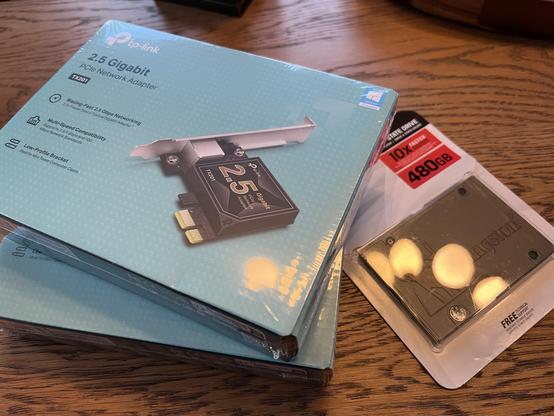
I’ve got the need. The need for speed.

The two network card will be used in the two rack pcs I have running Proxmox. The SSD will be used to replace the existing 500GB HDD in one of the two rack pcs. The other rack pc already has an SSD replacement running in it.

#CosplayAsSysadmin
#Multigigabit
#Ethernet

Note this synchronizer ONLY works with PiHole v6.x+, it will not work with v5.x.

I successfully deployed a secondary PiHole container on a different bare metal device, deployed a container for Nebula-sync, and updated my router to use the secondary PiHole as another DNS server. The synchronization from the primary to the secondary was quick and flawless. What a cool project!

#CosplayAsSysadmin
#Docker
#PiHole

This looks like a fantastic way for me to get a secondary instance of a DNS server running.

Techno Tim has a great video about it where he sets it up as a Docker container.

I might have to work on upgrading my PiHole instance to 6.x, though the last time I did that it completely broke the web access.

#CosplayAsSysadmin
#Docker
#PiHole

https://github.com/lovelaze/nebula-sync

GitHub - lovelaze/nebula-sync: Synchronize configuration of multiple Pi-hole v6.x instances.

Synchronize configuration of multiple Pi-hole v6.x instances. - GitHub - lovelaze/nebula-sync: Synchronize configuration of multiple Pi-hole v6.x instances.

GitHub

There must be a small cache in the Thunderbolt Display to allow for the transfer of the small blocks to sustain the 225MBps with a count of only 1024.

As soon as I increased the count to 8192 (from 4096) the bandwidth dropped from ~220MBps to ~15MBps.

It seems like there is a cache of about 2MB somewhere in the USB chain (512 * 4096)?

I feel like I should write a python script to graph the distribution of these bandwidths on block size and count.

#CosplayAsSysadmin

I bought a new 256GB thumb drive that promises USB3.1 transfer speeds or up to 400MBps.

I also wanted to retest the throughput to the USB ports on the back of my Thunderbolt Display.

*Thunderbolt Display*
Bandwidth (block=512M, count=1) 11MBps
Latency (block=512, count=1024) 225MBps

*USB3 Hub*
Bandwidth (block=512M, count=1) 117MBps
Latency (block=512, count=1024) 114MBps

*Mac mini USB Port*
Bandwidth (block=512M, count=1) 115MBps
Latency (block=512, count=1024) 197MBps

#CosplayAsSysadmin