https://kanyilmaz.me/2026/02/23/cli-vs-mcp.html #saveMCPmanuals #CLImagic #JSONdump #techinnovation #HackerNews #ngated
With my internal laptop screen below the large external 24" monitor, I always have to tilt my neck unnaturally high whenever I open a new terminal window. This line at the end of my ~/.bashrc now displays the first prompt at the bottom of the terminal, which is usually at eye level:
tput cup 9999 0
(It puts the cursor at line 9999, column 0 of the terminal, which should be large enough for most screens so that it ends up at the bottom.)
#TIL: #xargs has an option -a to read items from a file instead of from standard input. This is perfect if you need to run xargs without a surrounding shell to provide the commonly used pipe mechanism, e.g. calling it just via exec() or similar.
My case today was with Perl's Test::Command::Simple::run_ok() in pxzgrep's TAP based test suite.
#TIL: Filter in #htop (either via pressing F4 or via the commandline option "-F") can't do regular expressions, but the pipe character "|" can be used to separate multiple search terms. E.g. only showing processes which have `systemd` or `sd-pam` in their name works like this:
htop -F 'systemd|sd-pam'
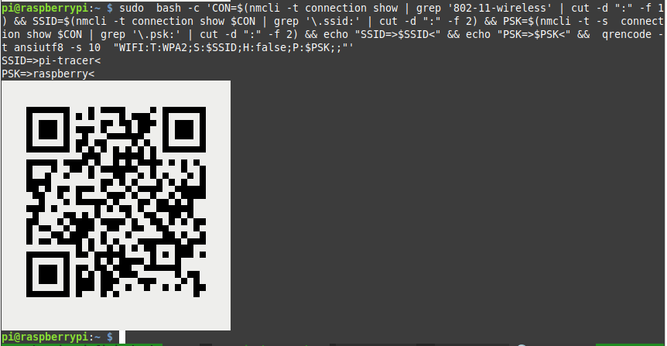
(Bash) One liner to create a QR-Code to connect your phone to the Wifi your PC is connected to using nmcli, qrencode and bash...
sudo bash -c 'CON=$(nmcli -t c s | grep -m 1 '802-11-wireless' | cut -d ":" -f 1) && SSID=$(nmcli -t c s $CON | grep '\.ssid:' | cut -d ":" -f 2) && PSK=$(nmcli -t -s c s $CON | grep '\.psk:' | cut -d ":" -f 2) && echo "SSID=>$SSID< PSK=>$PSK<" && qrencode -t ansiutf8 -s 10 "WIFI:T:WPA2;S:$SSID;H:false;P:$PSK;;"'
(edit: slightly improved)
CLI makes many things just way more efficient.
The problem: find all emails sent by any of 60 students since August to make sure I've not forgotten anything agreed. I have email addresses in a text file
Solution:
xargs -I M notmuch search date:2023-08-01.. from:M < emails.txt
Not sure if any of GUI email clients can perform similar operation as easily.
git rebase --empty=drop --strategy-option=theirs --exec='yarn ispretty || ( yarn prettier && git add -A && git commit --amend --no-edit )' origin/main
#mastoadmin
How to get all users from your instance in order to send them a message
```
❯ curl -H "Authorization: Bearer <Auth Key>" https://indiehackers.social/api/v1/admin/accounts | jq -r ".[].username" | awk '{print}' ORS=',@' | rev | cut -c3- | rev
```