One UI 9.0 Beta 3 is now live for the Galaxy S26!

Earlier this month, the One UI 9.0 beta program has started for users with the Galaxy S26 series devices in the following countries:

  • Korea
  • United States
  • United Kingdom
  • Germany
  • India
  • Poland

This version of One UI 9.0 provided several features, such as the Masking Tape feature in Samsung Notes and the enhanced quick panel that allows you to take it to the next level in your style with even more customization options.

Starting from today, One UI 9.0 Beta 3 is now available for those who have already joined the beta program with the Galaxy S26 in the above countries mentioned. The third beta version of One UI 9.0 is now available to fix some bugs and to incorporate general improvements across the whole operating system based on user feedback and internal evaluation, according to SammyGuru.

One UI 9.0 Beta 3 is available under build ZZF7, with the Galaxy S26, S26+, and S26 Ultra devices that joined the beta program receiving it. The following changes were made:

  • Bugs that have been fixed
    • Improved errors related to the privacy display when setting routines or toggling the Quick Panel ON/OFF
    • Fixed an issue where part of the camera preview screen was cropped under certain conditions
    • Fixed an issue where widget information, such as weather and battery on the lock screen, was not updating correctly
    • Improved focus accuracy when using 30x camera zoom
    • Fixed an issue where the home screen would not swipe left or right when using the per
    • Fixed an issue in the My Files app where the file list could not be scrolled to the end
    • Fixed an issue where the background screen would intermittently turn white when receiving a call
    • Fixed an issue where the device would reboot once during video streaming
    • Fixed an issue where the background would appear black when pulling down the status bar

We encourage you to please report all bugs found to the Beta program community so that Samsung will analyze your feedback and implement fixes and/or improvements based on them.

To update your Galaxy S26 to One UI 9.0 Beta 3, first make sure that you are already in the beta program. Then, follow these steps:

  • Open Settings, and navigate to System Update
  • Tap on Check for Updates
  • Press Download and Install
  • Wait until the download and the installation is complete, then press Reboot Now
  • Wait until the phone reboots successfully
  • Make sure that you’re connected to a stable and fast Wi-Fi network to avoid high mobile data fees. Never interrupt the update in any way, or problems could occur later. Make sure that you apply all available updates once you update your phone for maximum stability. An update might take 10 to 20 minutes to apply, depending on the device and the type of the update being applied.

    #Android #Android17 #AndroidC #AndroidCinnamonBun #GalaxyS26 #GalaxyS26Ultra #news #oneUi #S26 #S26Ultra #Samsung #SamsungGalaxyS26 #SamsungGalaxyS26Ultra #smartphone #Tech #Technology #update
    Eligible Flagships and Middle Rangers for One UI 9.0

    One UI 9.0 Beta Program started on May when it provided several new features, such as added more customization options for the quick panel, which One UI 8.5 already let you customize it. Alongside with it was the Samsung Notes update that added more pen types, and a few more features that were added to this version of One UI 9.0.

    One UI 9.0 also upgrades Android to version 17 Cinnamon Bun, which provides more features and improvements over Android 16 Baklava, which both One UI 8.0 and 8.5 used. Although this list is based on Samsung’s refreshed update policy and may not be the final list, the following flagships will be able to experience the One UI 9.0 update:

    • Galaxy S
      • Galaxy S23 / S23+ / S23 Ultra / S23 FE
      • Galaxy S24 / S24+ / S24 Ultra / S23 FE
      • Galaxy S25 / S25+ / S25 Edge / S25 Ultra / S25 FE
      • Galaxy S26 / S26+ / S26 Ultra
    • Galaxy Z
      • Galaxy Z Fold/Flip 5
      • Galaxy Z Fold/Flip 6
      • Galaxy Z Fold Special Edition (Korea only)
      • Galaxy Z Fold/Flip 7
      • Galaxy Z Flip FE
      • Galaxy Z TriFold
    • Galaxy Tab S
      • Galaxy Tab S9 / S9+ / S9 Ultra / S9 FE / S9 FE+
      • Galaxy Tab S10+ / S10 Ultra / S10 FE / S10 FE+
      • Galaxy Tab S11 / S11 Ultra
      • Galaxy Tab S6 Lite (2024)

    Alongside the above flagship devices that are expected to get the One UI 9.0 update, some middle-rangers are listed as expected to get the One UI 9.0 update, according to the rollout history:

    • Galaxy A5x
      • Galaxy A57
      • Galaxy A56
      • Galaxy A55
      • Galaxy A54
    • Galaxy A3x
      • Galaxy A37
      • Galaxy A36
      • Galaxy A35
      • Galaxy A34
    • Galaxy A2x
      • Galaxy A27
      • Galaxy A26
      • Galaxy A25
      • Galaxy A24

    Please note that the list above is not official, and can change as soon as the official rollout of One UI 9.0 starts.

    #Android #Android17 #AndroidC #AndroidCinnamonBun #news #oneUi #OneUI9 #OneUI90 #Samsung #smartphone #Tech #Technology #update

    Galaxy A34 also enters One UI 9.0 testing!

    Alongside the Galaxy A57 released this year that entered testing yesterday, the Galaxy A34 has also entered testing of One UI 9.0, which is based on Android 17 Cinnamon Bun. This version of One UI brings improved Samsung Notes that has more pen styles and other tools, improved Creative Studio that allows you to create personalized profile cards for your contacts effortlessly, and flexible Quick Panel that allows further customization.

    First spotted by Tarun Vats, the test build of One UI 9.0 has been spotted on test servers, with SM-A346B as the model and EUX as the CSC, which means that Samsung has started testing One UI 9.0 officially, with the following information:

    • SM-A346B: A346BXXUFGZF1

    This device is getting quarterly security patch cadence, which means that you’ll be able to upgrade the security of your Android software in each quarter of a year. The stable rollout of One UI 9.0 is expected to start in the second half of this year, and it will first be unveiled to the upcoming foldable devices that will be announced at a Galaxy Unpacked event on July 22nd.

    To update your Galaxy A34 to the latest monthly security patch, follow these steps:

  • Open Settings, and navigate to System Update
  • Tap on Check for Updates
  • Press Download and Install
  • Wait until the download and the installation is complete, then press Reboot Now
  • Wait until the phone reboots successfully
  • Make sure that you’re connected to a stable and fast Wi-Fi network to avoid high mobile data fees. Never interrupt the update in any way, or problems could occur later. Make sure that you apply all available updates once you update your phone for maximum stability. An update might take 2 to 5 minutes to apply, depending on the device and the type of the update being applied.

    If you’re seeing “Your software is up to date,” this means that the update hasn’t reached your device yet. Keep checking for updates, as Samsung rolls it out gradually to all devices from country to country, usually starting from Korea.

    #A34 #Android #Android17 #AndroidC #AndroidCinnamonBun #GalaxyA34 #news #oneUi #Samsung #SamsungGalaxyA34 #smartphone #Tech #Technology #update

    One UI 9.0 Beta 3 will be released next week!

    Last month, the One UI 9.0 beta program has started for users with the Galaxy S26 series devices in the following countries:

    • Korea
    • United States
    • United Kingdom
    • Germany
    • India
    • Poland

    This version of One UI 9.0 provided several features, such as the Masking Tape feature in Samsung Notes and the enhanced quick panel that allows you to take it to the next level in your style with even more customization options.

    Samsung has now officially announced that One UI 9.0 Beta 3 is scheduled to be available for those who have already joined the beta program with the Galaxy S26 in the above countries mentioned. The third beta version will be released next week, according to the announcement.

    The third beta version of One UI 9.0 will be released next week to fix some bugs and to incorporate general improvements across the whole operating system based on user feedback and internal evaluation.

    To update your Galaxy to One UI 9.0 Beta 3 once it gets released, first make sure that you are already in the beta program. Then, follow these steps:

  • Open Settings, and navigate to System Update
  • Tap on Check for Updates
  • Press Download and Install
  • Wait until the download and the installation is complete, then press Reboot Now
  • Wait until the phone reboots successfully
  • Make sure that you’re connected to a stable and fast Wi-Fi network to avoid high mobile data fees. Never interrupt the update in any way, or problems could occur later. Make sure that you apply all available updates once you update your phone for maximum stability. An update might take 10 to 20 minutes to apply, depending on the device and the type of the update being applied.

    #Android #Android17 #AndroidC #AndroidCinnamonBun #GalaxyS26 #GalaxyS26Ultra #news #oneUi #S26 #S26Ultra #Samsung #SamsungGalaxyS26 #SamsungGalaxyS26Ultra #smartphone #Tech #Technology #update
    Galaxy A57 enters One UI 9.0 testing!

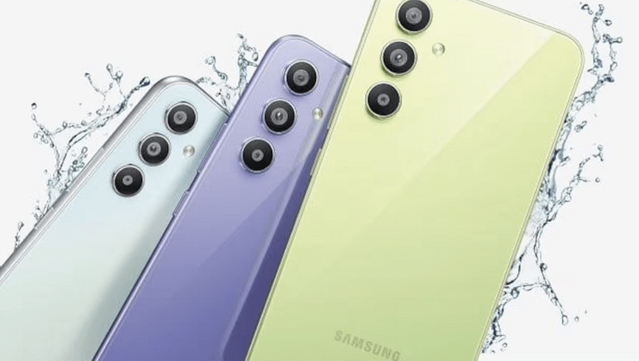
    Not too long after the Galaxy A57 was released worldwide, the middle-ranger device has entered testing of One UI 9.0, which is based on Android 17 Cinnamon Bun. This version of One UI brings improved Samsung Notes that has more pen styles and other tools, improved Creative Studio that allows you to create personalized profile cards for your contacts effortlessly, and flexible Quick Panel that allows further customization.

    The test build of One UI 9.0 has been spotted on test servers, with SM-A576B as the model and EUX as the CSC. According to Tarun Vats, official internal testing of One UI 9.0 for the Galaxy A57 has started.

    The following information is available:

    • SM-A576B: A576BXXU3BZF3

    If the expansion of the beta program of One UI 9.0 happened, the Galaxy A57 might enter the beta program. If this happened, you’ll be able to join the beta program in eligible countries. Currently, there is no information as to when the expansion actually happens.

    Meanwhile, the Galaxy A57 is already receiving monthly security updates since the initial launch, and Samsung is expected to roll out this month’s security patch for this phone somewhere during June. This builds confidence for users who care about their phone being secure.

    To update your Galaxy A57 to the latest monthly security patch, follow these steps:

  • Open Settings, and navigate to System Update
  • Tap on Check for Updates
  • Press Download and Install
  • Wait until the download and the installation is complete, then press Reboot Now
  • Wait until the phone reboots successfully
  • Make sure that you’re connected to a stable and fast Wi-Fi network to avoid high mobile data fees. Never interrupt the update in any way, or problems could occur later. Make sure that you apply all available updates once you update your phone for maximum stability. An update might take 2 to 5 minutes to apply, depending on the device and the type of the update being applied.

    If you’re seeing “Your software is up to date,” this means that the update hasn’t reached your device yet. Keep checking for updates, as Samsung rolls it out gradually to all devices from country to country, usually starting from Korea.

    #A57 #Android #Android17 #AndroidC #AndroidCinnamonBun #GalaxyA57 #news #oneUi #Samsung #SamsungGalaxyA57 #smartphone #Tech #Technology #update

    One UI 9.0 Beta expands to India and Poland, Beta 2 now live!

    Earlier this month, the One UI 9.0 beta program has started for users with the Galaxy S26 series devices in the following countries:

    • Korea
    • United States
    • United Kingdom
    • Germany

    This version of One UI 9.0 provided several features, such as the Masking Tape feature in Samsung Notes and the enhanced quick panel that allows you to take it to the next level in your style with even more customization options.

    May 26th has come, and One UI 9.0 Beta 2 is now available for those who have already joined the beta program with the Galaxy S26 in the above countries mentioned. Alongside that, India and Poland can now finally get their first taste of One UI 9.0 in the Galaxy S26 with the first beta on May 26th. This is what Samsung promised in the Korean version of the announcement in Samsung Newsroom.

    The second beta version of One UI 9.0 is now available to fix some bugs and to incorporate general improvements across the whole operating system based on user feedback and internal evaluation, according to Tarun Vats.

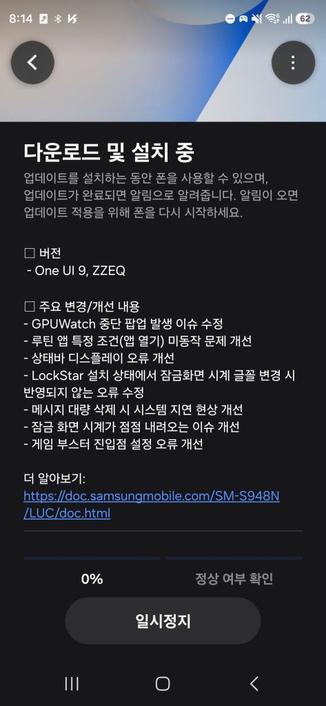
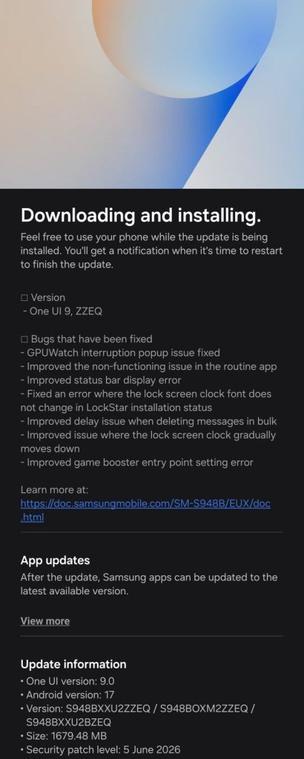
    One UI 9.0 Beta 2 is available under build ZZEQ, with the Galaxy S26, S26+, and S26 Ultra devices that joined the beta program receiving it. The following changes were made:

    • Bugs that have been fixed
      • GPUWatch interruption popup issue fixed
      • Improved the non-functioning issue in the routine app
      • Improved status bar display error
      • Fixed an error where the lock screen clock font does not change in LockStar installation status
      • Improved delay issue when deleting messages in bulk
      • Improved issue where the lock screen clock gradually moves down
      • Improved game booster entry point setting error

    This update also brings the June 2026 security patch, which fixes many vulnerabilities that were discovered in different system components since the beginning of this month. Samsung did not mention the details of those vulnerabilities that were fixed in June 2026 security patch, though.

    Meanwhile, One UI 8.5’s stable rollout is still ongoing for more devices, with the Galaxy S22, the Z Fold/Flip4, and the Galaxy Tab S8 being the last flagship devices eligible for this platform update, essentially setting the end of the line for future software upgrades. Those devices are, however, expected to receive the May 2026 security patch before One UI 8.5 as per the quarterly rollout schedule.

    To update your Galaxy to One UI 9.0 Beta 2, first make sure that you are already in the beta program. Then, follow these steps:

  • Open Settings, and navigate to System Update
  • Tap on Check for Updates
  • Press Download and Install
  • Wait until the download and the installation is complete, then press Reboot Now
  • Wait until the phone reboots successfully
  • Make sure that you’re connected to a stable and fast Wi-Fi network to avoid high mobile data fees. Never interrupt the update in any way, or problems could occur later. Make sure that you apply all available updates once you update your phone for maximum stability. An update might take 10 to 20 minutes to apply, depending on the device and the type of the update being applied.

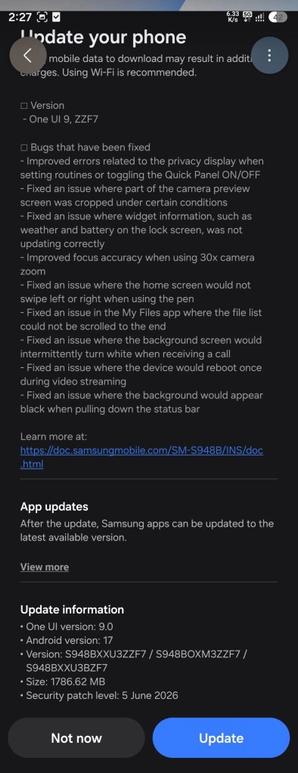
    For India and Poland, you’ll have to follow the steps outlined in this article to join the beta program. Then, check for updates on your phone. You should see something like this:

    Press Update, wait for the update to install, then reboot your phone. You should be taken to the beta version of One UI 9.0.

    We encourage you to please report all bugs found to the Beta program community so that Samsung will analyze your feedback and implement fixes and/or improvements based on them.

    #Android #Android17 #AndroidC #AndroidCinnamonBun #GalaxyS26 #GalaxyS26Ultra #news #oneUi #S26 #S26Ultra #Samsung #SamsungGalaxyS26 #SamsungGalaxyS26Ultra #smartphone #Tech #Technology #update

    Current progress of Good Lock is now available for One UI 9.0

    Since the beta program of One UI 9.0 started, the Good Lock team has shared an initial progress announcement (thanks, Sammy Fans) for the next version of One UI expected to be released in the second half of this year. Good Lock is a set of modules that modify your phone’s appearance and behavior in different areas, including the lock screen (LockStar), the home screen (Home Up), and much more.

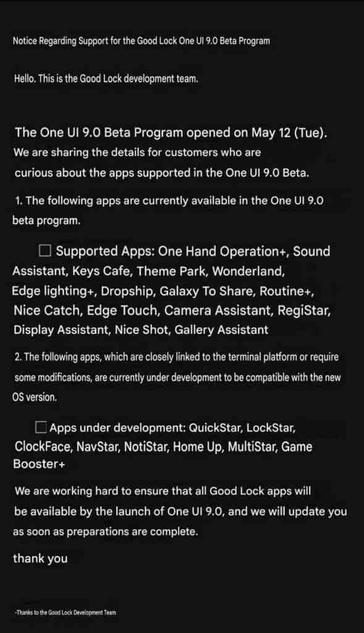
    Today, Samsung has shared the current progress of One UI 9.0 support for Good Lock through the official Samsung Members announcement wall. Here’s the official announcement:

    This gives us a hint that the majority of Good Lock modules already support One UI 9.0, such as Sound Assistant and Gallery Assistant, while the remaining modules need to be updated to fully support One UI 9.0, such as QuickStar, LockStar, and Home Up.

    The following modules are currently under development, with the expected update to be available during the One UI 9.0 beta program in different times:

    • QuickStar
    • LockStar
    • ClockFace
    • NavStar
    • NotiStar
    • Home Up
    • MultiStar
    • Game Booster+

    The above modules were listed as needing an update because they have a deeper integration with the UI framework, along with launcher behavior and UI-level rendering mechanism. Once these modules get updated, they’ll support One UI 9.0 out of the box, unlocking the possibility of customizing your phone to your heart’s content, such as lock screen, home screen, and quick panel customization.

    However, the below modules already support One UI 9.0:

    • One Hand Operation+
    • Sound Assistant
    • Keys Cafe
    • Theme Park
    • Wonderland
    • Edge Lighting+
    • Dropship
    • Galaxy To Share
    • Routines+
    • Nice Catch
    • Edge Touch
    • Camera Assistant
    • RegiStar
    • Display Assistant
    • Nice Shot
    • Gallery Assistant

    Theme creation and setting (Theme Park), keyboard style customization (Keys Cafe), volume slider configuration (Sound Assistant), and other customizations are already available for those running One UI 9.0 Beta on their Galaxy S26 devices, so there should be no problem when using those modules.

    This is common with all new One UI versions where certain Good Lock modules need to be updated before they’re usable in later beta versions of the UI. One UI 9.0 is expected to release in the second half of this year.

    #Android #Android17 #AndroidC #AndroidCinnamonBun #GoodLock #news #oneUi #OneUI9 #OneUI90 #Samsung #smartphone #Tech #Technology #update

    One UI 9.0 Beta 1 brings revamped music player style in quick panel

    One UI 9.0 is a platform upgrade that updates your phone to Android 17 and brings a small amount of features, as well as other improvements to make your experience more streamlined. The beta program has started this week, and it’s currently available for Galaxy S26 users in the US, the UK, Korea, and Germany, with May 26th being the expected date of when users in India and Poland will be able to try out One UI 9.0 Beta.

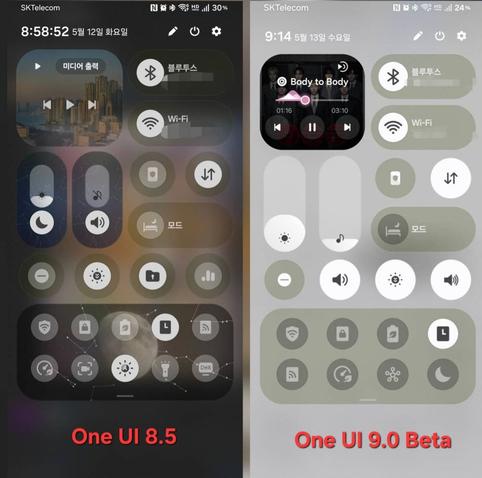
    While the changelogs have stated various improvements and features added to this version of One UI, it also brought some more modernization of various styles, including the design of the music player in the Quick Panel.

    The button styles have changed to have a circular fill around their icons, which makes pressing them easier than before. The waves in the slider have become more colorful and intense than before, and the circular slider thumb has also gained color and glow.

    Among other changes in the quick panel are separate brightness bars and volume bars from auto brightness button and volume mode button. The circular buttons’ fill is now filling the entire button instead of a smaller circle, which accounts for modern look, as Alfatürk spotted.

    Please note that Samsung might not have opened the Beta program in your country yet, even if your country is eligible for beta testing. In this case, you’ll have to wait for the beta banner.

    To join the Beta Program, you must have the latest version of Samsung Members installed. You can get the latest version through either the Galaxy Store or the Play Store. Once done, you should be able to join the program if you have an eligible device.

    You can find instructions on how to join the beta program here.

    #Android #Android17 #AndroidC #AndroidCinnamonBun #news #oneUi #OneUI9 #OneUI90 #Samsung #smartphone #Tech #Technology #update

    Samsung announces One UI 9.0 Beta Program to launch this week!

    In the middle of the official One UI 8.5’s rollout that brought a new visual design and various new features to the Galaxy S25, Samsung has officially announced the One UI 9.0 Beta Program that will start this week according to their official newsroom article. Despite the One UI 8.5 rollout being at its early phase (that is, no A series devices and no tablets received the update yet), One UI 9.0 was already in the works, and Samsung has finally explained that the beta program will start this week.

    Samsung has confirmed that the beta program will start this week for the Galaxy S26 for the following countries:

    • Korea
    • India
    • United States
    • United Kingdom
    • Germany
    • Poland

    They have also confirmed that One UI 9.0 would be introduced with future flagship devices, such as the upcoming foldables which will be announced in this summer’s Galaxy Unpacked event, and that it promised advanced AI features that will make mobile interaction easier and more effortless.

    The feature list announced in the article is rather small, but it includes, but not limited to:

    • Samsung Notes has earned new pen styles, new decorative tapes, and new tools.
    • Contacts and Creative Studio allows you to create personalized profile cards for your contacts effortlessly.
    • Quick Panel, which has already been enhanced with One UI 8.5, has become even more customizable with brightness, sound, and media player being independently adjustable.
    • Enhanced protection against high-risk apps blocks the installation of such apps to protect your phone or tablet from malicious apps.

    You can read more about One UI 9.0 Beta by clicking on the below button:

    Learn more #Android #AndroidC #AndroidCinnamonBun #GalaxyS26 #GalaxyS26Ultra #GalaxyS26 #news #oneUi #OneUI9 #OneUI90 #S26 #S26Ultra #S26 #Samsung #SamsungGalaxyS26 #SamsungGalaxyS26Ultra #SamsungGalaxyS26 #smartphone #Tech #Technology #update
    Samsung’s future Galaxy Book laptops will use Aluminum OS and One UI

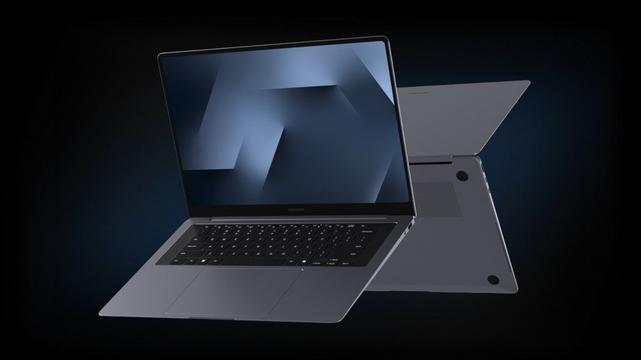
    In an effort to unify the user experience and to make it more consistent across devices that Samsung manufactures, the company have planned to integrate Android-based operating system, Aluminum OS, with One UI 9.0 as the software to the upcoming Galaxy Book laptops in a report made by SamMobile.

    The upcoming Book laptops will be in three tiers: entry-level devices, middle-rangers, and flagships. This move was done by Samsung to unify the user experience and to increase consistency, ensuring that your productivity is taken to high levels.

    In the past, with the introduction of the Galaxy Watch4, Samsung had a similar plan to migrate from Tizen Watch to Android-based Wear OS with One UI as the software. A more recent event was that Samsung had integrated One UI to their smart televisions.

    The following tiers will be made:

    • The entry-level version is the cheapest version of the upcoming Galaxy Book laptops that are suitable for the most basic tasks.
    • The middle-ranger version is beefier, with the laptops at this range being able to perform a bit of demanding tasks.
    • The flagship version is the strongest, the sleekiest, and the most expensive class of Galaxy Book laptops, packed with carefully-chosen device specifications that will make your Android-based laptop be able to perform the most demanding tasks in no time while increasing your productivity in ways that will wow you.

    The upcoming Google I/O developer conference will be live on May 2026, and Google may unveil Android 17, which One UI 9.0 will use, while the company may unveil Aluminum OS that is based on the same version of Android.

    #Android #Android17 #AndroidCinnamonBun #GalaxyBook #news #oneUi #OneUI90 #Samsung #SamsungGalaxyBook #Tech #Technology #update