Aptivi
One UI 9.0 Beta 3 is now live for the Galaxy S26!
Earlier this month, the One UI 9.0 beta program has started for users with the Galaxy S26 series devices in the following countries:
- Korea
- United States
- United Kingdom
- Germany
- India
- Poland
This version of One UI 9.0 provided several features, such as the Masking Tape feature in Samsung Notes and the enhanced quick panel that allows you to take it to the next level in your style with even more customization options.
Starting from today, One UI 9.0 Beta 3 is now available for those who have already joined the beta program with the Galaxy S26 in the above countries mentioned. The third beta version of One UI 9.0 is now available to fix some bugs and to incorporate general improvements across the whole operating system based on user feedback and internal evaluation, according to SammyGuru.
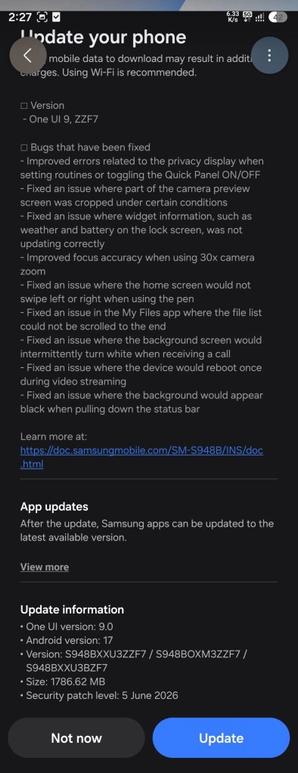
One UI 9.0 Beta 3 is available under build ZZF7, with the Galaxy S26, S26+, and S26 Ultra devices that joined the beta program receiving it. The following changes were made:
- Bugs that have been fixed
- Improved errors related to the privacy display when setting routines or toggling the Quick Panel ON/OFF
- Fixed an issue where part of the camera preview screen was cropped under certain conditions
- Fixed an issue where widget information, such as weather and battery on the lock screen, was not updating correctly
- Improved focus accuracy when using 30x camera zoom
- Fixed an issue where the home screen would not swipe left or right when using the per
- Fixed an issue in the My Files app where the file list could not be scrolled to the end
- Fixed an issue where the background screen would intermittently turn white when receiving a call
- Fixed an issue where the device would reboot once during video streaming
- Fixed an issue where the background would appear black when pulling down the status bar
We encourage you to please report all bugs found to the Beta program community so that Samsung will analyze your feedback and implement fixes and/or improvements based on them.
To update your Galaxy S26 to One UI 9.0 Beta 3, first make sure that you are already in the beta program. Then, follow these steps:
Make sure that you’re connected to a stable and fast Wi-Fi network to avoid high mobile data fees. Never interrupt the update in any way, or problems could occur later. Make sure that you apply all available updates once you update your phone for maximum stability. An update might take 10 to 20 minutes to apply, depending on the device and the type of the update being applied.
#Android #Android17 #AndroidC #AndroidCinnamonBun #GalaxyS26 #GalaxyS26Ultra #news #oneUi #S26 #S26Ultra #Samsung #SamsungGalaxyS26 #SamsungGalaxyS26Ultra #smartphone #Tech #Technology #update