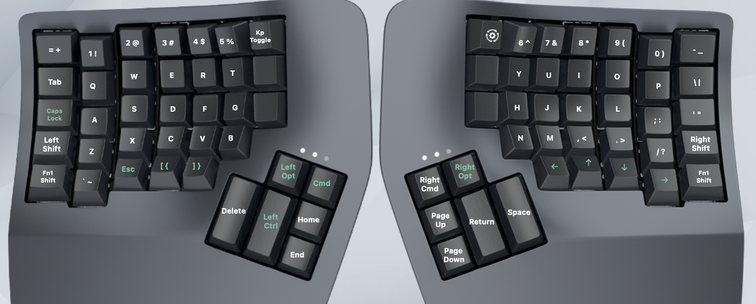
@tynstar I'm sure I'll get used to it, still disappointing though. The #kinesis #advantage360 shows how small you can make those leds. So i don't really buy the bulkyness argument.

Let's hope the firmware catches up to allow configuring the keyswitch LEDs sometime soon. But doesn't seem too promising right now.

@flub Have you tried the latest firmware? I have an #advantage360 at home and updated it recently to try out their Cirque programming tool, and I haven't had a connection issue yet. It's only been days though, so too soon to claim victory. https://kinesis-ergo.com/support/kb360pro/#firmware-updates

They specifically mention "improves stability of the split connection"

Advantage360 Pro Tech Support

Get help with your KB360 Pro (ZMK) Kinesis Advantage 360 keyboard. Manuals, Troubleshooting, FAQs, firmware updates, or submit a trouble ticket.

Kinesis
Does anyone do a **wired** split ergonomic #keyboard? I'm getting tired of my #kinesis #advantage360 pro losing sync between the two halves.
Buying the Kinesis Advantage 360 keyboard was a mistake | Angelika.me

Why this beast of a keyboard did not work for me and what I ended up using instead.

4 weeks with my new #Kinesis #Advantage360

I'm feeling very frustrated today. I needed to write a lot of code fast, and I can't. The arrows still feel wrong, so code navigation sucks.

But the worst mistake was placing esc under my left ring finger, lowest row, between backtick and square bracket. Esc being between printable characters used a lot in code, I press it accidentally A LOT and close my IDE's terminal window in the middle of writing a command.

https://mas.to/@angelikatyborska/115195750650619774

Angelika Cathor (@[email protected])

Attached: 1 image Fourth day with my new #Kinesis #Advantage360 Time to try some remapping: - two cmds, two alts, and one ctrl like on a macbook keyboard because most mac shortcuts rely on cmds and alts, - alts get the most comfortable position because I use them a lot to type special DE and PL letters, - all arrows on one side for easier text selection, - capslock in its original position because I use it a lot for VoiceOver navigation, - no need for forward-delete (AKA delete) because ctrl+d does the job

mas.to

2 weeks with my new #Kinesis #Advantage360

I'm pretty fluent in typing plain English by now 🥳

Typing code is still hard. I remember where the symbols are but I'm very slow finding them. I often misjudge whether I'm back on home row or a row below that. I still wish there were bumps on f/j!

Code navigation is still hard too. I often use alt/cmd + arrows to move, and I keep struggling to find alt or cmd without looking. My chosen arrow layout is also tricky (on one row: left up down right).

Fifth day with my new #Kinesis #Advantage360

After the arrow and modifiers remapping, I'm trying to use the keyboard the whole day, for basic tasks.

My main problem now is that I only know my favorite keyboard shortcuts by muscle memory, which doesn't work on a new keyboard with a different layout. For example, in WebStorm, I always use "add cursor and select next occurrence", and I only remember that the shortcut uses the letter G, but not which modifiers...

Fourth day with my new #Kinesis #Advantage360

Time to try some remapping:
- two cmds, two alts, and one ctrl like on a macbook keyboard because most mac shortcuts rely on cmds and alts,
- alts get the most comfortable position because I use them a lot to type special DE and PL letters,
- all arrows on one side for easier text selection,
- capslock in its original position because I use it a lot for VoiceOver navigation,
- no need for forward-delete (AKA delete) because ctrl+d does the job

Third day of practicing typing on my new #Kinesis #Advantage360

I keep accidentally pressing backspace (left thumb) instead of space (right thumb), constantly removing characters that I have already typed correctly 😭

Random thoughts after 30 min with my new #Kinesis #Advantage360

- it's beautiful
- I can't type
- why are there no bumps on f and j?
- only one alt and one cmd but two ctrls? that's the opposite of what I need
- how am I supposed to do my cmd+alt+ctrl keyboard shortcuts now that all of those keys are assigned to thumbs? I only have two thumbs
- how am I supposed to select text (shift + arrows) when the arrows are split between two hands? (l/r on the left and u/d on the right)